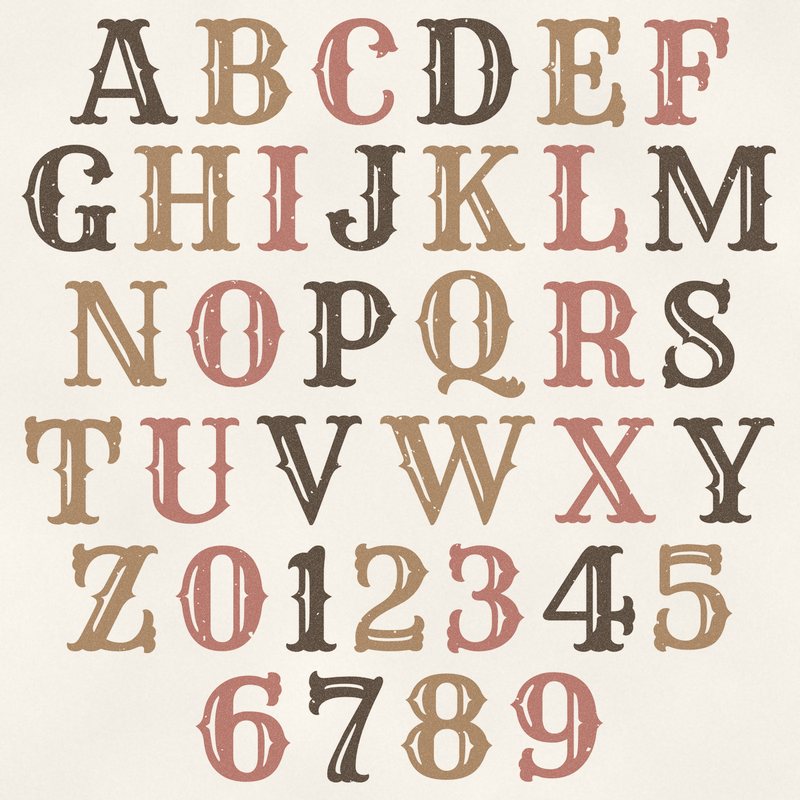
Vintage Stamp Alphabet
Distressed rubber stamp letters in sepia and faded ink.
- Type
- Alphabet
- Inside
- 42 letters and symbols
- Format
- PNG with transparency, 300 dpi
- Download
- ZIP, 1.6 MB
- Themes
- Family, Travel
- parchment
- sepia
- faded teal
- dusty red
- old gold
Free for personal use and for layouts and cards you sell or give away. Please do not share or sell the files themselves; link to this page instead. Terms of use
About this freebie
The Vintage Stamp Alphabet brings the look of distressed rubber stamp letters in sepia and faded ink to your digital pages. This free download includes 42 separate transparent PNG files. You get letters A to Z, numbers 0 to 9, plus basic punctuation like an apostrophe. The color palette features parchment, sepia, faded teal, dusty red, old gold, and umber. These letters are perfect for heritage projects, family albums, and travel layouts. The characters are about 600 to 900 pixels tall, which prints at 2 to 3 inches at 300 dpi.
Ideas for using it
- Build a large title for a heritage scrapbook page using the sepia and umber letters to match old black and white photographs.
- Spell out the name of a city or country on your vacation layouts with the faded teal and dusty red characters.
- Create custom greeting cards to sell or give away. The old gold numbers work well for milestone birthday and anniversary cards.
- Mix and match the letters with different colors to label sections in a digital journal or family recipe book.
How to use it
- Drag and drop the separate PNG files onto your canvas to spell your words. Overlap the edges slightly for a realistic stamped effect.
- Since the files are transparent, you can place them directly over patterned paper or photos without a white background showing through.
- Scale the letters down from their original 2 to 3 inches if you need a smaller subtitle for your layout.
- Keep the downloaded ZIP file organized in a folder on your computer. The file size is about 1.6 MB, so it takes up very little space.
- Each character is its own transparent PNG file. Place letters on separate layers and line them up on one baseline.
- Resize all letters of a word by the same amount so they stay consistent.
What is inside the ZIP
One folder named vintage-stamp-alphabet with the files below (file names start with vintage-stamp-alphabet-), plus README.txt and LICENSE.txt.
Show all 42 files
| File | What | Pixels | Type | Size |
|---|---|---|---|---|
| A.png | A | 601 x 592 px | PNG | 42 KB |
| B.png | B | 544 x 599 px | PNG | 46 KB |
| C.png | C | 494 x 599 px | PNG | 35 KB |
| D.png | D | 571 x 599 px | PNG | 44 KB |
| E.png | E | 500 x 615 px | PNG | 41 KB |
| F.png | F | 476 x 603 px | PNG | 35 KB |
| G.png | G | 529 x 599 px | PNG | 41 KB |
| H.png | H | 590 x 592 px | PNG | 45 KB |
| I.png | I | 287 x 592 px | PNG | 23 KB |
| J.png | J | 447 x 596 px | PNG | 30 KB |
| K.png | K | 572 x 592 px | PNG | 46 KB |
| L.png | L | 474 x 602 px | PNG | 31 KB |
| M.png | M | 735 x 592 px | PNG | 57 KB |
| N.png | N | 576 x 592 px | PNG | 46 KB |
| O.png | O | 559 x 599 px | PNG | 44 KB |
| P.png | P | 524 x 595 px | PNG | 38 KB |
| Q.png | Q | 618 x 711 px | PNG | 54 KB |
| R.png | R | 565 x 595 px | PNG | 46 KB |
| S.png | S | 408 x 614 px | PNG | 39 KB |
| T.png | T | 543 x 607 px | PNG | 37 KB |
| U.png | U | 555 x 596 px | PNG | 36 KB |
| V.png | V | 587 x 614 px | PNG | 38 KB |
| W.png | W | 863 x 614 px | PNG | 65 KB |
| X.png | X | 571 x 592 px | PNG | 44 KB |
| Y.png | Y | 564 x 592 px | PNG | 37 KB |
| Z.png | Z | 511 x 612 px | PNG | 43 KB |
| 0.png | 0 | 520 x 592 px | PNG | 40 KB |
| 1.png | 1 | 286 x 593 px | PNG | 23 KB |
| 2.png | 2 | 421 x 609 px | PNG | 36 KB |
| 3.png | 3 | 437 x 612 px | PNG | 37 KB |
| 4.png | 4 | 519 x 594 px | PNG | 36 KB |
| 5.png | 5 | 446 x 603 px | PNG | 36 KB |
| 6.png | 6 | 532 x 613 px | PNG | 44 KB |
| 7.png | 7 | 418 x 623 px | PNG | 31 KB |
| 8.png | 8 | 515 x 594 px | PNG | 45 KB |
| 9.png | 9 | 521 x 613 px | PNG | 42 KB |
| ampersand.png | & | 541 x 593 px | PNG | 45 KB |
| exclamation.png | ! | 264 x 649 px | PNG | 22 KB |
| question.png | ? | 446 x 641 px | PNG | 33 KB |
| period.png | . | 202 x 150 px | PNG | 6 KB |
| comma.png | , | 199 x 273 px | PNG | 9 KB |
| apostrophe.png | ' | 185 x 282 px | PNG | 8 KB |
You may also like
More alphabets


Tutorials for this freebie
- How to use digital alphabetsLearn how to use digital alphabets on your scrapbook pages. Find tips for spacing letters, adding shadows, and building…
- How to make a scrapbook page titleLearn how to make a scrapbook page title that stands out. Discover tips for placement, mixing fonts, and using digital…
- How to recolor digital papers and elementsLearn how to recolor digital scrapbooking papers and elements. Discover simple steps for Photoshop, GIMP, Affinity and…