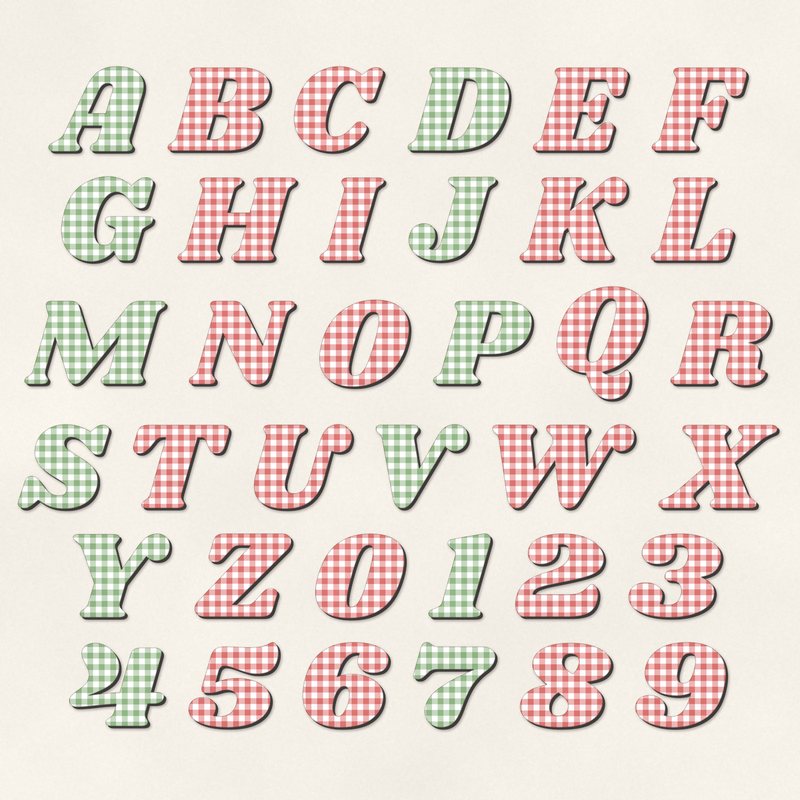
Gingham Picnic Alphabet
Bold italic letters cut from gingham.
- Type
- Alphabet
- Inside
- 42 letters and symbols
- Format
- PNG with transparency, 300 dpi
- Download
- ZIP, 8.1 MB
- Themes
- Summer, Family
- ivory
- tomato red
- leaf green
- sunflower
- sky
Free for personal use and for layouts and cards you sell or give away. Please do not share or sell the files themselves; link to this page instead. Terms of use
About this freebie
The Gingham Picnic Alphabet gives you bold italic letters cut from gingham patterns. This free download includes 42 separate transparent PNG files. You get letters A to Z, numbers 0 to 9, and basic punctuation like an apostrophe.
The palette features ivory, tomato red, leaf green, sunflower, sky, and charcoal. Each character has a neat papercut effect. These letters are perfect for your summer and family scrapbook layouts. The characters are about 600 to 900 pixels tall, which prints at 2 to 3 inches at 300 dpi.
Ideas for using it
- Spell out the location of your family reunion across the top of your page. The tomato red and leaf green gingham fits outdoor barbecue photos perfectly.
- Create a bright title for your beach layouts. Mix the sunflower and sky letters to match sunny outdoor pictures and swimming pool memories.
- Design handmade invitations for a neighborhood block party. The papercut effect gives your cards a crafty look, and you can print them to give away.
- Number a top 10 list of your favorite warm weather activities. Use the charcoal numbers for a strong contrast against an ivory background.
How to use it
- Open the 8.1 MB ZIP file to find the individual PNG images. Drag each letter onto your page to build your words.
- Learn how to make a scrapbook title by slightly overlapping the edges of these italic letters. This creates a connected look for your words.
- Add a small drop shadow to each letter in your image editor. This makes the papercut effect look like real paper resting on your layout.
- You can resize the 2 to 3 inch letters down for smaller cards. Hold the shift key while scaling in most programs to keep the proportions right.
- Each character is its own transparent PNG file. Place letters on separate layers and line them up on one baseline.
- Resize all letters of a word by the same amount so they stay consistent.
What is inside the ZIP
One folder named gingham-picnic-alphabet with the files below (file names start with gingham-picnic-alphabet-), plus README.txt and LICENSE.txt.
Show all 42 files
| File | What | Pixels | Type | Size |
|---|---|---|---|---|
| A.png | A | 626 x 566 px | PNG | 196 KB |
| B.png | B | 667 x 556 px | PNG | 240 KB |
| C.png | C | 589 x 568 px | PNG | 190 KB |
| D.png | D | 661 x 556 px | PNG | 227 KB |
| E.png | E | 623 x 556 px | PNG | 206 KB |
| F.png | F | 622 x 556 px | PNG | 185 KB |
| G.png | G | 606 x 568 px | PNG | 226 KB |
| H.png | H | 764 x 556 px | PNG | 247 KB |
| I.png | I | 437 x 556 px | PNG | 126 KB |
| J.png | J | 578 x 560 px | PNG | 160 KB |
| K.png | K | 699 x 559 px | PNG | 237 KB |
| L.png | L | 546 x 556 px | PNG | 159 KB |
| M.png | M | 900 x 556 px | PNG | 293 KB |
| N.png | N | 688 x 559 px | PNG | 207 KB |
| O.png | O | 594 x 577 px | PNG | 219 KB |
| P.png | P | 645 x 556 px | PNG | 193 KB |
| Q.png | Q | 594 x 736 px | PNG | 267 KB |
| R.png | R | 653 x 563 px | PNG | 241 KB |
| S.png | S | 603 x 564 px | PNG | 212 KB |
| T.png | T | 631 x 555 px | PNG | 180 KB |
| U.png | U | 643 x 563 px | PNG | 203 KB |
| V.png | V | 606 x 558 px | PNG | 166 KB |
| W.png | W | 907 x 558 px | PNG | 286 KB |
| X.png | X | 769 x 556 px | PNG | 222 KB |
| Y.png | Y | 633 x 559 px | PNG | 181 KB |
| Z.png | Z | 635 x 556 px | PNG | 204 KB |
| 0.png | 0 | 589 x 562 px | PNG | 216 KB |
| 1.png | 1 | 427 x 559 px | PNG | 124 KB |
| 2.png | 2 | 588 x 556 px | PNG | 211 KB |
| 3.png | 3 | 610 x 560 px | PNG | 216 KB |
| 4.png | 4 | 624 x 556 px | PNG | 205 KB |
| 5.png | 5 | 593 x 567 px | PNG | 205 KB |
| 6.png | 6 | 572 x 566 px | PNG | 225 KB |
| 7.png | 7 | 548 x 565 px | PNG | 163 KB |
| 8.png | 8 | 602 x 562 px | PNG | 228 KB |
| 9.png | 9 | 597 x 566 px | PNG | 224 KB |
| ampersand.png | & | 713 x 607 px | PNG | 259 KB |
| exclamation.png | ! | 339 x 617 px | PNG | 100 KB |
| question.png | ? | 508 x 598 px | PNG | 165 KB |
| period.png | . | 205 x 205 px | PNG | 28 KB |
| comma.png | , | 241 x 320 px | PNG | 47 KB |
| apostrophe.png | ' | 205 x 227 px | PNG | 29 KB |
You may also like
More alphabets


Tutorials for this freebie
- How to use digital alphabetsLearn how to use digital alphabets on your scrapbook pages. Find tips for spacing letters, adding shadows, and building…
- How to make a scrapbook page titleLearn how to make a scrapbook page title that stands out. Discover tips for placement, mixing fonts, and using digital…
- How to recolor digital papers and elementsLearn how to recolor digital scrapbooking papers and elements. Discover simple steps for Photoshop, GIMP, Affinity and…