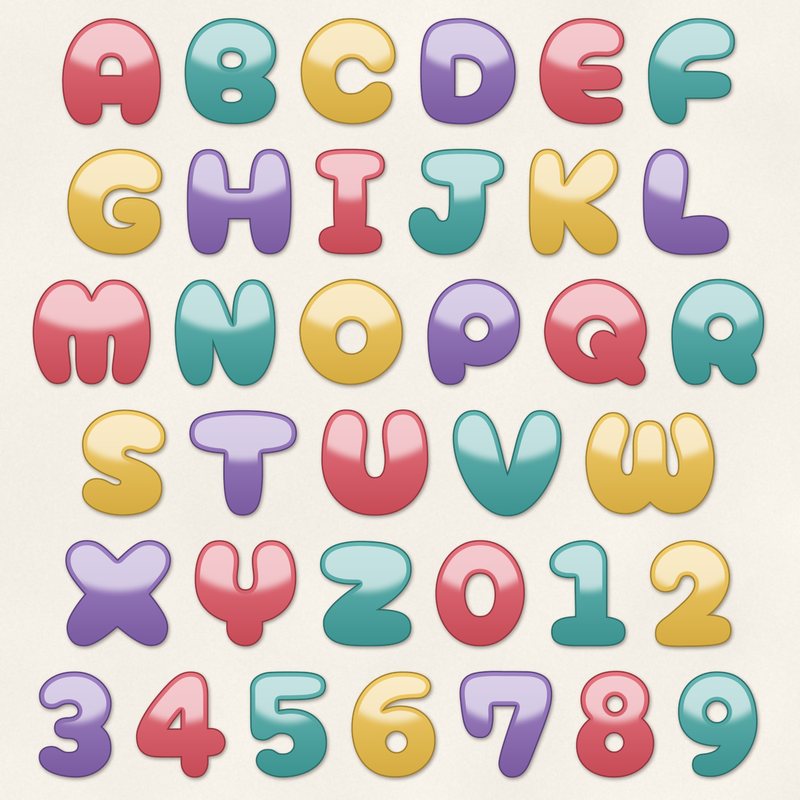
Candy Gel Alphabet
Glossy gel letters in candy colors.
- Type
- Alphabet
- Inside
- 68 letters and symbols
- Format
- PNG with transparency, 300 dpi
- Download
- ZIP, 3.3 MB
- Themes
- Birthday, Summer
- white
- cherry
- teal
- sunshine
- grape
Free for personal use and for layouts and cards you sell or give away. Please do not share or sell the files themselves; link to this page instead. Terms of use
About this freebie
The Candy Gel Alphabet gives you glossy gel letters in bright candy colors. This digital alphabet includes 68 separate transparent PNG files. You get uppercase letters from A to Z, lowercase letters from a to z, numbers 0 to 9, plus a few punctuation marks. The palette features white, cherry, teal, sunshine, grape, and ink. These letters are 600 to 900 pixels tall, which prints at 2 to 3 inches at 300 dpi. They are perfect for birthday and summer pages.
Ideas for using it
- Spell out a big title for a pool party layout. The glossy gel effect looks just like water drops or shiny plastic beach toys.
- Create a bright greeting card for a child. You can mix the cherry, teal, sunshine, and grape letters to make a fun and colorful message.
- Design a sweet layout for a candy shop visit. The shiny letters match the look of hard candies and lollipops perfectly.
How to use it
- Drag each PNG file onto your page to spell your word. You can learn more about how to use digital alphabets in our tutorial section.
- Overlap the letters slightly to make your words look natural. The transparent backgrounds allow the colors to interact nicely without blocking the letters behind them.
- Add a small drop shadow to each letter. This makes the glossy gel effect stand out even more against a flat paper background.
- The download is a ZIP file of about 3.3 MB. Extract the folder to your computer before trying to open the individual PNG images.
- Each character is its own transparent PNG file. Place letters on separate layers and line them up on one baseline.
- Resize all letters of a word by the same amount so they stay consistent.
What is inside the ZIP
One folder named candy-gel-alphabet with the files below (file names start with candy-gel-alphabet-), plus README.txt and LICENSE.txt.
Show all 68 files
| File | What | Pixels | Type | Size |
|---|---|---|---|---|
| A.png | A | 549 x 588 px | PNG | 57 KB |
| B.png | B | 512 x 586 px | PNG | 60 KB |
| C.png | C | 527 x 585 px | PNG | 62 KB |
| D.png | D | 530 x 586 px | PNG | 53 KB |
| E.png | E | 476 x 586 px | PNG | 53 KB |
| F.png | F | 486 x 585 px | PNG | 43 KB |
| G.png | G | 529 x 586 px | PNG | 62 KB |
| H.png | H | 580 x 584 px | PNG | 58 KB |
| I.png | I | 397 x 584 px | PNG | 35 KB |
| J.png | J | 533 x 586 px | PNG | 41 KB |
| K.png | K | 502 x 586 px | PNG | 61 KB |
| L.png | L | 485 x 586 px | PNG | 41 KB |
| M.png | M | 647 x 579 px | PNG | 71 KB |
| N.png | N | 558 x 585 px | PNG | 60 KB |
| O.png | O | 573 x 586 px | PNG | 61 KB |
| P.png | P | 517 x 586 px | PNG | 56 KB |
| Q.png | Q | 569 x 588 px | PNG | 67 KB |
| R.png | R | 517 x 586 px | PNG | 57 KB |
| S.png | S | 469 x 587 px | PNG | 55 KB |
| T.png | T | 592 x 583 px | PNG | 39 KB |
| U.png | U | 591 x 586 px | PNG | 61 KB |
| V.png | V | 599 x 585 px | PNG | 61 KB |
| W.png | W | 704 x 564 px | PNG | 75 KB |
| X.png | X | 581 x 586 px | PNG | 63 KB |
| Y.png | Y | 561 x 585 px | PNG | 62 KB |
| Z.png | Z | 510 x 584 px | PNG | 47 KB |
| a-lower.png | a | 396 x 412 px | PNG | 41 KB |
| b-lower.png | b | 453 x 587 px | PNG | 53 KB |
| c-lower.png | c | 400 x 412 px | PNG | 42 KB |
| d-lower.png | d | 453 x 587 px | PNG | 48 KB |
| e-lower.png | e | 404 x 412 px | PNG | 42 KB |
| f-lower.png | f | 434 x 585 px | PNG | 42 KB |
| g-lower.png | g | 465 x 579 px | PNG | 58 KB |
| h-lower.png | h | 444 x 586 px | PNG | 47 KB |
| i-lower.png | i | 232 x 607 px | PNG | 32 KB |
| j-lower.png | j | 310 x 739 px | PNG | 40 KB |
| k-lower.png | k | 429 x 585 px | PNG | 52 KB |
| l-lower.png | l | 235 x 585 px | PNG | 27 KB |
| m-lower.png | m | 562 x 426 px | PNG | 51 KB |
| n-lower.png | n | 427 x 424 px | PNG | 42 KB |
| o-lower.png | o | 435 x 413 px | PNG | 41 KB |
| p-lower.png | p | 473 x 522 px | PNG | 49 KB |
| q-lower.png | q | 472 x 522 px | PNG | 52 KB |
| r-lower.png | r | 398 x 419 px | PNG | 34 KB |
| s-lower.png | s | 378 x 412 px | PNG | 40 KB |
| t-lower.png | t | 456 x 586 px | PNG | 47 KB |
| u-lower.png | u | 422 x 411 px | PNG | 40 KB |
| v-lower.png | v | 444 x 410 px | PNG | 43 KB |
| w-lower.png | w | 543 x 413 px | PNG | 52 KB |
| x-lower.png | x | 394 x 413 px | PNG | 40 KB |
| y-lower.png | y | 438 x 523 px | PNG | 51 KB |
| z-lower.png | z | 383 x 412 px | PNG | 35 KB |
| 0.png | 0 | 501 x 586 px | PNG | 58 KB |
| 1.png | 1 | 433 x 585 px | PNG | 31 KB |
| 2.png | 2 | 459 x 588 px | PNG | 53 KB |
| 3.png | 3 | 416 x 586 px | PNG | 54 KB |
| 4.png | 4 | 501 x 586 px | PNG | 44 KB |
| 5.png | 5 | 437 x 586 px | PNG | 52 KB |
| 6.png | 6 | 472 x 586 px | PNG | 59 KB |
| 7.png | 7 | 516 x 588 px | PNG | 51 KB |
| 8.png | 8 | 443 x 589 px | PNG | 60 KB |
| 9.png | 9 | 449 x 583 px | PNG | 56 KB |
| ampersand.png | & | 518 x 587 px | PNG | 56 KB |
| exclamation.png | ! | 244 x 582 px | PNG | 37 KB |
| question.png | ? | 398 x 586 px | PNG | 50 KB |
| period.png | . | 213 x 212 px | PNG | 14 KB |
| comma.png | , | 205 x 284 px | PNG | 20 KB |
| apostrophe.png | ' | 155 x 256 px | PNG | 13 KB |
You may also like
More alphabets


Tutorials for this freebie
- How to use digital alphabetsLearn how to use digital alphabets on your scrapbook pages. Find tips for spacing letters, adding shadows, and building…
- How to make a scrapbook page titleLearn how to make a scrapbook page title that stands out. Discover tips for placement, mixing fonts, and using digital…
- How to recolor digital papers and elementsLearn how to recolor digital scrapbooking papers and elements. Discover simple steps for Photoshop, GIMP, Affinity and…