Embellishments
Bunting Banners
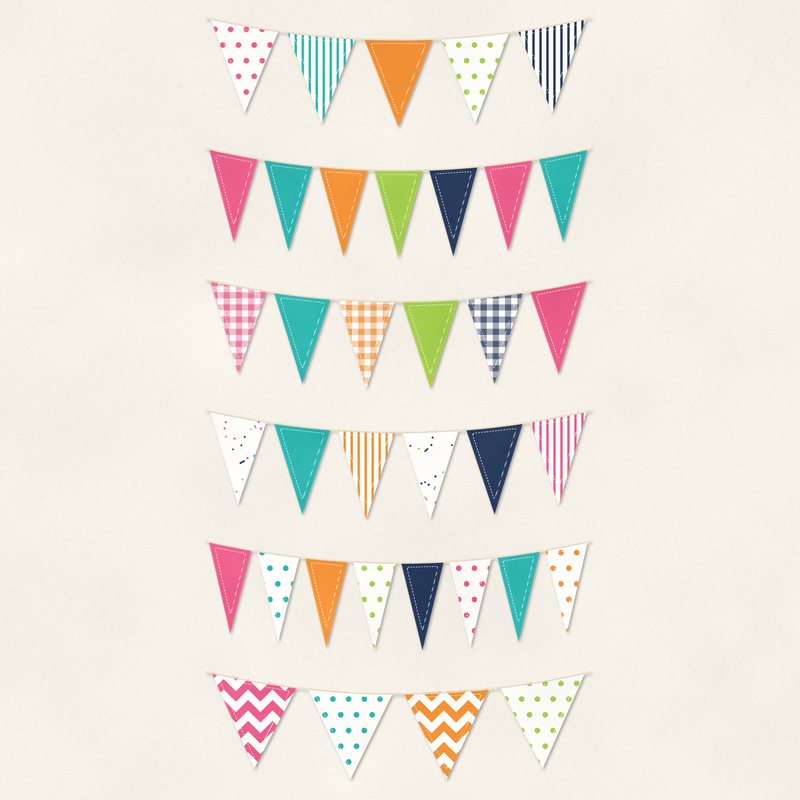
Six strings of bunting with patterned flags and stitched edges.
- Type
- Embellishments
- Inside
- 6 elements
- Format
- PNG with transparency, 300 dpi
- Download
- ZIP, 3.3 MB
- Themes
- Birthday, Summer
- white
- hot pink
- turquoise
- tangerine
- lime
Free for personal use and for layouts and cards you sell or give away. Please do not share or sell the files themselves; link to this page instead. Terms of use
About this freebie
This free embellishment pack includes six strings of bunting with patterned flags and stitched edges. The banners feature a bright color palette of white, hot pink, turquoise, tangerine, lime, and navy. These festive decorations are ideal for your birthday and summer digital scrapbooking layouts. Each transparent PNG file is saved at 300 dpi and includes a soft drop shadow.
Ideas for using it
- String a bright tangerine and hot pink banner across the top of a birthday party invitation.
- Layer multiple bunting banners over a navy background to create a festive border for your summer vacation photos.
- Place a turquoise and lime banner above a journaling block to draw attention to your typed story.
- Decorate handmade greeting cards by printing these banners and cutting them out for physical paper projects.
How to use it
- The banners already have a soft drop shadow applied. You do not need to add your own shadow effects to these files.
- Resize the transparent PNG files to fit your page width. Hold the shift key in most software to keep the proportions correct while scaling.
- Use the eraser tool in your software to remove a few flags if the string is too long for your specific layout design.
- Elements are transparent PNG files: drag them onto a page above your papers.
- Each element includes a soft drop shadow. Keep one light direction for the whole page.
What is inside the ZIP
One folder named bunting-banners with the files below (file names start with bunting-banners-), plus README.txt and LICENSE.txt.
| File | What | Pixels | Type | Size |
|---|---|---|---|---|
| 01-bunting-banner.png | bunting banner | 2239 x 658 px | PNG | 525 KB |
| 02-bunting-banner.png | bunting banner | 2239 x 655 px | PNG | 650 KB |
| 03-bunting-banner.png | bunting banner | 2239 x 659 px | PNG | 549 KB |
| 04-bunting-banner.png | bunting banner | 2239 x 649 px | PNG | 523 KB |
| 05-bunting-banner.png | bunting banner | 2239 x 655 px | PNG | 525 KB |
| 06-bunting-banner.png | bunting banner | 2239 x 657 px | PNG | 565 KB |
You may also like
More embellishments


Tutorials for this freebie
- How to add realistic drop shadowsLearn how to add realistic drop shadows to your digital scrapbook pages with the right settings for papers, flowers and…
- Scrapbook layout design basicsLearn the basics of digital scrapbook layout design. Master focal points, the rule of thirds, visual triangles, and…
- How to recolor digital papers and elementsLearn how to recolor digital scrapbooking papers and elements. Discover simple steps for Photoshop, GIMP, Affinity and…