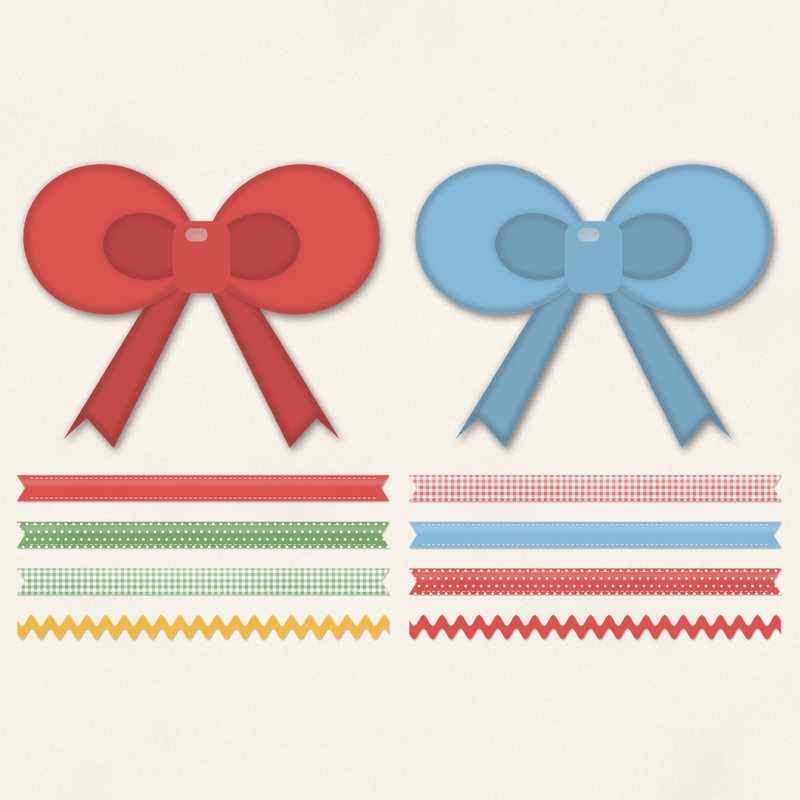
Ribbons and Ric Rac
Stitched ribbons, gingham ribbon, ric rac and two bows.
- Type
- Embellishments
- Inside
- 10 elements
- Format
- PNG with transparency, 300 dpi
- Download
- ZIP, 2.7 MB
- Themes
- Everyday, Summer
- ivory
- tomato red
- leaf green
- sunflower
- sky
Free for personal use and for layouts and cards you sell or give away. Please do not share or sell the files themselves; link to this page instead. Terms of use
About this freebie
Add a cheerful touch to your pages with this free embellishment pack. The Ribbons and Ric Rac set includes 10 transparent PNG items at 300 dpi. You get stitched ribbons, gingham ribbon, ric rac, and two bows. The color palette features ivory, tomato red, leaf green, sunflower, sky, and charcoal. These bright pieces are perfect for summer layouts and everyday projects. Each element comes with a soft drop shadow already applied, making them quick and easy to use on your digital pages. The download is about 2.7 MB.
Ideas for using it
- Layer the tomato red gingham ribbon under a photo frame to ground your focal point on a summer picnic layout.
- Place the sunflower and sky blue ric rac along the edges of your journaling block to add a playful border.
- Use the two bows to anchor the corners of a large title card on an everyday family scrapbook page.
- Stack multiple stitched ribbons in leaf green and charcoal to create a textured background strip across your page.
How to use it
- Since these elements already have a soft drop shadow, you do not need to add your own shadow effects in your software.
- If the colors do not match your photos, try adjusting the hue and saturation to blend them with other kits.
- These transparent PNG files work in any standard photo editing program. Just drag and drop them directly onto your digital canvas.
- You can resize the ribbons to make them narrower, but stretching them larger than their original 300 dpi size may cause pixelation.
- Elements are transparent PNG files: drag them onto a page above your papers.
- Each element includes a soft drop shadow. Keep one light direction for the whole page.
What is inside the ZIP
One folder named ribbons-and-ric-rac with the files below (file names start with ribbons-and-ric-rac-), plus README.txt and LICENSE.txt.
| File | What | Pixels | Type | Size |
|---|---|---|---|---|
| 01-ribbon.png | ribbon | 2420 x 196 px | PNG | 226 KB |
| 02-ribbon.png | ribbon | 2420 x 196 px | PNG | 437 KB |
| 03-ribbon.png | ribbon | 2420 x 196 px | PNG | 328 KB |
| 04-ribbon.png | ribbon | 2426 x 185 px | PNG | 170 KB |
| 05-ribbon.png | ribbon | 2426 x 185 px | PNG | 166 KB |
| 06-ribbon.png | ribbon | 2420 x 196 px | PNG | 214 KB |
| 07-ribbon.png | ribbon | 2420 x 196 px | PNG | 437 KB |
| 08-ribbon.png | ribbon | 2420 x 196 px | PNG | 325 KB |
| 09-bow.png | bow | 882 x 706 px | PNG | 181 KB |
| 10-bow.png | bow | 882 x 706 px | PNG | 202 KB |
You may also like
More embellishments


Tutorials for this freebie
- How to add realistic drop shadowsLearn how to add realistic drop shadows to your digital scrapbook pages with the right settings for papers, flowers and…
- Scrapbook layout design basicsLearn the basics of digital scrapbook layout design. Master focal points, the rule of thirds, visual triangles, and…
- How to recolor digital papers and elementsLearn how to recolor digital scrapbooking papers and elements. Discover simple steps for Photoshop, GIMP, Affinity and…