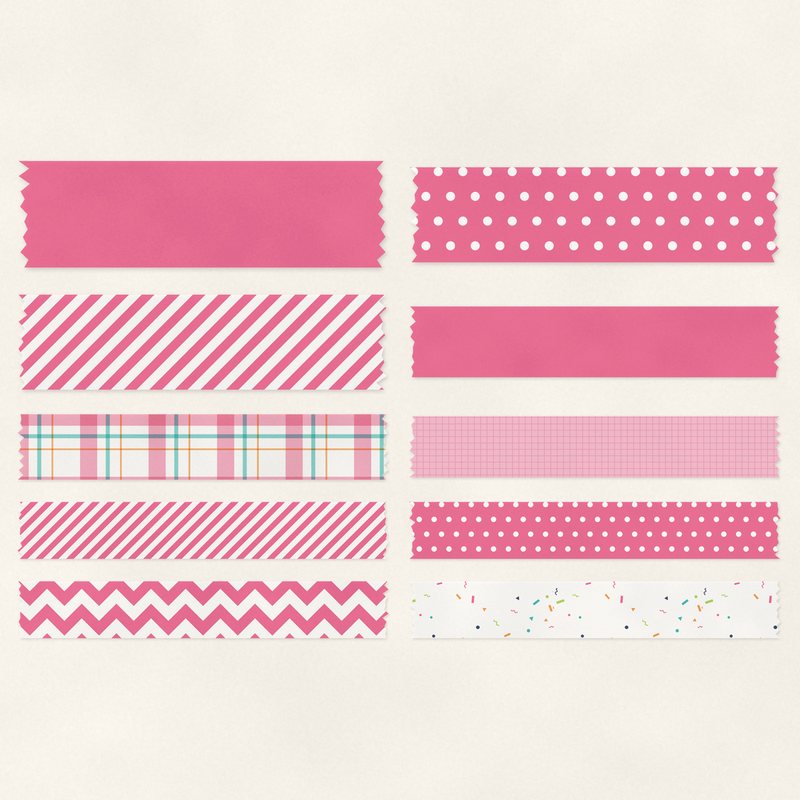
Bold Washi Tape
Ten bright washi tape strips with torn ends.
- Type
- Embellishments
- Inside
- 10 elements
- Format
- PNG with transparency, 300 dpi
- Download
- ZIP, 2.4 MB
- Themes
- Birthday, Everyday
- white
- hot pink
- turquoise
- tangerine
- lime
Free for personal use and for layouts and cards you sell or give away. Please do not share or sell the files themselves; link to this page instead. Terms of use
About this freebie
This free embellishment pack includes ten bright washi tape strips with torn ends. The bold palette features white, hot pink, turquoise, tangerine, lime, and navy. These colorful pieces are perfect for your birthday and everyday digital scrapbooking layouts.
Each piece comes as a transparent PNG file at 300 dpi. The tape strips include a soft drop shadow to help them stand out on your page. You can use them to anchor photos or add small pops of color to your projects.
Ideas for using it
- Layer a hot pink or tangerine tape strip over the corner of a photo to create a casual, taped down look for your pictures.
- Stack three or four different colors of tape strips in a row to build a bright background element for a birthday card.
- Use a navy or turquoise washi tape piece to attach a small journaling tag to your everyday scrapbook layouts.
- Place a lime tape strip across the top of a digital frame to add a bright pop of color to a simple page design.
How to use it
- These files already include a soft drop shadow. You do not need to add your own shadow effects in your image editing software.
- If the colors do not match your current project, you can easily alter them. Learn more about recoloring digital elements to fit your needs.
- You can resize these transparent PNG files to make the tape look wider or thinner. Just drag the corners of the image box in your software.
- Elements are transparent PNG files: drag them onto a page above your papers.
- Each element includes a soft drop shadow. Keep one light direction for the whole page.
What is inside the ZIP
One folder named bold-washi-tape with the files below (file names start with bold-washi-tape-), plus README.txt and LICENSE.txt.
| File | What | Pixels | Type | Size |
|---|---|---|---|---|
| 01-washi-tape.png | washi tape | 1515 x 254 px | PNG | 291 KB |
| 02-washi-tape.png | washi tape | 1516 x 254 px | PNG | 209 KB |
| 03-washi-tape.png | washi tape | 1413 x 254 px | PNG | 214 KB |
| 04-washi-tape.png | washi tape | 1214 x 254 px | PNG | 175 KB |
| 05-washi-tape.png | washi tape | 1516 x 254 px | PNG | 329 KB |
| 06-washi-tape.png | washi tape | 913 x 254 px | PNG | 135 KB |
| 07-washi-tape.png | washi tape | 1514 x 254 px | PNG | 299 KB |
| 08-washi-tape.png | washi tape | 1315 x 254 px | PNG | 415 KB |
| 09-washi-tape.png | washi tape | 914 x 254 px | PNG | 178 KB |
| 10-washi-tape.png | washi tape | 813 x 254 px | PNG | 122 KB |
You may also like
More embellishments


Tutorials for this freebie
- How to add realistic drop shadowsLearn how to add realistic drop shadows to your digital scrapbook pages with the right settings for papers, flowers and…
- Scrapbook layout design basicsLearn the basics of digital scrapbook layout design. Master focal points, the rule of thirds, visual triangles, and…
- How to recolor digital papers and elementsLearn how to recolor digital scrapbooking papers and elements. Discover simple steps for Photoshop, GIMP, Affinity and…