Bright Buttons
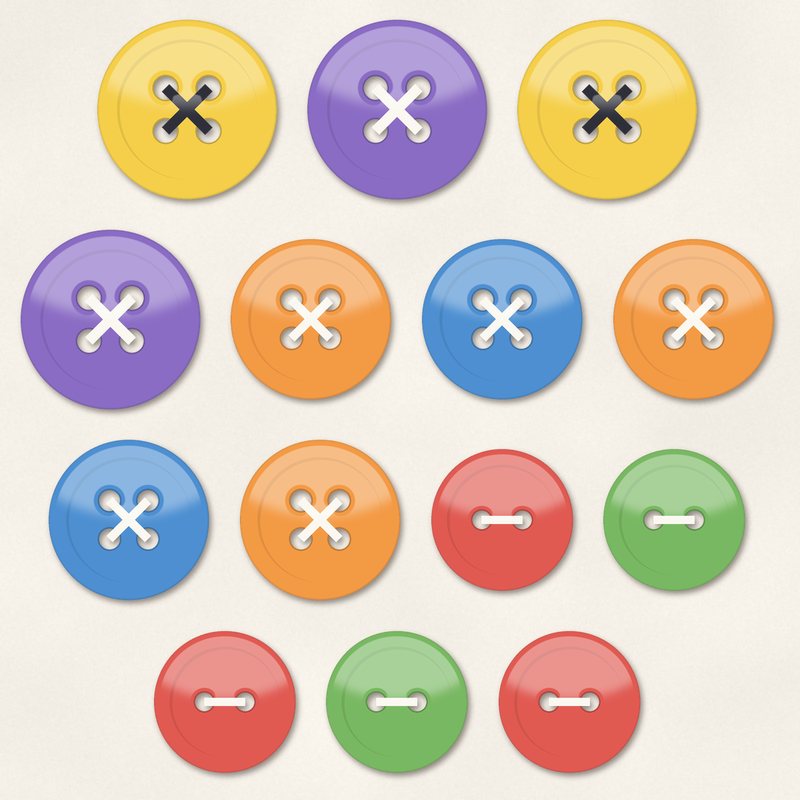
Fourteen glossy buttons in rainbow colors, two and four hole.
- Type
- Embellishments
- Inside
- 14 elements
- Format
- PNG with transparency, 300 dpi
- Download
- ZIP, 731 KB
- Themes
- Everyday
- white
- red
- orange
- yellow
- green
- blue
- purple
Free for personal use and for layouts and cards you sell or give away. Please do not share or sell the files themselves; link to this page instead. Terms of use
About this freebie
This free embellishment pack includes 14 glossy buttons in bright rainbow colors. You will find both two and four hole variations in white, red, orange, yellow, green, blue, purple, and ink. These classic elements are a staple for everyday digital scrapbooking pages.
Each button is a transparent PNG file at 300 dpi. They come with a soft drop shadow already applied, which makes them quick to place on your layouts. The bright palette works well for cheerful themes like birthday cards or simple family moments.
Ideas for using it
- Create a bright birthday layout using the red, orange, and yellow buttons scattered across the page like confetti.
- Design a school memory page and use the blue and green buttons to anchor your photos or journaling blocks.
- Make handmade greeting cards to sell or give away. The small 0.7 MB download size makes it easy to keep these files handy for quick card making.
- String the two and four hole buttons along a digital ribbon or piece of twine to create a custom border for your layout.
How to use it
- The buttons include a soft drop shadow. If you prefer to add realistic drop shadows yourself, you can crop the edges slightly to remove the default shadow.
- Layer several buttons in a cluster on the corner of a photo frame to draw attention to your favorite family pictures.
- Try recoloring digital elements using your image editing software. You can adjust the hue of the white or ink buttons to match your specific project colors.
- Resize the 300 dpi PNG files to make tiny decorative brads or large statement pieces. Always hold the shift key while scaling to keep the buttons perfectly round.
- Elements are transparent PNG files: drag them onto a page above your papers.
- Each element includes a soft drop shadow. Keep one light direction for the whole page.
What is inside the ZIP
One folder named bright-buttons with the files below (file names start with bright-buttons-), plus README.txt and LICENSE.txt.
Show all 14 files
| File | What | Pixels | Type | Size |
|---|---|---|---|---|
| 01-button.png | button | 331 x 331 px | PNG | 38 KB |
| 02-button.png | button | 371 x 371 px | PNG | 57 KB |
| 03-button.png | button | 411 x 411 px | PNG | 61 KB |
| 04-button.png | button | 331 x 331 px | PNG | 39 KB |
| 05-button.png | button | 371 x 371 px | PNG | 57 KB |
| 06-button.png | button | 411 x 411 px | PNG | 64 KB |
| 07-button.png | button | 331 x 331 px | PNG | 38 KB |
| 08-button.png | button | 371 x 371 px | PNG | 57 KB |
| 09-button.png | button | 411 x 411 px | PNG | 61 KB |
| 10-button.png | button | 331 x 331 px | PNG | 39 KB |
| 11-button.png | button | 371 x 371 px | PNG | 57 KB |
| 12-button.png | button | 411 x 411 px | PNG | 64 KB |
| 13-button.png | button | 331 x 331 px | PNG | 38 KB |
| 14-button.png | button | 371 x 371 px | PNG | 57 KB |
You may also like
More embellishments


Tutorials for this freebie
- How to add realistic drop shadowsLearn how to add realistic drop shadows to your digital scrapbook pages with the right settings for papers, flowers and…
- Scrapbook layout design basicsLearn the basics of digital scrapbook layout design. Master focal points, the rule of thirds, visual triangles, and…
- How to recolor digital papers and elementsLearn how to recolor digital scrapbooking papers and elements. Discover simple steps for Photoshop, GIMP, Affinity and…