Chalkboard Labels
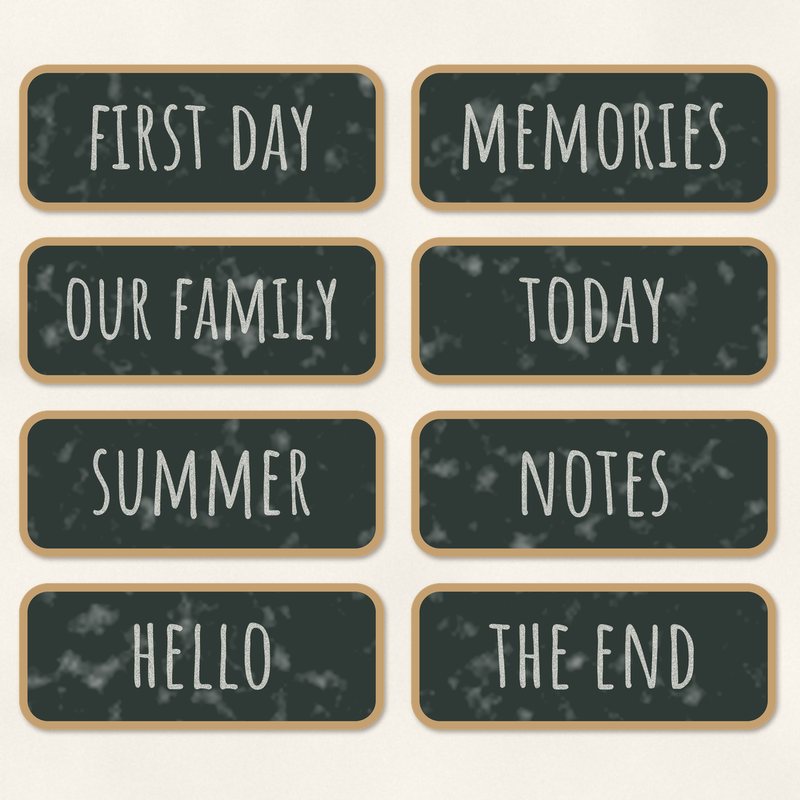
Eight wood framed chalkboard labels with chalk words.
- Type
- Embellishments
- Inside
- 8 elements
- Format
- PNG with transparency, 300 dpi
- Download
- ZIP, 2.7 MB
- Themes
- School, Everyday
- paper white
- apple red
- pencil yellow
- chalk green
- crayon blue
Free for personal use and for layouts and cards you sell or give away. Please do not share or sell the files themselves; link to this page instead. Terms of use
About this freebie
This free embellishment pack features eight wood framed chalkboard labels. Each label includes chalk words like first day, memories, our family, today, summer, notes, hello, and the end. The labels use a color palette of paper white, apple red, pencil yellow, chalk green, crayon blue, and graphite. These elements are perfect for school layouts and everyday pages. The files are transparent PNG images at 300 dpi. They come with a soft drop shadow already applied so you can place them directly onto your digital scrapbooking projects.
Ideas for using it
- Use the first day label on a page about a new school year. Pair it with apple red and pencil yellow papers.
- Add the summer label to a layout of your warm weather photos. The chalk green and crayon blue colors fit perfectly with outdoor pictures.
- Place the our family label on a heritage or family reunion page. The classic wood frame and graphite background suit traditional layouts.
- Put the notes label next to a journaling block on an everyday page. It draws attention to the story behind your photos.
How to use it
- These transparent PNG files already have a soft drop shadow. You do not need to add extra shadows in your software.
- The download is a ZIP file of about 2.7 MB. You need to extract the folder before you can open the images in your workspace.
- You can use these files for personal projects. You are also free to use them on cards and layouts you sell or give away.
- Resize the labels to fit your page design. Make sure you scale them down rather than up to keep the 300 dpi resolution crisp.
- Elements are transparent PNG files: drag them onto a page above your papers.
- Each element includes a soft drop shadow. Keep one light direction for the whole page.
What is inside the ZIP
One folder named chalkboard-labels with the files below (file names start with chalkboard-labels-), plus README.txt and LICENSE.txt.
| File | What | Pixels | Type | Size |
|---|---|---|---|---|
| 01-chalkboard-label-first-day.png | chalkboard label first day | 1337 x 557 px | PNG | 345 KB |
| 02-chalkboard-label-memories.png | chalkboard label memories | 1337 x 557 px | PNG | 412 KB |
| 03-chalkboard-label-our-family.png | chalkboard label our family | 1337 x 557 px | PNG | 400 KB |
| 04-chalkboard-label-today.png | chalkboard label today | 1337 x 557 px | PNG | 301 KB |
| 05-chalkboard-label-summer.png | chalkboard label summer | 1337 x 557 px | PNG | 344 KB |
| 06-chalkboard-label-notes.png | chalkboard label notes | 1337 x 557 px | PNG | 299 KB |
| 07-chalkboard-label-hello.png | chalkboard label hello | 1337 x 557 px | PNG | 318 KB |
| 08-chalkboard-label-the-end.png | chalkboard label the end | 1337 x 557 px | PNG | 319 KB |
You may also like
More embellishments


Tutorials for this freebie
- How to add realistic drop shadowsLearn how to add realistic drop shadows to your digital scrapbook pages with the right settings for papers, flowers and…
- Scrapbook layout design basicsLearn the basics of digital scrapbook layout design. Master focal points, the rule of thirds, visual triangles, and…
- How to recolor digital papers and elementsLearn how to recolor digital scrapbooking papers and elements. Discover simple steps for Photoshop, GIMP, Affinity and…