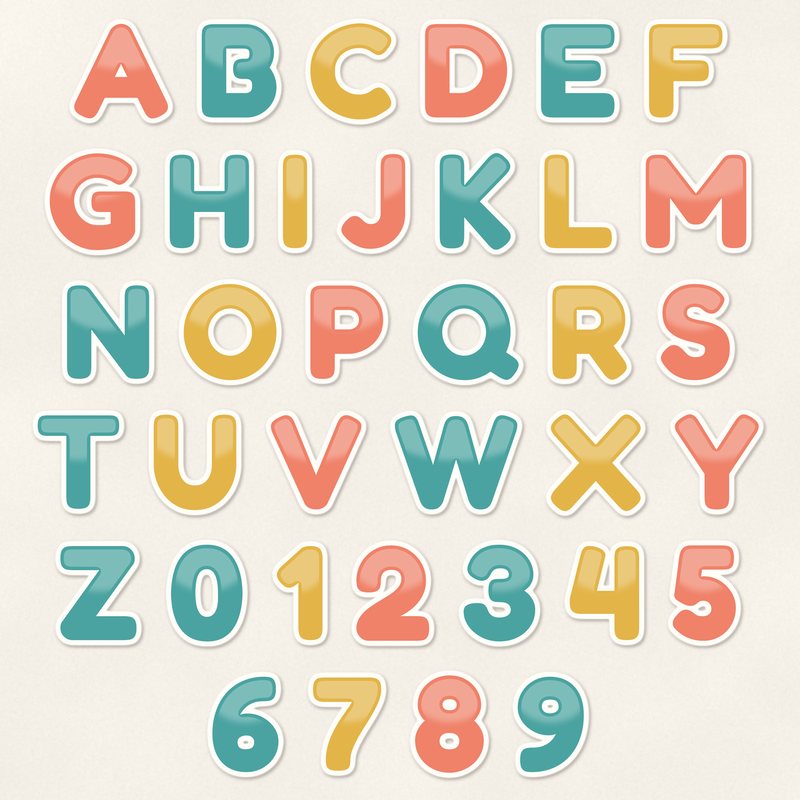
Sticker Pop Alphabet
Rounded sticker letters with a white outline, upper and lower case.
- Type
- Alphabet
- Inside
- 68 letters and symbols
- Format
- PNG with transparency, 300 dpi
- Download
- ZIP, 3.5 MB
- Themes
- Everyday, Birthday
- white
- coral
- teal
- mustard
- blush
Free for personal use and for layouts and cards you sell or give away. Please do not share or sell the files themselves; link to this page instead. Terms of use
About this freebie
The Sticker Pop Alphabet brings a fun look to your digital scrapbooking. This free download includes 68 separate transparent PNG files featuring upper and lower case letters, numbers 0 to 9, and basic punctuation. Each character has a rounded sticker effect with a crisp white outline.
The palette includes coral, teal, mustard, blush, and charcoal. These bold letters are perfect for everyday layouts and cheerful birthday designs. The letters are about 600 to 900 pixels tall, which prints at 2 to 3 inches at 300 dpi. The ZIP download size is about 3.5 MB.
Ideas for using it
- Spell out a large title for a birthday party scrapbook page using the bright coral and teal letters. The sticker effect adds a playful touch to celebration photos.
- Create custom digital greeting cards to give away. You can mix the mustard and blush letters to write a cheerful message on the front of your card.
- Use the charcoal numbers to highlight the age of the birthday person or document the year on an everyday family layout.
How to use it
- Drag and drop each transparent PNG file onto your canvas to spell your word. You can overlap the white outlines slightly for a realistic sticker look.
- Add a small drop shadow to each letter in your image editor. This makes the 600 to 900 pixel tall letters look like physical stickers resting on your page.
- If you want to resize the letters, scale them down rather than up. Shrinking the 2 to 3 inch letters keeps the rounded edges and white outline sharp at 300 dpi.
- You can use these letters for personal projects and for cards or layouts you sell or give away. Just remember that the 68 files themselves may not be shared or sold.
- Each character is its own transparent PNG file. Place letters on separate layers and line them up on one baseline.
- Resize all letters of a word by the same amount so they stay consistent.
What is inside the ZIP
One folder named sticker-pop-alphabet with the files below (file names start with sticker-pop-alphabet-), plus README.txt and LICENSE.txt.
Show all 68 files
| File | What | Pixels | Type | Size |
|---|---|---|---|---|
| A.png | A | 633 x 639 px | PNG | 61 KB |
| B.png | B | 526 x 635 px | PNG | 51 KB |
| C.png | C | 560 x 647 px | PNG | 69 KB |
| D.png | D | 568 x 634 px | PNG | 53 KB |
| E.png | E | 521 x 635 px | PNG | 48 KB |
| F.png | F | 520 x 635 px | PNG | 42 KB |
| G.png | G | 588 x 651 px | PNG | 72 KB |
| H.png | H | 554 x 634 px | PNG | 35 KB |
| I.png | I | 242 x 635 px | PNG | 22 KB |
| J.png | J | 464 x 642 px | PNG | 38 KB |
| K.png | K | 505 x 647 px | PNG | 58 KB |
| L.png | L | 485 x 634 px | PNG | 29 KB |
| M.png | M | 675 x 633 px | PNG | 62 KB |
| N.png | N | 569 x 634 px | PNG | 55 KB |
| O.png | O | 629 x 649 px | PNG | 77 KB |
| P.png | P | 517 x 634 px | PNG | 48 KB |
| Q.png | Q | 674 x 649 px | PNG | 85 KB |
| R.png | R | 525 x 636 px | PNG | 59 KB |
| S.png | S | 492 x 650 px | PNG | 69 KB |
| T.png | T | 566 x 635 px | PNG | 34 KB |
| U.png | U | 573 x 643 px | PNG | 52 KB |
| V.png | V | 614 x 638 px | PNG | 56 KB |
| W.png | W | 796 x 638 px | PNG | 95 KB |
| X.png | X | 611 x 648 px | PNG | 73 KB |
| Y.png | Y | 577 x 642 px | PNG | 51 KB |
| Z.png | Z | 535 x 637 px | PNG | 56 KB |
| a-lower.png | a | 491 x 487 px | PNG | 44 KB |
| b-lower.png | b | 489 x 662 px | PNG | 52 KB |
| c-lower.png | c | 445 x 497 px | PNG | 51 KB |
| d-lower.png | d | 489 x 662 px | PNG | 47 KB |
| e-lower.png | e | 486 x 505 px | PNG | 48 KB |
| f-lower.png | f | 413 x 665 px | PNG | 51 KB |
| g-lower.png | g | 484 x 650 px | PNG | 59 KB |
| h-lower.png | h | 487 x 663 px | PNG | 49 KB |
| i-lower.png | i | 240 x 663 px | PNG | 35 KB |
| j-lower.png | j | 359 x 821 px | PNG | 43 KB |
| k-lower.png | k | 456 x 667 px | PNG | 53 KB |
| l-lower.png | l | 308 x 664 px | PNG | 30 KB |
| m-lower.png | m | 661 x 489 px | PNG | 50 KB |
| n-lower.png | n | 489 x 488 px | PNG | 41 KB |
| o-lower.png | o | 505 x 504 px | PNG | 51 KB |
| p-lower.png | p | 486 x 650 px | PNG | 52 KB |
| q-lower.png | q | 486 x 650 px | PNG | 53 KB |
| r-lower.png | r | 400 x 492 px | PNG | 33 KB |
| s-lower.png | s | 425 x 503 px | PNG | 49 KB |
| t-lower.png | t | 413 x 616 px | PNG | 54 KB |
| u-lower.png | u | 488 x 488 px | PNG | 42 KB |
| v-lower.png | v | 515 x 497 px | PNG | 54 KB |
| w-lower.png | w | 653 x 495 px | PNG | 64 KB |
| x-lower.png | x | 493 x 496 px | PNG | 57 KB |
| y-lower.png | y | 522 x 661 px | PNG | 57 KB |
| z-lower.png | z | 494 x 489 px | PNG | 43 KB |
| 0.png | 0 | 510 x 652 px | PNG | 63 KB |
| 1.png | 1 | 362 x 636 px | PNG | 33 KB |
| 2.png | 2 | 516 x 644 px | PNG | 68 KB |
| 3.png | 3 | 509 x 651 px | PNG | 70 KB |
| 4.png | 4 | 496 x 636 px | PNG | 46 KB |
| 5.png | 5 | 461 x 645 px | PNG | 60 KB |
| 6.png | 6 | 477 x 644 px | PNG | 62 KB |
| 7.png | 7 | 491 x 635 px | PNG | 48 KB |
| 8.png | 8 | 492 x 655 px | PNG | 63 KB |
| 9.png | 9 | 477 x 644 px | PNG | 65 KB |
| ampersand.png | & | 611 x 666 px | PNG | 70 KB |
| exclamation.png | ! | 248 x 638 px | PNG | 34 KB |
| question.png | ? | 448 x 648 px | PNG | 62 KB |
| period.png | . | 248 x 248 px | PNG | 19 KB |
| comma.png | , | 248 x 358 px | PNG | 26 KB |
| apostrophe.png | ' | 227 x 362 px | PNG | 24 KB |
You may also like
More alphabets


Tutorials for this freebie
- How to use digital alphabetsLearn how to use digital alphabets on your scrapbook pages. Find tips for spacing letters, adding shadows, and building…
- How to make a scrapbook page titleLearn how to make a scrapbook page title that stands out. Discover tips for placement, mixing fonts, and using digital…
- How to recolor digital papers and elementsLearn how to recolor digital scrapbooking papers and elements. Discover simple steps for Photoshop, GIMP, Affinity and…