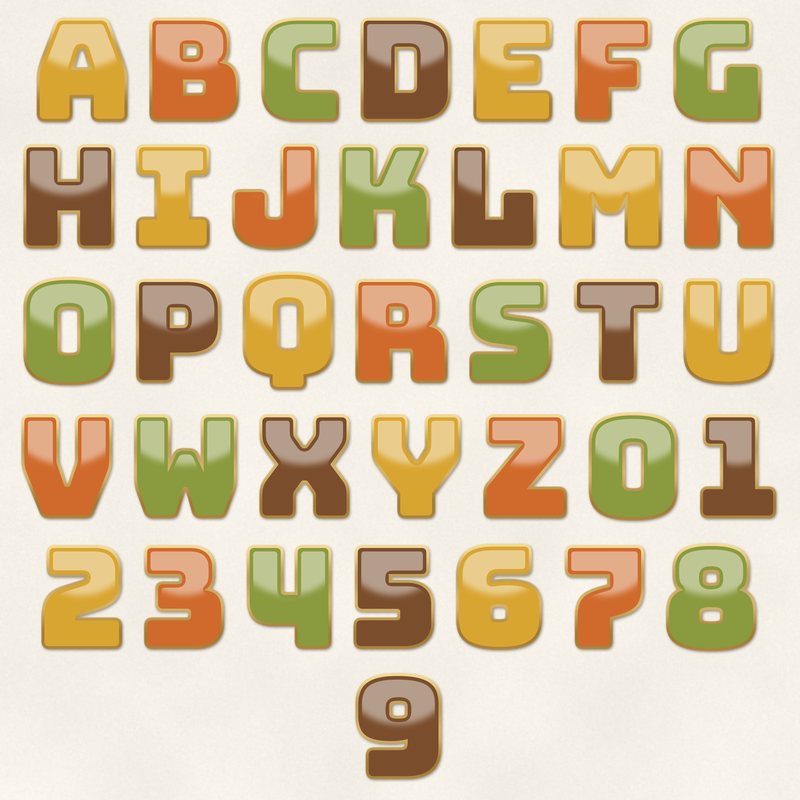
Retro Enamel Alphabet
Enamel letters with a gold metal rim.
- Type
- Alphabet
- Inside
- 42 letters and symbols
- Format
- PNG with transparency, 300 dpi
- Download
- ZIP, 1.8 MB
- Themes
- Everyday
- cream
- mustard
- burnt orange
- avocado
- brown
Free for personal use and for layouts and cards you sell or give away. Please do not share or sell the files themselves; link to this page instead. Terms of use
About this freebie
Add a touch of vintage charm to your everyday layouts with the Retro Enamel Alphabet. This free download includes 42 separate transparent PNG files featuring letters from A to Z, numbers 0 to 9, and basic punctuation. Each character has a glossy enamel look with a gold metal rim. The color palette features a mix of cream, mustard, burnt orange, avocado, brown, and chocolate. These letters are 600 to 900 pixels tall, which prints at 2 to 3 inches at 300 dpi. They are perfect for titles on heritage pages, autumn layouts, or casual family scrapbook projects.
Ideas for using it
- Spell out names on heritage family layouts using the chocolate and brown letters for a classic, vintage feel.
- Mix the mustard, burnt orange, and avocado letters to create a colorful autumn title for your fall festival photos.
- Create custom greeting cards to sell or give away, using the cream letters and gold metal rims for elegant greetings.
- Number your everyday list pages from 0 to 9 using the different colors to make each point stand out clearly.
How to use it
- Open the 1.8 MB ZIP file to access the 42 separate PNG files. Drag each letter individually onto your digital canvas.
- If you are unsure about placing individual PNG files, read our guide on how to use digital alphabets for basic software steps.
- Overlap the edges of the letters slightly to make your words look like realistic physical metal enamel pieces.
- Add a small drop shadow to each letter to emphasize the gold metal rim and the glossy enamel effect.
- Each character is its own transparent PNG file. Place letters on separate layers and line them up on one baseline.
- Resize all letters of a word by the same amount so they stay consistent.
What is inside the ZIP
One folder named retro-enamel-alphabet with the files below (file names start with retro-enamel-alphabet-), plus README.txt and LICENSE.txt.
Show all 42 files
| File | What | Pixels | Type | Size |
|---|---|---|---|---|
| A.png | A | 539 x 614 px | PNG | 51 KB |
| B.png | B | 533 x 613 px | PNG | 48 KB |
| C.png | C | 466 x 614 px | PNG | 36 KB |
| D.png | D | 537 x 613 px | PNG | 40 KB |
| E.png | E | 474 x 614 px | PNG | 33 KB |
| F.png | F | 460 x 614 px | PNG | 32 KB |
| G.png | G | 520 x 614 px | PNG | 39 KB |
| H.png | H | 538 x 614 px | PNG | 34 KB |
| I.png | I | 444 x 614 px | PNG | 28 KB |
| J.png | J | 509 x 625 px | PNG | 35 KB |
| K.png | K | 535 x 614 px | PNG | 51 KB |
| L.png | L | 508 x 614 px | PNG | 26 KB |
| M.png | M | 606 x 614 px | PNG | 51 KB |
| N.png | N | 534 x 614 px | PNG | 45 KB |
| O.png | O | 538 x 636 px | PNG | 50 KB |
| P.png | P | 505 x 614 px | PNG | 42 KB |
| Q.png | Q | 538 x 693 px | PNG | 53 KB |
| R.png | R | 546 x 614 px | PNG | 47 KB |
| S.png | S | 491 x 613 px | PNG | 54 KB |
| T.png | T | 522 x 614 px | PNG | 25 KB |
| U.png | U | 536 x 625 px | PNG | 38 KB |
| V.png | V | 539 x 614 px | PNG | 47 KB |
| W.png | W | 606 x 614 px | PNG | 53 KB |
| X.png | X | 535 x 614 px | PNG | 63 KB |
| Y.png | Y | 533 x 614 px | PNG | 53 KB |
| Z.png | Z | 498 x 614 px | PNG | 43 KB |
| 0.png | 0 | 530 x 636 px | PNG | 49 KB |
| 1.png | 1 | 457 x 614 px | PNG | 26 KB |
| 2.png | 2 | 483 x 614 px | PNG | 45 KB |
| 3.png | 3 | 481 x 613 px | PNG | 47 KB |
| 4.png | 4 | 505 x 614 px | PNG | 36 KB |
| 5.png | 5 | 484 x 613 px | PNG | 43 KB |
| 6.png | 6 | 513 x 626 px | PNG | 54 KB |
| 7.png | 7 | 475 x 614 px | PNG | 36 KB |
| 8.png | 8 | 535 x 636 px | PNG | 63 KB |
| 9.png | 9 | 513 x 625 px | PNG | 57 KB |
| ampersand.png | & | 602 x 613 px | PNG | 54 KB |
| exclamation.png | ! | 263 x 613 px | PNG | 31 KB |
| question.png | ? | 497 x 614 px | PNG | 47 KB |
| period.png | . | 274 x 275 px | PNG | 14 KB |
| comma.png | , | 274 x 351 px | PNG | 22 KB |
| apostrophe.png | ' | 252 x 351 px | PNG | 18 KB |
You may also like
More alphabets


Tutorials for this freebie
- How to use digital alphabetsLearn how to use digital alphabets on your scrapbook pages. Find tips for spacing letters, adding shadows, and building…
- How to make a scrapbook page titleLearn how to make a scrapbook page title that stands out. Discover tips for placement, mixing fonts, and using digital…
- How to recolor digital papers and elementsLearn how to recolor digital scrapbooking papers and elements. Discover simple steps for Photoshop, GIMP, Affinity and…