Retro Seventies Papers
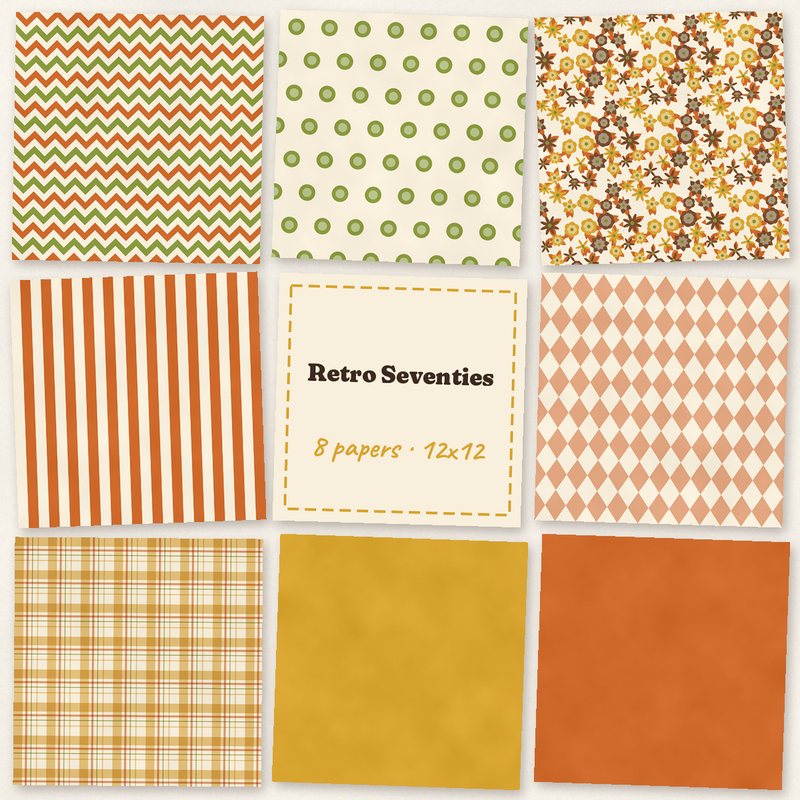
Mustard, burnt orange and avocado in bold retro patterns.
- Type
- Paper pack
- Inside
- 8 papers
- Format
- JPG, 300 dpi
- Size
- 12 x 12 in (3600 x 3600 px)
- Download
- ZIP, 9.9 MB
- Themes
- Everyday
- cream
- mustard
- burnt orange
- avocado
- brown
Free for personal use and for layouts and cards you sell or give away. Please do not share or sell the files themselves; link to this page instead. Terms of use
About this freebie
The Retro Seventies Papers pack brings bold vintage style to your everyday digital scrapbooking projects. This free download includes 8 JPG papers measuring 12 x 12 inches at 300 dpi. The color palette features cream, mustard, burnt orange, avocado, brown, and chocolate. You get a mix of fun patterns like multi chevron, big dots, floral, wide stripes, harlequin, and plaid. It also includes solid mustard and solid burnt orange papers to balance your layouts. The 9.9 MB ZIP file is free for personal use and for cards or layouts you sell or give away.
Ideas for using it
- Create a vintage family tree layout using the solid mustard paper as a background and the chocolate brown plaid for photo mats.
- Design retro greeting cards to sell or give away. The wide stripes and big dots make fun, bold backgrounds for simple sentiments.
- Scrapbook your everyday memories with the multi chevron and floral patterns. Pair them with cream and avocado accents for a coordinated look.
- Build a recipe mini album featuring classic seventies dishes. The burnt orange and avocado papers fit perfectly with retro kitchen themes.
How to use it
- Unzip the 9.9 MB download folder to access your 8 JPG files. You can open these in any standard photo editing software.
- Learn more about page sizes and printing to ensure your 3600 x 3600 pixel papers print perfectly at 12 x 12 inches.
- Use the solid burnt orange and mustard papers to frame busy patterns like the harlequin or floral designs so your photos stand out.
- Scale down the big dots or wide stripes if you need smaller patterns for digital greeting cards or pocket pages.
- Use the papers as page backgrounds, or cut blocks and strips by clipping them to shapes.
- The papers are 3600 x 3600 pixels, so they can be scaled down for 8 x 8 inch albums without losing quality.
What is inside the ZIP
One folder named retro-seventies-papers with the files below (file names start with retro-seventies-papers-), plus README.txt and LICENSE.txt.
| File | What | Pixels | Type | Size |
|---|---|---|---|---|
| paper-01-multi-chevron.jpg | Multi chevron | 3600 x 3600 px (12 x 12 in) | JPG | 1.4 MB |
| paper-02-big-dots.jpg | Big dots | 3600 x 3600 px (12 x 12 in) | JPG | 960 KB |
| paper-03-floral.jpg | Floral | 3600 x 3600 px (12 x 12 in) | JPG | 1.8 MB |
| paper-04-wide-stripes.jpg | Wide stripes | 3600 x 3600 px (12 x 12 in) | JPG | 901 KB |
| paper-05-harlequin.jpg | Harlequin | 3600 x 3600 px (12 x 12 in) | JPG | 1.1 MB |
| paper-06-plaid.jpg | Plaid | 3600 x 3600 px (12 x 12 in) | JPG | 1.9 MB |
| paper-07-solid-mustard.jpg | Solid mustard | 3600 x 3600 px (12 x 12 in) | JPG | 914 KB |
| paper-08-solid-burnt-orange.jpg | Solid burnt orange | 3600 x 3600 px (12 x 12 in) | JPG | 914 KB |
You may also like
More papers


Tutorials for this freebie
- Clipping masks explained (and the shortcut in every program)Learn how to use clipping masks in digital scrapbooking. Find the shortcuts for Photoshop, Elements, Affinity, GIMP…
- Choosing color palettes for scrapbook pagesLearn how to choose color palettes for digital scrapbook pages. Discover tips for matching colors to photos, using the…
- Scrapbook page sizes for printing: 12x12, 8x8, 8.5x11 and A4Learn the standard digital scrapbook page sizes for printing. Find pixel dimensions for 12x12, 8x8, US Letter, and A4…