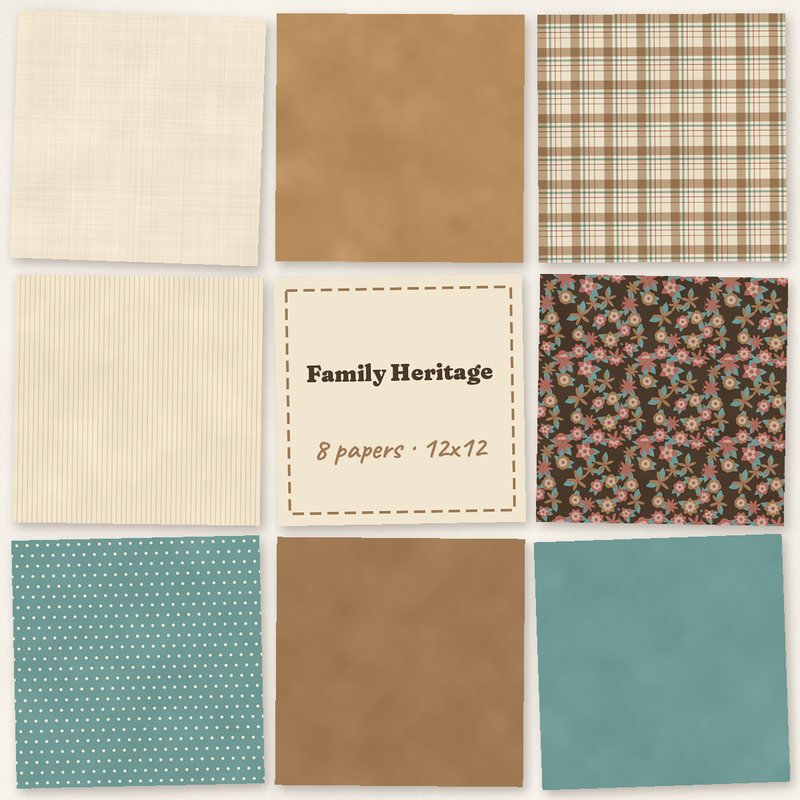
Family Heritage Papers
Parchment, sepia and faded teal papers for heritage photos.
- Type
- Paper pack
- Inside
- 8 papers
- Format
- JPG, 300 dpi
- Size
- 12 x 12 in (3600 x 3600 px)
- Download
- ZIP, 10.1 MB
- Themes
- Family
- parchment
- sepia
- faded teal
- dusty red
- old gold
Free for personal use and for layouts and cards you sell or give away. Please do not share or sell the files themselves; link to this page instead. Terms of use
About this freebie
The Family Heritage Papers pack brings a classic look to your genealogy and ancestry projects. This free download includes 8 digital papers in a palette of parchment, sepia, faded teal, dusty red, old gold, and umber. You receive versatile patterns like plaid, pinstripe, tiny dots, and a dark floral, along with textured linen, kraft, and solid backgrounds. These 12 x 12 inch JPG files are perfect for framing old black and white photographs or creating elegant family albums.
Ideas for using it
- Build a title page for your ancestry album using the dark floral paper as a rich background for old gold lettering.
- Layer the linen and kraft papers to create a neutral base for scanned black and white portraits of your grandparents.
- Use the plaid and pinstripe patterns to make masculine birthday cards for the men in your family.
- Combine the solid faded teal and solid sepia papers to mat your vintage photos and make them stand out.
How to use it
- Each paper is 3600 x 3600 pixels at 300 dpi. You can read about page sizes and printing to ensure your physical albums look sharp.
- The 10.1 MB ZIP file contains standard JPG images. You must extract the folder first to open the backgrounds in your photo editing software.
- You can use these free files for personal layouts and for cards you sell or give away. Just remember the files themselves cannot be shared.
- Use the papers as page backgrounds, or cut blocks and strips by clipping them to shapes.
- The papers are 3600 x 3600 pixels, so they can be scaled down for 8 x 8 inch albums without losing quality.
What is inside the ZIP
One folder named family-heritage-papers with the files below (file names start with family-heritage-papers-), plus README.txt and LICENSE.txt.
| File | What | Pixels | Type | Size |
|---|---|---|---|---|
| paper-01-linen.jpg | Linen | 3600 x 3600 px (12 x 12 in) | JPG | 1.5 MB |
| paper-02-kraft.jpg | Kraft | 3600 x 3600 px (12 x 12 in) | JPG | 1.4 MB |
| paper-03-plaid.jpg | Plaid | 3600 x 3600 px (12 x 12 in) | JPG | 1.8 MB |
| paper-04-pinstripe.jpg | Pinstripe | 3600 x 3600 px (12 x 12 in) | JPG | 1.0 MB |
| paper-05-dark-floral.jpg | Dark floral | 3600 x 3600 px (12 x 12 in) | JPG | 1.6 MB |
| paper-06-tiny-dots.jpg | Tiny dots | 3600 x 3600 px (12 x 12 in) | JPG | 1.0 MB |
| paper-07-solid-sepia.jpg | Solid sepia | 3600 x 3600 px (12 x 12 in) | JPG | 913 KB |
| paper-08-solid-faded-teal.jpg | Solid faded teal | 3600 x 3600 px (12 x 12 in) | JPG | 913 KB |
You may also like
More papers


Tutorials for this freebie
- Clipping masks explained (and the shortcut in every program)Learn how to use clipping masks in digital scrapbooking. Find the shortcuts for Photoshop, Elements, Affinity, GIMP…
- Choosing color palettes for scrapbook pagesLearn how to choose color palettes for digital scrapbook pages. Discover tips for matching colors to photos, using the…
- Scrapbook page sizes for printing: 12x12, 8x8, 8.5x11 and A4Learn the standard digital scrapbook page sizes for printing. Find pixel dimensions for 12x12, 8x8, US Letter, and A4…