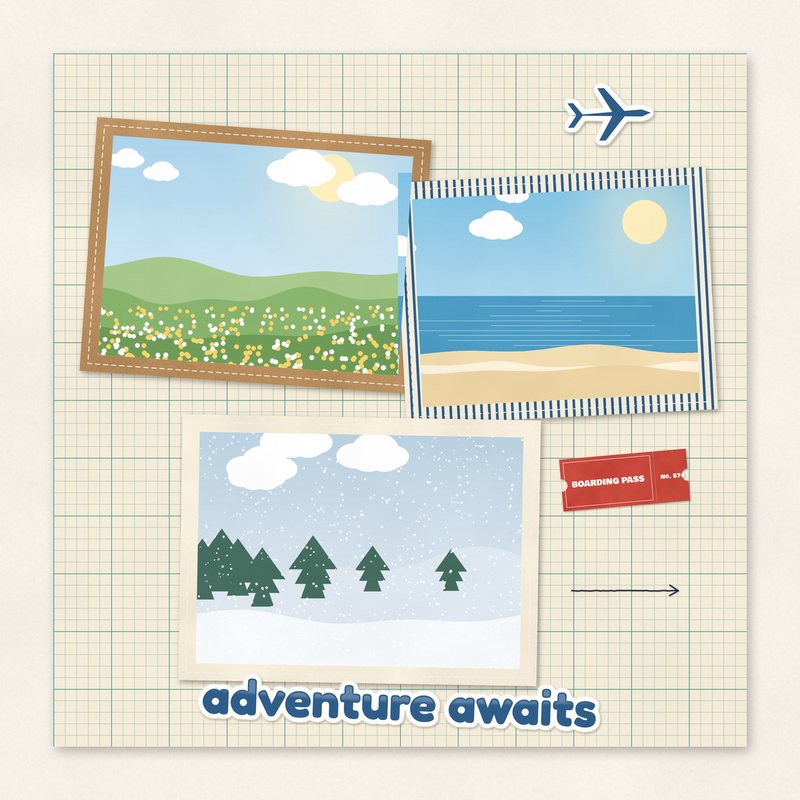
Adventure Awaits Travel Quick Page
Map grid background with three tilted photo holes and a boarding pass.
- Type
- Quick page
- Inside
- 3 photo holes
- Format
- PNG with transparent holes, 300 dpi
- Size
- 12 x 12 in (3600 x 3600 px)
- Download
- ZIP, 6.3 MB
- Themes
- Travel
- map cream
- passport blue
- stamp red
- ochre
- teal
Free for personal use and for layouts and cards you sell or give away. Please do not share or sell the files themselves; link to this page instead. Terms of use
About this freebie
The Adventure Awaits Travel Quick Page is a ready-to-use background for your vacation memories. This 12 x 12 inch PNG file features a map cream grid background layered with a boarding pass and three tilted photo holes. The color palette includes passport blue, stamp red, ochre, teal, and ink. The download includes one 3600 x 3600 pixel page at 300 dpi with transparent cutouts for your pictures. The preview image shows sample photos, but your downloaded file will have empty spaces ready for your own pictures. It is ideal for road trips, flights, and summer holidays.
Ideas for using it
- Frame three photos from a recent flight or airport visit using the passport blue and stamp red accents to highlight your departure.
- Create a cover page for your travel album by placing a title card in one of the photo holes and destination pictures in the other two.
- Print your finished layout to display in a 12 x 12 inch frame to remember a special family road trip or summer vacation.
- Make a quick layout of a city tour by filling the 5.6 x 4.0 inch and 5.2 x 3.8 inch holes with landscape shots.
How to use it
- If you are new to this format, read our guide on how to use quick pages to learn how to place your photos behind the PNG layer.
- Resize your pictures to fit the 5.2 x 3.8, 4.8 x 3.6, and 5.6 x 4.0 inch transparent holes before dragging them under the background layer.
- Save your completed layout as a flattened JPG file before printing to keep the file size manageable and ensure the transparent areas print correctly.
- The 6.3 MB ZIP file must be extracted on your computer before you can open the PNG file in your photo editing software.
- Put your photo on a layer under the quick page and move it until it shows through the hole.
- Keep the quick page as PNG while you work so the holes stay transparent.
What is inside the ZIP
One folder named adventure-awaits-travel-quick-page with the files below (file names start with adventure-awaits-travel-quick-page-), plus README.txt and LICENSE.txt.
| File | What | Pixels | Type | Size |
|---|---|---|---|---|
| adventure-awaits-travel-quick-page.png | quick page | 3600 x 3600 px (12 x 12 in) | PNG | 6.3 MB |
You may also like
More quick pages


Tutorials for this freebie
- How to use quick pagesLearn how to use digital scrapbooking quick pages. Discover how to place photos, resize them, and export your finished…
- Printing scrapbook pages at home vs at a photo labLearn how to print digital scrapbook pages at home or at a photo lab. Discover practical tips for paper choices, color…
- How to turn digital scrapbook pages into a photo bookLearn how to turn your digital scrapbook pages into a printed photo book. Get practical tips on sizing, bleeds…