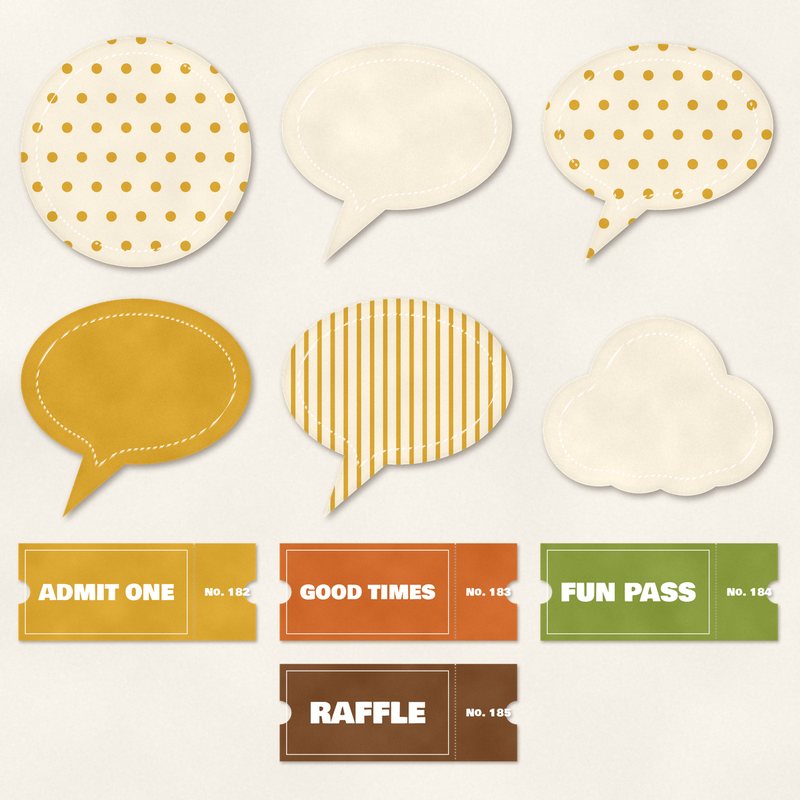
Tickets and Speech Bubbles
Retro tickets, speech bubbles and a thought cloud.
- Type
- Embellishments
- Inside
- 10 elements
- Format
- PNG with transparency, 300 dpi
- Download
- ZIP, 2.7 MB
- Themes
- Everyday
- cream
- mustard
- burnt orange
- avocado
- brown
Free for personal use and for layouts and cards you sell or give away. Please do not share or sell the files themselves; link to this page instead. Terms of use
About this freebie
This free embellishment pack includes 10 items to decorate your digital scrapbook pages. You get retro tickets reading ADMIT ONE, GOOD TIMES, FUN PASS, and RAFFLE. The set also features four speech bubbles, a thought cloud, and a circle sticker.
These elements come in a warm color palette of cream, mustard, burnt orange, avocado, brown, and chocolate. The files are transparent PNGs at 300 dpi with a soft drop shadow already applied. These graphics work well for everyday layouts or casual greeting cards.
Ideas for using it
- Add the ADMIT ONE or FUN PASS tickets to a layout about a family trip to the local fair or amusement park.
- Place a speech bubble near a photo of your child and type a funny quote or conversation directly onto the sticker.
- Layer the retro tickets behind a photo frame to add a pop of mustard or burnt orange to an autumn scrapbook page.
- Use the thought cloud sticker to hold the date or a short journaling note on your everyday digital layouts.
How to use it
- The transparent PNG files include a soft drop shadow. You can place them directly onto your digital background without adding extra layer styles.
- If the cream or avocado colors do not match your photos, try recoloring digital elements using the hue and saturation tools in your software.
- Type your text over the speech bubbles using a dark brown or chocolate font to coordinate with the retro color palette.
- Keep the 2.7 MB ZIP file saved on your computer so you can reuse these 10 items for cards you sell or give away.
- Elements are transparent PNG files: drag them onto a page above your papers.
- Each element includes a soft drop shadow. Keep one light direction for the whole page.
What is inside the ZIP
One folder named tickets-and-speech-bubbles with the files below (file names start with tickets-and-speech-bubbles-), plus README.txt and LICENSE.txt.
| File | What | Pixels | Type | Size |
|---|---|---|---|---|
| 01-ticket-admit-one.png | ticket ADMIT ONE | 1134 x 484 px | PNG | 263 KB |
| 02-ticket-good-times.png | ticket GOOD TIMES | 1134 x 484 px | PNG | 268 KB |
| 03-ticket-fun-pass.png | ticket FUN PASS | 1134 x 484 px | PNG | 263 KB |
| 04-ticket-raffle.png | ticket RAFFLE | 1134 x 484 px | PNG | 257 KB |
| 05-sticker-bubble.png | sticker bubble | 744 x 701 px | PNG | 250 KB |
| 06-sticker-bubble.png | sticker bubble | 744 x 701 px | PNG | 276 KB |
| 07-sticker-bubble.png | sticker bubble | 744 x 701 px | PNG | 257 KB |
| 08-sticker-bubble.png | sticker bubble | 744 x 701 px | PNG | 284 KB |
| 09-sticker-cloud.png | sticker cloud | 730 x 577 px | PNG | 228 KB |
| 10-sticker-circle.png | sticker circle | 744 x 745 px | PNG | 326 KB |
You may also like
More embellishments


Tutorials for this freebie
- How to add realistic drop shadowsLearn how to add realistic drop shadows to your digital scrapbook pages with the right settings for papers, flowers and…
- Scrapbook layout design basicsLearn the basics of digital scrapbook layout design. Master focal points, the rule of thirds, visual triangles, and…
- How to recolor digital papers and elementsLearn how to recolor digital scrapbooking papers and elements. Discover simple steps for Photoshop, GIMP, Affinity and…