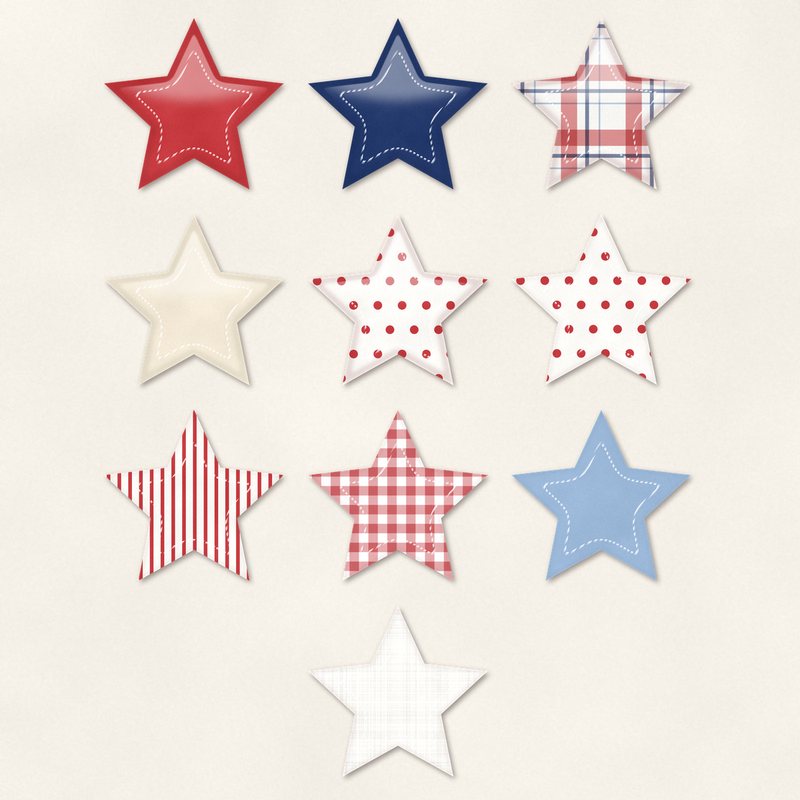
Star Sticker Mix
Ten stitched and puffy star stickers.
- Type
- Embellishments
- Inside
- 10 elements
- Format
- PNG with transparency, 300 dpi
- Download
- ZIP, 2.4 MB
- Themes
- Fourth of July, Everyday
- white
- flag red
- navy
- sky
- cream
Free for personal use and for layouts and cards you sell or give away. Please do not share or sell the files themselves; link to this page instead. Terms of use
About this freebie
Add a touch of texture to your pages with the Star Sticker Mix. This free embellishment pack includes 10 stitched and puffy star stickers. The palette features white, flag red, navy, sky, cream, and ink. These stars are perfect for Fourth of July layouts or everyday projects. The files are transparent PNGs at 300 dpi with a soft drop shadow already applied. You can use these files for personal projects, as well as for cards and layouts you sell or give away. The download size is about 2.4 MB.
Ideas for using it
- Create a Fourth of July scrapbook page and scatter the flag red and navy stars around your photos for a festive look.
- Design a birthday card using the sky and cream stars. The puffy texture adds a fun, tactile feel to your printed greeting cards.
- Build a digital layout for your everyday memories. Group three stars together near your journaling block to draw the eye to your text.
- Make a patriotic party invitation. Place the white and ink stars along the borders to frame your event details.
How to use it
- These PNG files already include a soft drop shadow. You do not need to add extra shadows in your software.
- If you want to match a different color scheme, try recoloring digital elements using the hue and saturation tools in your image editor.
- Layer the star stickers over digital ribbons or paper strips to create custom embellishment clusters for your digital scrapbook pages.
- Elements are transparent PNG files: drag them onto a page above your papers.
- Each element includes a soft drop shadow. Keep one light direction for the whole page.
What is inside the ZIP
One folder named star-sticker-mix with the files below (file names start with star-sticker-mix-), plus README.txt and LICENSE.txt.
| File | What | Pixels | Type | Size |
|---|---|---|---|---|
| 01-sticker-star.png | sticker star | 695 x 666 px | PNG | 234 KB |
| 02-sticker-star.png | sticker star | 695 x 666 px | PNG | 232 KB |
| 03-sticker-star.png | sticker star | 695 x 665 px | PNG | 207 KB |
| 04-sticker-star.png | sticker star | 695 x 665 px | PNG | 210 KB |
| 05-sticker-star.png | sticker star | 695 x 665 px | PNG | 265 KB |
| 06-sticker-star.png | sticker star | 695 x 665 px | PNG | 203 KB |
| 07-sticker-star.png | sticker star | 695 x 666 px | PNG | 317 KB |
| 08-sticker-star.png | sticker star | 695 x 665 px | PNG | 255 KB |
| 09-sticker-star.png | sticker star | 695 x 666 px | PNG | 229 KB |
| 10-sticker-star.png | sticker star | 695 x 666 px | PNG | 234 KB |
You may also like
More embellishments


Tutorials for this freebie
- How to add realistic drop shadowsLearn how to add realistic drop shadows to your digital scrapbook pages with the right settings for papers, flowers and…
- Scrapbook layout design basicsLearn the basics of digital scrapbook layout design. Master focal points, the rule of thirds, visual triangles, and…
- How to recolor digital papers and elementsLearn how to recolor digital scrapbooking papers and elements. Discover simple steps for Photoshop, GIMP, Affinity and…