Paper Clips and Brads
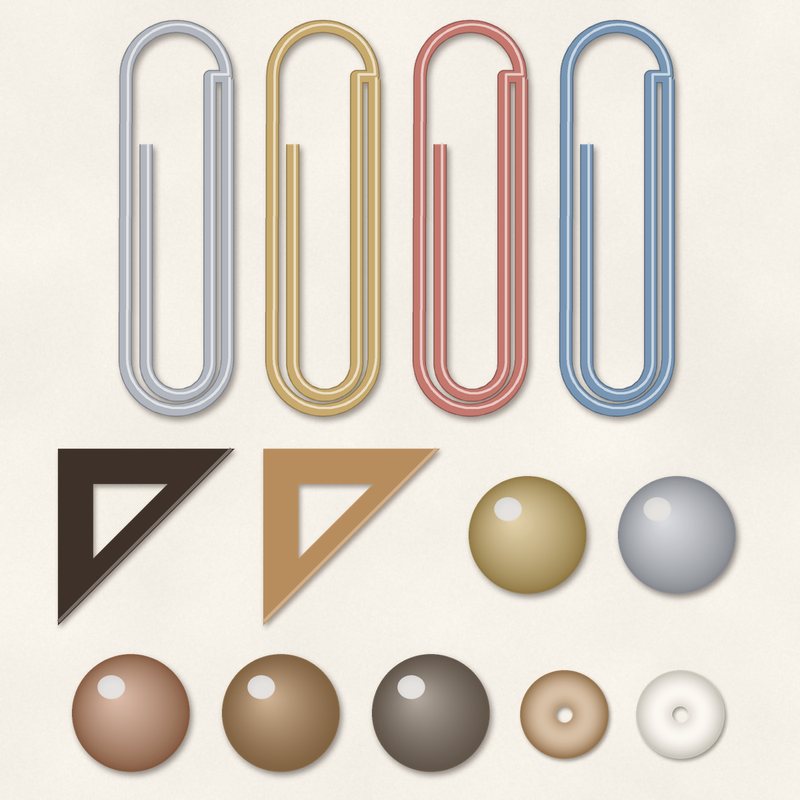
Metal paper clips, brads, photo corners and sequins.
- Type
- Embellishments
- Inside
- 13 elements
- Format
- PNG with transparency, 300 dpi
- Download
- ZIP, 364 KB
- Themes
- Everyday
- linen
- kraft
- stone
- cream
- taupe
Free for personal use and for layouts and cards you sell or give away. Please do not share or sell the files themselves; link to this page instead. Terms of use
About this freebie
The Paper Clips and Brads embellishment pack includes 13 items to decorate your digital pages. You get 4 paper clips, 5 brads, 2 photo corners, and 2 sequins in neutral shades of linen, kraft, stone, cream, taupe, and espresso. These transparent PNG files are saved at 300 dpi and include a soft drop shadow for a realistic look. This versatile set is a great fit for everyday layouts, family albums, and printable greeting cards.
Ideas for using it
- Anchor a small journaling block to your background paper using one of the metal paper clips. This adds texture without distracting from your story.
- Place the photo corners on the edges of a vintage family portrait to give it a classic scrapbook album feel.
- Scatter the sequins and brads around a main cluster of flowers or tags to fill empty spaces in your page design.
- Use the espresso and taupe brads to visually attach ribbons or paper strips across the center of your layout.
How to use it
- These PNG files already include a soft drop shadow. You do not need to add your own shadow effects in your image editing software.
- If you want to match a specific paper, you can try recoloring digital elements using the hue and saturation sliders in your graphics program.
- The 0.4 MB ZIP file is small and downloads quickly. Extract the folder to your computer before trying to drag the PNG files onto your canvas.
- Make sure your software supports transparent PNG files. You can easily resize these embellishments by dragging the corner handles of the bounding box.
- Elements are transparent PNG files: drag them onto a page above your papers.
- Each element includes a soft drop shadow. Keep one light direction for the whole page.
What is inside the ZIP
One folder named paper-clips-and-brads with the files below (file names start with paper-clips-and-brads-), plus README.txt and LICENSE.txt.
Show all 13 files
| File | What | Pixels | Type | Size |
|---|---|---|---|---|
| 01-paper-clip.png | paper clip | 231 x 729 px | PNG | 44 KB |
| 02-paper-clip.png | paper clip | 231 x 729 px | PNG | 46 KB |
| 03-paper-clip.png | paper clip | 231 x 729 px | PNG | 46 KB |
| 04-paper-clip.png | paper clip | 231 x 729 px | PNG | 46 KB |
| 05-brad.png | brad | 227 x 227 px | PNG | 27 KB |
| 06-brad.png | brad | 227 x 227 px | PNG | 26 KB |
| 07-brad.png | brad | 227 x 227 px | PNG | 27 KB |
| 08-brad.png | brad | 227 x 227 px | PNG | 26 KB |
| 09-brad.png | brad | 227 x 227 px | PNG | 23 KB |
| 10-photo-corner.png | photo corner | 321 x 322 px | PNG | 4 KB |
| 11-photo-corner.png | photo corner | 321 x 322 px | PNG | 5 KB |
| 12-sequin.png | sequin | 170 x 170 px | PNG | 22 KB |
| 13-sequin.png | sequin | 170 x 170 px | PNG | 19 KB |
You may also like
More embellishments


Tutorials for this freebie
- How to add realistic drop shadowsLearn how to add realistic drop shadows to your digital scrapbook pages with the right settings for papers, flowers and…
- Scrapbook layout design basicsLearn the basics of digital scrapbook layout design. Master focal points, the rule of thirds, visual triangles, and…
- How to recolor digital papers and elementsLearn how to recolor digital scrapbooking papers and elements. Discover simple steps for Photoshop, GIMP, Affinity and…