Kraft Tags and Twine
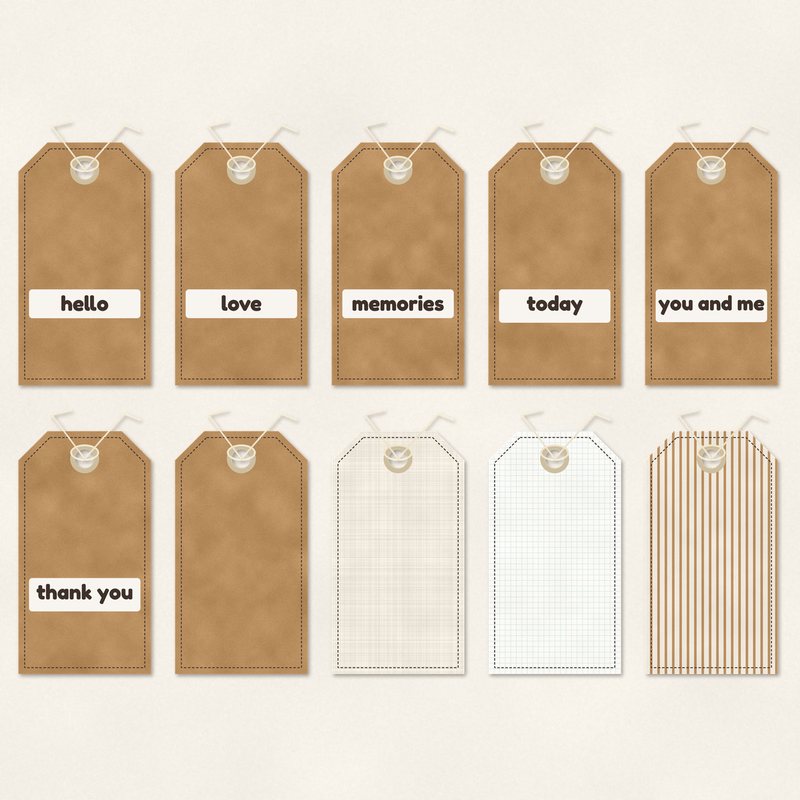
Ten kraft and linen tags with twine, six with words.
- Type
- Embellishments
- Inside
- 10 elements
- Format
- PNG with transparency, 300 dpi
- Download
- ZIP, 6.1 MB
- Themes
- Everyday
- linen
- kraft
- stone
- cream
- taupe
Free for personal use and for layouts and cards you sell or give away. Please do not share or sell the files themselves; link to this page instead. Terms of use
About this freebie
Add a rustic touch to your pages with the Kraft Tags and Twine embellishment pack. This free download includes ten tags with twine in a neutral palette of linen, kraft, stone, cream, taupe, and espresso. Six of the tags feature everyday words like hello, love, memories, today, you and me, and thank you.
The remaining four tags are blank for your own text. These transparent PNG files are saved at 300 dpi and come with a soft drop shadow already applied. They work well for everyday layouts and handmade cards.
Ideas for using it
- Layer the "thank you" tag over a cream background to create a quick printable greeting card. You can sell or give away the finished cards.
- Tuck the "memories" tag behind a photo frame on a heritage layout. The kraft and stone colors match well with older black and white photographs.
- Use the blank linen tags to write down the date and location of your photos. Just add a text box over the tag in your software.
- Cluster the "you and me" and "love" tags near a focal photo of your family. The espresso text will draw the eye directly to the picture.
How to use it
- These PNG files already include a soft drop shadow. You do not need to add your own shadow effects in your image editing program.
- The 6.1 MB ZIP file needs to be extracted before you can use the embellishments. Right click the downloaded folder and select extract all.
- If you want to change the twine color, you can try recoloring digital elements using a hue and saturation adjustment layer in your software.
- Elements are transparent PNG files: drag them onto a page above your papers.
- Each element includes a soft drop shadow. Keep one light direction for the whole page.
What is inside the ZIP
One folder named kraft-tags-and-twine with the files below (file names start with kraft-tags-and-twine-), plus README.txt and LICENSE.txt.
| File | What | Pixels | Type | Size |
|---|---|---|---|---|
| 01-tag-hello.png | tag hello | 764 x 1479 px | PNG | 590 KB |
| 02-tag-love.png | tag love | 764 x 1479 px | PNG | 590 KB |
| 03-tag-memories.png | tag memories | 764 x 1479 px | PNG | 600 KB |
| 04-tag-today.png | tag today | 764 x 1479 px | PNG | 588 KB |
| 05-tag-you-and-me.png | tag you and me | 764 x 1479 px | PNG | 596 KB |
| 06-tag-thank-you.png | tag thank you | 764 x 1479 px | PNG | 594 KB |
| 07-tag.png | tag | 764 x 1479 px | PNG | 615 KB |
| 08-tag.png | tag | 764 x 1479 px | PNG | 618 KB |
| 09-tag.png | tag | 764 x 1479 px | PNG | 666 KB |
| 10-tag.png | tag | 764 x 1479 px | PNG | 613 KB |
You may also like
More embellishments


Tutorials for this freebie
- How to add realistic drop shadowsLearn how to add realistic drop shadows to your digital scrapbook pages with the right settings for papers, flowers and…
- Scrapbook layout design basicsLearn the basics of digital scrapbook layout design. Master focal points, the rule of thirds, visual triangles, and…
- How to recolor digital papers and elementsLearn how to recolor digital scrapbooking papers and elements. Discover simple steps for Photoshop, GIMP, Affinity and…