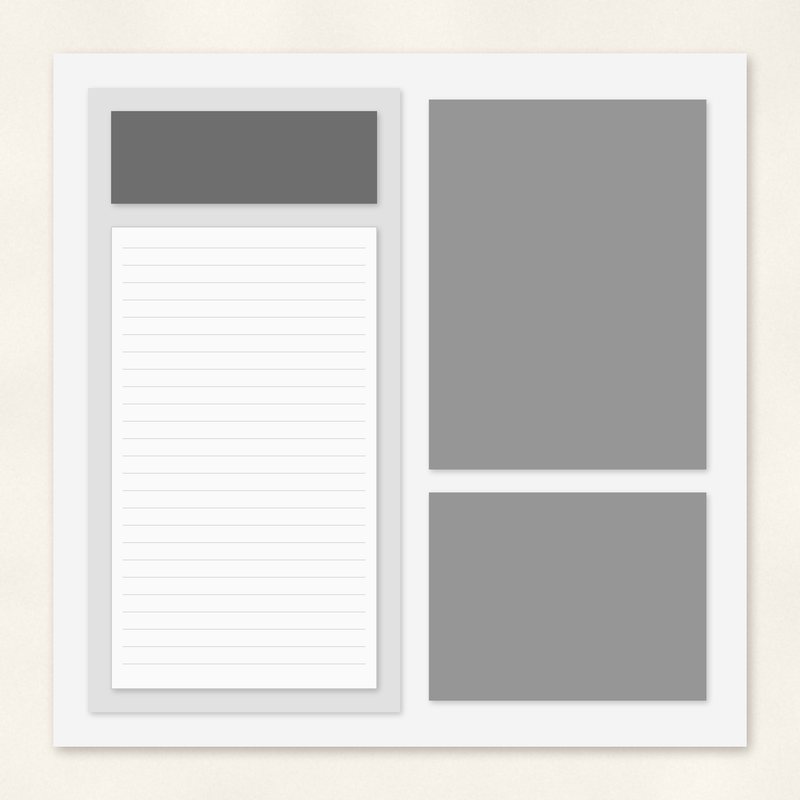
Journaling Heavy Template
Room for a long story next to two photos.
- Type
- Page template
- Inside
- 6 layers
- Format
- PNG layers, 300 dpi
- Size
- 12 x 12 in (3600 x 3600 px)
- Download
- ZIP, 532 KB
- Themes
- Everyday
Free for personal use and for layouts and cards you sell or give away. Please do not share or sell the files themselves; link to this page instead. Terms of use
About this freebie
The Journaling Heavy Template gives you room for a long story next to two photos. This free layered page template includes 6 PNG layers stacked to build your layout. You get gray shapes for a background, a paper block, a journaling panel, a title, and two photo spots. The file sizes are 3600 by 3600 pixels, which prints at 12 by 12 inches at 300 dpi. The 0.5 MB download also brings a flattened guide JPG and a text file listing the layer order. It works well for everyday memory keeping.
Ideas for using it
- Document a special family event by placing a 4.8 by 6.4 inch portrait next to a 4.8 by 3.6 inch candid shot.
- Write a detailed letter to a loved one on the journaling panel. Add two favorite everyday photos to complete the page.
- Create a recipe layout. Type your ingredients and instructions in the text area, and place photos of the finished dish in the photo spots.
How to use it
- Open the text file to see the exact layer order. Stack your 6 PNG layers from the background up to the photos.
- Learn how to use page templates by clipping your chosen digital papers to the gray paper block and background layers.
- Place your images over the gray photo spots. Use your software tools to group the photo to the shape below it.
- You can use this free file for personal projects or for cards and layouts you sell or give away.
- Place every PNG layer at the top left corner of a 12 x 12 inch, 300 dpi page and they line up.
- Clip a paper or a photo to each gray shape, then delete or hide the gray.
What is inside the ZIP
One folder named journaling-heavy-template with the files below (file names start with journaling-heavy-template-), plus README.txt and LICENSE.txt.
| File | What | Pixels | Type | Size |
|---|---|---|---|---|
| layer-00-background.png | background | 3600 x 3600 px (12 x 12 in) | PNG | 59 KB |
| layer-01-paper-block.png | paper-block | 3600 x 3600 px (12 x 12 in) | PNG | 58 KB |
| layer-02-journaling-panel.png | journaling-panel | 3600 x 3600 px (12 x 12 in) | PNG | 57 KB |
| layer-03-title.png | title | 3600 x 3600 px (12 x 12 in) | PNG | 52 KB |
| layer-04-photo-1.png | photo-1 | 3600 x 3600 px (12 x 12 in) | PNG | 55 KB |
| layer-05-photo-2.png | photo-2 | 3600 x 3600 px (12 x 12 in) | PNG | 53 KB |
| preview-flat.jpg | flattened guide | 3600 x 3600 px | JPG | 196 KB |
| layer-order.txt | layer order | TXT | 1 KB |
You may also like
More page templates


Tutorials for this freebie
- How to use digital scrapbook page templatesLearn how to use digital scrapbook page templates. This guide covers stacking PNG layers, clipping masks, and adding…
- Clipping masks explained (and the shortcut in every program)Learn how to use clipping masks in digital scrapbooking. Find the shortcuts for Photoshop, Elements, Affinity, GIMP…
- How to add realistic drop shadowsLearn how to add realistic drop shadows to your digital scrapbook pages with the right settings for papers, flowers and…