Big Title Two Photos Template
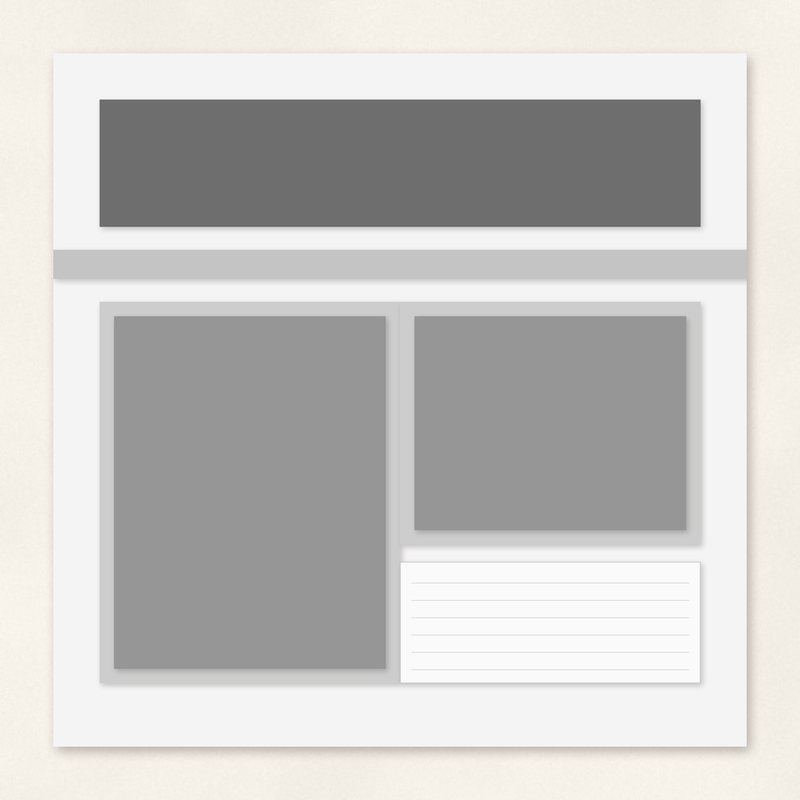
A large title band with one portrait and one landscape photo.
- Type
- Page template
- Inside
- 8 layers
- Format
- PNG layers, 300 dpi
- Size
- 12 x 12 in (3600 x 3600 px)
- Download
- ZIP, 606 KB
- Themes
- Everyday
Free for personal use and for layouts and cards you sell or give away. Please do not share or sell the files themselves; link to this page instead. Terms of use
About this freebie
The Big Title Two Photos Template gives you a fast start for your everyday digital scrapbooking layouts. This free download includes 8 PNG layers to build a 12 x 12 inch page at 300 dpi. The design features a large title band across the page, plus one portrait and one landscape photo spot. You will find gray shapes marking the photo spots, paper areas, and journaling blocks. The ZIP file is about 0.6 MB and contains a flattened guide JPG along with a text file listing the layer order.
Ideas for using it
- Use the 4.7 x 6.1 inch portrait spot for a main subject and the 4.7 x 3.7 inch landscape spot for a close up detail.
- Fill the big title band with a bold patterned paper and add your page title in a contrasting solid color.
- Create a quick layout about your daily routine by placing family photos in the two gray photo spots.
How to use it
- Stack the 8 PNG layers in your graphics program using the provided text file as a guide for the correct order.
- Read our tutorial on how to use page templates if you need help placing your digital papers and photos.
- Clip your photos to the gray shapes using your software tools. Menu names vary by version, but most programs use clipping masks.
- Place every PNG layer at the top left corner of a 12 x 12 inch, 300 dpi page and they line up.
- Clip a paper or a photo to each gray shape, then delete or hide the gray.
What is inside the ZIP
One folder named big-title-two-photos-template with the files below (file names start with big-title-two-photos-template-), plus README.txt and LICENSE.txt.
| File | What | Pixels | Type | Size |
|---|---|---|---|---|
| layer-00-background.png | background | 3600 x 3600 px (12 x 12 in) | PNG | 59 KB |
| layer-01-big-title.png | big-title | 3600 x 3600 px (12 x 12 in) | PNG | 52 KB |
| layer-02-thin-strip.png | thin-strip | 3600 x 3600 px (12 x 12 in) | PNG | 51 KB |
| layer-03-mat-1.png | mat-1 | 3600 x 3600 px (12 x 12 in) | PNG | 55 KB |
| layer-04-photo-1.png | photo-1 | 3600 x 3600 px (12 x 12 in) | PNG | 55 KB |
| layer-05-mat-2.png | mat-2 | 3600 x 3600 px (12 x 12 in) | PNG | 53 KB |
| layer-06-photo-2.png | photo-2 | 3600 x 3600 px (12 x 12 in) | PNG | 53 KB |
| layer-07-journaling.png | journaling | 3600 x 3600 px (12 x 12 in) | PNG | 52 KB |
| preview-flat.jpg | flattened guide | 3600 x 3600 px | JPG | 172 KB |
| layer-order.txt | layer order | TXT | 1 KB |
You may also like
More page templates


Tutorials for this freebie
- How to use digital scrapbook page templatesLearn how to use digital scrapbook page templates. This guide covers stacking PNG layers, clipping masks, and adding…
- Clipping masks explained (and the shortcut in every program)Learn how to use clipping masks in digital scrapbooking. Find the shortcuts for Photoshop, Elements, Affinity, GIMP…
- How to add realistic drop shadowsLearn how to add realistic drop shadows to your digital scrapbook pages with the right settings for papers, flowers and…