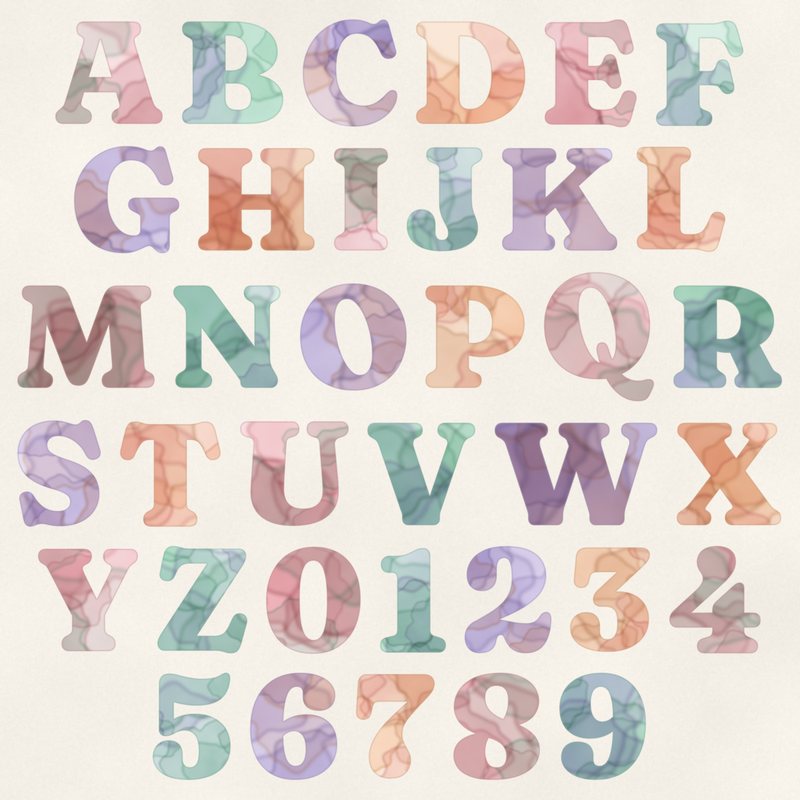
Watercolor Serif Alphabet
Soft watercolor letters in blush, mint and lavender.
- Type
- Alphabet
- Inside
- 68 letters and symbols
- Format
- PNG with transparency, 300 dpi
- Download
- ZIP, 9.1 MB
- Themes
- Baby, Wedding, Spring
- white
- blush
- mint
- lavender
- peach
Free for personal use and for layouts and cards you sell or give away. Please do not share or sell the files themselves; link to this page instead. Terms of use
About this freebie
This free download gives you a complete digital alphabet with a soft watercolor effect. The letters feature gentle shades of blush, mint, lavender, peach and plum ink. You receive 68 separate transparent PNG files, including uppercase A to Z, lowercase a to z, numbers 0 to 9, and basic punctuation. These letters are perfect for baby pages, spring layouts or gentle wedding designs, and the files are free for personal use or items you sell.
Ideas for using it
- Spell out a newborn name on a birth announcement card. The soft blush and mint colors match perfectly with nursery photos.
- Create a title for your spring garden layouts. You can mix the uppercase and lowercase letters to build a relaxed, playful header.
- Design elegant table numbers for a reception. Print the numbers 0 to 9 on white cardstock for a gentle watercolor touch.
- Make custom greeting cards using the peach and lavender letters to spell out a warm, personalized message for family and friends.
How to use it
- Place each letter on a new layer in your software to overlap the edges slightly. This creates a realistic, hand-painted look for your words.
- The letters are about 600 to 900 pixels tall. You can scale them down to fit smaller cards without losing any watercolor details.
- Read our guide on how to use digital alphabets for practical steps on aligning and spacing these separate PNG files evenly on your page.
- Since the files are 300 dpi, they print beautifully at 2 to 3 inches tall. Keep your document resolution at 300 dpi for crisp results.
- Each character is its own transparent PNG file. Place letters on separate layers and line them up on one baseline.
- Resize all letters of a word by the same amount so they stay consistent.
What is inside the ZIP
One folder named watercolor-serif-alphabet with the files below (file names start with watercolor-serif-alphabet-), plus README.txt and LICENSE.txt.
Show all 68 files
| File | What | Pixels | Type | Size |
|---|---|---|---|---|
| A.png | A | 574 x 548 px | PNG | 151 KB |
| B.png | B | 543 x 548 px | PNG | 173 KB |
| C.png | C | 506 x 572 px | PNG | 148 KB |
| D.png | D | 584 x 548 px | PNG | 160 KB |
| E.png | E | 494 x 575 px | PNG | 149 KB |
| F.png | F | 470 x 561 px | PNG | 135 KB |
| G.png | G | 561 x 572 px | PNG | 164 KB |
| H.png | H | 621 x 548 px | PNG | 171 KB |
| I.png | I | 297 x 548 px | PNG | 96 KB |
| J.png | J | 411 x 556 px | PNG | 117 KB |
| K.png | K | 614 x 548 px | PNG | 172 KB |
| L.png | L | 475 x 561 px | PNG | 125 KB |
| M.png | M | 729 x 548 px | PNG | 223 KB |
| N.png | N | 572 x 548 px | PNG | 154 KB |
| O.png | O | 568 x 572 px | PNG | 174 KB |
| P.png | P | 532 x 548 px | PNG | 143 KB |
| Q.png | Q | 588 x 686 px | PNG | 203 KB |
| R.png | R | 581 x 547 px | PNG | 173 KB |
| S.png | S | 449 x 570 px | PNG | 161 KB |
| T.png | T | 539 x 561 px | PNG | 128 KB |
| U.png | U | 579 x 559 px | PNG | 152 KB |
| V.png | V | 577 x 548 px | PNG | 136 KB |
| W.png | W | 861 x 548 px | PNG | 222 KB |
| X.png | X | 559 x 548 px | PNG | 163 KB |
| Y.png | Y | 535 x 548 px | PNG | 133 KB |
| Z.png | Z | 482 x 574 px | PNG | 155 KB |
| a-lower.png | a | 426 x 389 px | PNG | 113 KB |
| b-lower.png | b | 455 x 598 px | PNG | 141 KB |
| c-lower.png | c | 374 x 388 px | PNG | 91 KB |
| d-lower.png | d | 451 x 599 px | PNG | 130 KB |
| e-lower.png | e | 383 x 388 px | PNG | 108 KB |
| f-lower.png | f | 336 x 565 px | PNG | 109 KB |
| g-lower.png | g | 462 x 660 px | PNG | 181 KB |
| h-lower.png | h | 473 x 590 px | PNG | 133 KB |
| i-lower.png | i | 237 x 557 px | PNG | 80 KB |
| j-lower.png | j | 299 x 739 px | PNG | 123 KB |
| k-lower.png | k | 476 x 590 px | PNG | 139 KB |
| l-lower.png | l | 237 x 590 px | PNG | 81 KB |
| m-lower.png | m | 702 x 380 px | PNG | 157 KB |
| n-lower.png | n | 473 x 380 px | PNG | 106 KB |
| o-lower.png | o | 423 x 388 px | PNG | 104 KB |
| p-lower.png | p | 455 x 557 px | PNG | 136 KB |
| q-lower.png | q | 451 x 557 px | PNG | 130 KB |
| r-lower.png | r | 372 x 380 px | PNG | 86 KB |
| s-lower.png | s | 352 x 390 px | PNG | 106 KB |
| t-lower.png | t | 321 x 479 px | PNG | 85 KB |
| u-lower.png | u | 466 x 390 px | PNG | 108 KB |
| v-lower.png | v | 444 x 374 px | PNG | 99 KB |
| w-lower.png | w | 672 x 374 px | PNG | 141 KB |
| x-lower.png | x | 443 x 370 px | PNG | 109 KB |
| y-lower.png | y | 453 x 551 px | PNG | 132 KB |
| z-lower.png | z | 376 x 391 px | PNG | 102 KB |
| 0.png | 0 | 507 x 571 px | PNG | 162 KB |
| 1.png | 1 | 357 x 557 px | PNG | 95 KB |
| 2.png | 2 | 464 x 572 px | PNG | 154 KB |
| 3.png | 3 | 431 x 560 px | PNG | 146 KB |
| 4.png | 4 | 491 x 572 px | PNG | 134 KB |
| 5.png | 5 | 421 x 572 px | PNG | 144 KB |
| 6.png | 6 | 468 x 572 px | PNG | 163 KB |
| 7.png | 7 | 424 x 559 px | PNG | 120 KB |
| 8.png | 8 | 466 x 571 px | PNG | 172 KB |
| 9.png | 9 | 467 x 571 px | PNG | 163 KB |
| ampersand.png | & | 577 x 569 px | PNG | 197 KB |
| exclamation.png | ! | 207 x 592 px | PNG | 81 KB |
| question.png | ? | 435 x 581 px | PNG | 118 KB |
| period.png | . | 192 x 195 px | PNG | 31 KB |
| comma.png | , | 205 x 330 px | PNG | 45 KB |
| apostrophe.png | ' | 159 x 321 px | PNG | 36 KB |
You may also like
More alphabets


Tutorials for this freebie
- How to use digital alphabetsLearn how to use digital alphabets on your scrapbook pages. Find tips for spacing letters, adding shadows, and building…
- How to make a scrapbook page titleLearn how to make a scrapbook page title that stands out. Discover tips for placement, mixing fonts, and using digital…
- How to recolor digital papers and elementsLearn how to recolor digital scrapbooking papers and elements. Discover simple steps for Photoshop, GIMP, Affinity and…