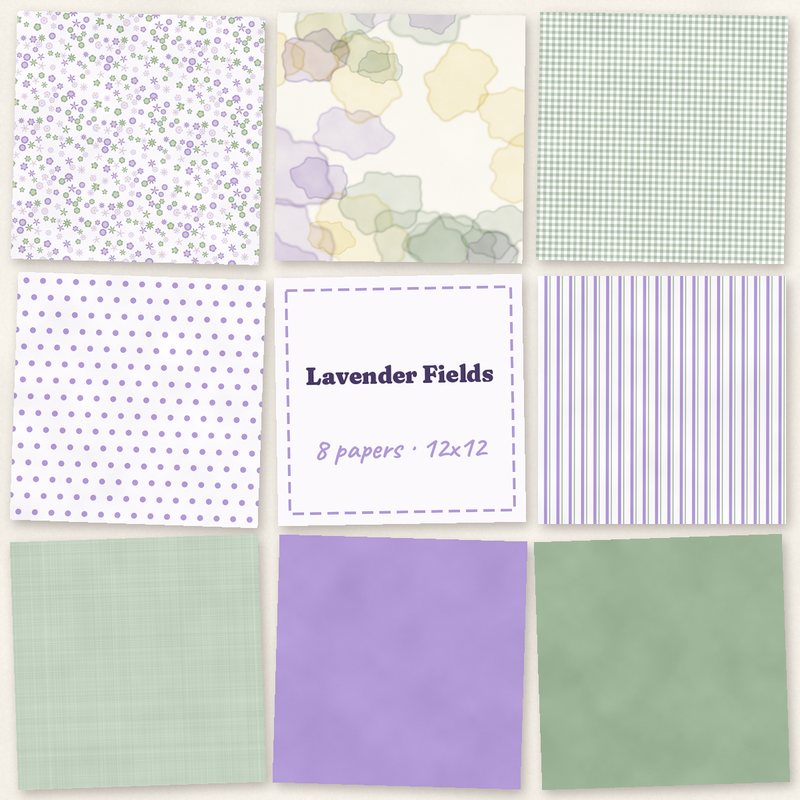
Lavender Fields Papers
Lavender, sage and lemon florals and washes.
- Type
- Paper pack
- Inside
- 8 papers
- Format
- JPG, 300 dpi
- Size
- 12 x 12 in (3600 x 3600 px)
- Download
- ZIP, 9.4 MB
- Themes
- Spring, Wedding
- white
- lavender
- sage
- lemon
- lilac
Free for personal use and for layouts and cards you sell or give away. Please do not share or sell the files themselves; link to this page instead. Terms of use
About this freebie
The Lavender Fields Papers pack brings a fresh palette of white, lavender, sage, lemon, lilac, and violet ink to your digital scrapbooking. This free download includes 8 JPG papers, each measuring 12 by 12 inches at 300 dpi. You get classic patterns like a ditsy floral, small gingham, polka dots, and stripes, plus a watercolor wash and tinted linen. These soft colors and solid lavender and sage backgrounds work beautifully for spring layouts and wedding albums.
Ideas for using it
- Create a garden layout using the ditsy floral paper as a background. Add the solid sage paper as a large mat for your photos.
- Design a greeting card for a spring birthday. You can use the small gingham paper for the card base and layer the watercolor wash over it.
- Build a wedding album page with the tinted linen paper. The subtle texture pairs well with formal photos and the solid lavender paper makes excellent photo frames.
- Combine the polka dots and stripes for a playful baby shower invitation. The lemon and lilac colors keep the design light and cheerful.
How to use it
- These 3600 by 3600 pixel JPG files work in most photo editing software. You can drag and drop them directly onto your digital canvas.
- If you want to print your layouts at home, check your printer settings. Ensure you select the correct paper size and high quality print options.
- You can use these papers for physical cards and layouts you sell or give away. Just remember that the 9.4 MB ZIP file itself cannot be shared or sold.
- To resize a pattern like the gingham or stripes, use the scale tool in your software. Scaling down keeps the 300 dpi resolution crisp.
- Use the papers as page backgrounds, or cut blocks and strips by clipping them to shapes.
- The papers are 3600 x 3600 pixels, so they can be scaled down for 8 x 8 inch albums without losing quality.
What is inside the ZIP
One folder named lavender-fields-papers with the files below (file names start with lavender-fields-papers-), plus README.txt and LICENSE.txt.
| File | What | Pixels | Type | Size |
|---|---|---|---|---|
| paper-01-ditsy-floral.jpg | Ditsy floral | 3600 x 3600 px (12 x 12 in) | JPG | 1.6 MB |
| paper-02-watercolor-wash.jpg | Watercolor wash | 3600 x 3600 px (12 x 12 in) | JPG | 849 KB |
| paper-03-small-gingham.jpg | Small gingham | 3600 x 3600 px (12 x 12 in) | JPG | 1.5 MB |
| paper-04-polka-dots.jpg | Polka dots | 3600 x 3600 px (12 x 12 in) | JPG | 938 KB |
| paper-05-stripes.jpg | Stripes | 3600 x 3600 px (12 x 12 in) | JPG | 1.2 MB |
| paper-06-tinted-linen.jpg | Tinted linen | 3600 x 3600 px (12 x 12 in) | JPG | 1.5 MB |
| paper-07-solid-lavender.jpg | Solid lavender | 3600 x 3600 px (12 x 12 in) | JPG | 914 KB |
| paper-08-solid-sage.jpg | Solid sage | 3600 x 3600 px (12 x 12 in) | JPG | 914 KB |
You may also like
More papers


Tutorials for this freebie
- Clipping masks explained (and the shortcut in every program)Learn how to use clipping masks in digital scrapbooking. Find the shortcuts for Photoshop, Elements, Affinity, GIMP…
- Choosing color palettes for scrapbook pagesLearn how to choose color palettes for digital scrapbook pages. Discover tips for matching colors to photos, using the…
- Scrapbook page sizes for printing: 12x12, 8x8, 8.5x11 and A4Learn the standard digital scrapbook page sizes for printing. Find pixel dimensions for 12x12, 8x8, US Letter, and A4…