Paper Flowers Pack
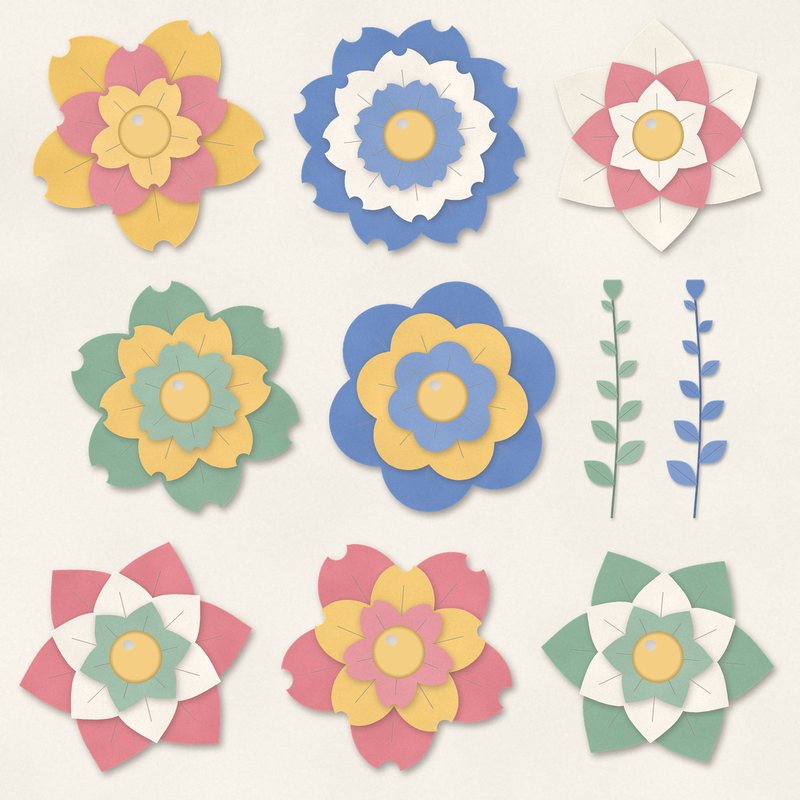
Eight layered paper flowers and two leaf sprigs.
- Type
- Embellishments
- Inside
- 10 elements
- Format
- PNG with transparency, 300 dpi
- Download
- ZIP, 2.5 MB
- Themes
- Spring, Wedding
- cream
- dusty rose
- sage
- butter yellow
- cornflower
Free for personal use and for layouts and cards you sell or give away. Please do not share or sell the files themselves; link to this page instead. Terms of use
About this freebie
The Paper Flowers Pack is a free embellishment pack featuring eight layered paper flowers and two leaf sprigs. These elements are colored in a soft palette of cream, dusty rose, sage, butter yellow, cornflower, and cocoa. The layered paper design gives each piece a realistic, crafted look.
This download is ideal for your spring and wedding digital scrapbooking layouts. Every item is a transparent PNG file saved at 300 dpi for clear printing. The files already include a soft drop shadow to save you time.
Ideas for using it
- Cluster a butter yellow and a dusty rose paper flower with a sage leaf sprig to decorate the corner of a wedding invitation.
- Frame a favorite spring photograph by placing the cream and cornflower paper flowers along the bottom edge of your layout.
- Create a handmade greeting card by printing the cocoa and dusty rose flowers on heavy cardstock and cutting them out.
How to use it
- The 10 items in this pack are transparent PNG files. You can drag and drop them directly onto your digital canvas.
- Because these elements already have a soft drop shadow, you do not need to add your own layer styles.
- The download is a ZIP file of about 2.5 MB. You must extract the folder before you can open the PNG files in your software.
- You can use these files for personal projects and for cards you sell or give away. The files themselves cannot be shared or sold.
- Elements are transparent PNG files: drag them onto a page above your papers.
- Each element includes a soft drop shadow. Keep one light direction for the whole page.
What is inside the ZIP
One folder named paper-flowers-pack with the files below (file names start with paper-flowers-pack-), plus README.txt and LICENSE.txt.
| File | What | Pixels | Type | Size |
|---|---|---|---|---|
| 01-paper-flower.png | paper flower | 714 x 699 px | PNG | 281 KB |
| 02-paper-flower.png | paper flower | 732 x 670 px | PNG | 271 KB |
| 03-paper-flower.png | paper flower | 708 x 708 px | PNG | 282 KB |
| 04-paper-flower.png | paper flower | 720 x 720 px | PNG | 323 KB |
| 05-paper-flower.png | paper flower | 714 x 708 px | PNG | 272 KB |
| 06-paper-flower.png | paper flower | 654 x 734 px | PNG | 269 KB |
| 07-paper-flower.png | paper flower | 716 x 726 px | PNG | 306 KB |
| 08-paper-flower.png | paper flower | 720 x 734 px | PNG | 307 KB |
| 09-leaf-sprig.png | leaf sprig | 321 x 1170 px | PNG | 91 KB |
| 10-leaf-sprig.png | leaf sprig | 321 x 1170 px | PNG | 91 KB |
You may also like
More embellishments


Tutorials for this freebie
- How to add realistic drop shadowsLearn how to add realistic drop shadows to your digital scrapbook pages with the right settings for papers, flowers and…
- Scrapbook layout design basicsLearn the basics of digital scrapbook layout design. Master focal points, the rule of thirds, visual triangles, and…
- How to recolor digital papers and elementsLearn how to recolor digital scrapbooking papers and elements. Discover simple steps for Photoshop, GIMP, Affinity and…