Hearts Sticker Mix
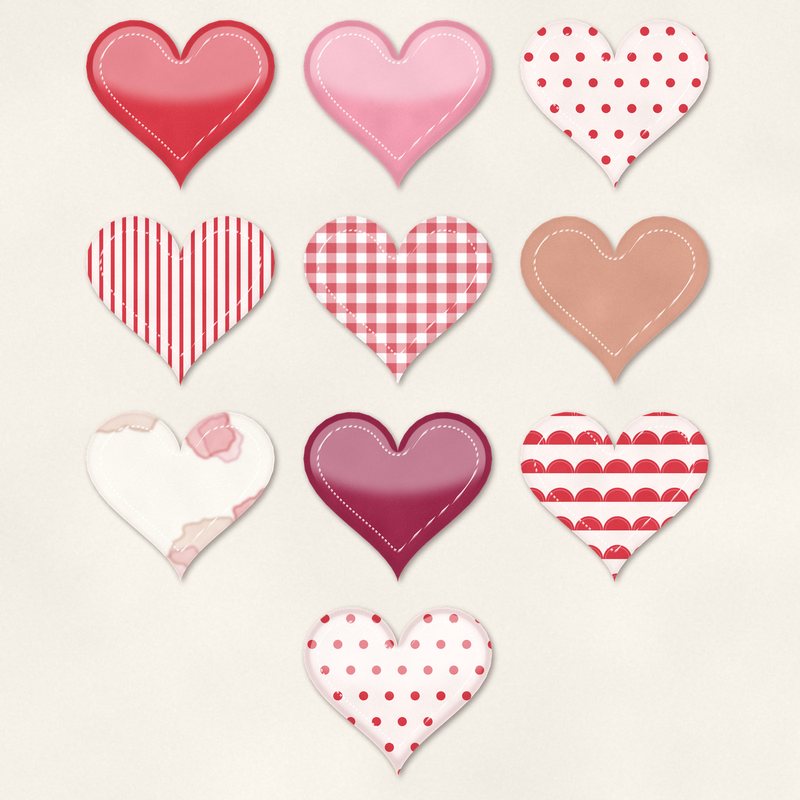
Ten heart stickers: puffy, stitched and patterned.
- Type
- Embellishments
- Inside
- 10 elements
- Format
- PNG with transparency, 300 dpi
- Download
- ZIP, 2.7 MB
- Themes
- Valentine's Day, Wedding
- blush
- red
- pink
- rose gold
- berry
Free for personal use and for layouts and cards you sell or give away. Please do not share or sell the files themselves; link to this page instead. Terms of use
About this freebie
Add a sweet touch to your pages with the Hearts Sticker Mix. This free embellishment pack includes 10 heart stickers in blush, red, pink, rose gold, berry, and cocoa. You get a mix of puffy, stitched, and patterned designs. Each element is a transparent PNG file at 300 dpi with a soft drop shadow already applied.
These stickers are perfect for valentines and wedding projects. The download size is about 2.7 MB. You can use these files for personal layouts, as well as for cards and pages you sell or give away.
Ideas for using it
- Create a romantic layout for your anniversary. Scatter the rose gold and berry heart stickers around a large focal photo of you and your partner.
- Design printable cards for your child to hand out at school. The puffy and stitched pink hearts make cute accents next to a short greeting.
- Build a title cluster for a wedding album page. Group three patterned heart stickers together near your text to draw the eye.
- Decorate a digital planner page for February. Place the small blush and cocoa hearts on the corners of your daily boxes.
How to use it
- Since these PNG files already have a soft drop shadow, you do not need to add your own layer styles in your software.
- You can resize these 300 dpi elements to make them smaller. Making them larger might cause the edges to look blurry on printed pages.
- If the red or berry colors do not match your photos, try adjusting the hue. Read our guide on recoloring digital elements for specific steps.
- Elements are transparent PNG files: drag them onto a page above your papers.
- Each element includes a soft drop shadow. Keep one light direction for the whole page.
What is inside the ZIP
One folder named hearts-sticker-mix with the files below (file names start with hearts-sticker-mix-), plus README.txt and LICENSE.txt.
| File | What | Pixels | Type | Size |
|---|---|---|---|---|
| 01-sticker-heart.png | sticker heart | 701 x 627 px | PNG | 281 KB |
| 02-sticker-heart.png | sticker heart | 701 x 627 px | PNG | 279 KB |
| 03-sticker-heart.png | sticker heart | 701 x 627 px | PNG | 243 KB |
| 04-sticker-heart.png | sticker heart | 701 x 627 px | PNG | 248 KB |
| 05-sticker-heart.png | sticker heart | 701 x 627 px | PNG | 342 KB |
| 06-sticker-heart.png | sticker heart | 701 x 627 px | PNG | 231 KB |
| 07-sticker-heart.png | sticker heart | 701 x 627 px | PNG | 240 KB |
| 08-sticker-heart.png | sticker heart | 701 x 627 px | PNG | 280 KB |
| 09-sticker-heart.png | sticker heart | 701 x 627 px | PNG | 300 KB |
| 10-sticker-heart.png | sticker heart | 701 x 627 px | PNG | 277 KB |
You may also like
More embellishments


Tutorials for this freebie
- How to add realistic drop shadowsLearn how to add realistic drop shadows to your digital scrapbook pages with the right settings for papers, flowers and…
- Scrapbook layout design basicsLearn the basics of digital scrapbook layout design. Master focal points, the rule of thirds, visual triangles, and…
- How to recolor digital papers and elementsLearn how to recolor digital scrapbooking papers and elements. Discover simple steps for Photoshop, GIMP, Affinity and…