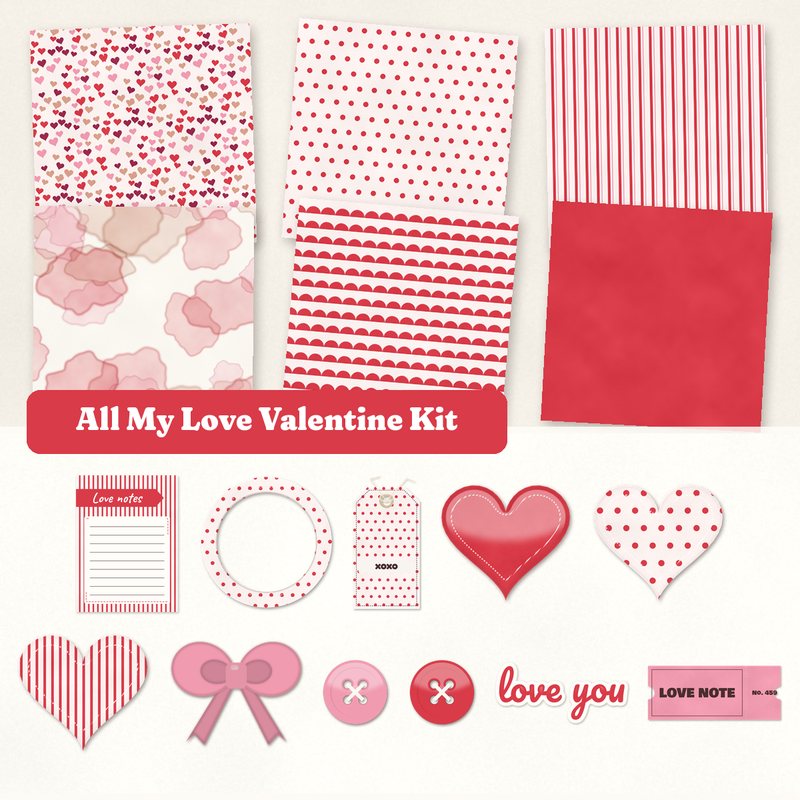
All My Love Valentine Kit
Puffy hearts, a love note ticket and pink ribbon.
- Type
- Kit
- Inside
- 6 papers, 13 elements
- Format
- JPG papers, PNG elements, 300 dpi
- Size
- 12 x 12 in papers (3600 x 3600 px)
- Download
- ZIP, 10.0 MB
- Themes
- Valentine's Day, Wedding, Family
- blush
- red
- pink
- rose gold
- berry
Free for personal use and for layouts and cards you sell or give away. Please do not share or sell the files themselves; link to this page instead. Terms of use
About this freebie
The All My Love Valentine Kit is a free digital scrapbook kit for your romantic pages. It features a palette of blush, red, pink, rose gold, berry, and cocoa. You get 6 JPG papers measuring 12 x 12 inches, including watercolor wash, scallops, and polka dots. The kit also includes 13 elements like puffy hearts, a love note ticket and pink ribbon. These files are perfect for valentines or wedding layouts. The PNG elements include a soft drop shadow to help them stand out on your page.
Ideas for using it
- Create a sweet layout about your spouse using the watercolor wash paper as a background. Add the frame and the love you word art to highlight a favorite photo.
- Design custom cards for your family members. Use the solid red paper and decorate the front with the 3 sticker hearts and the Be Mine label.
- Document a special date night by layering the striped and scalloped papers. Tuck the xoxo tag and the LOVE NOTE ticket behind your picture for extra detail.
How to use it
- The elements in this kit already include a soft drop shadow. You do not need to add your own shadows to the PNG files in your software.
- The 6 papers are 3600 x 3600 pixels at 300 dpi. This high resolution means they will print clearly if you choose to make physical cards.
- You can use the JPG journaling card to type a digital message. Just add a text box over the image before you save your finished project.
- This 10.0 MB download is free for personal use. You can also use these files for layouts and cards you sell or give away.
- Everything in a kit shares one palette, so any paper works with any element in it.
- Elements already carry a soft shadow; on busy papers you can add a little more.
What is inside the ZIP
One folder named all-my-love-valentine-kit with the files below (file names start with all-my-love-valentine-kit-), plus README.txt and LICENSE.txt.
Show all 19 files
| File | What | Pixels | Type | Size |
|---|---|---|---|---|
| paper-01-hearts.jpg | Hearts | 3600 x 3600 px (12 x 12 in) | JPG | 1.4 MB |
| paper-02-polka-dots.jpg | Polka dots | 3600 x 3600 px (12 x 12 in) | JPG | 1.0 MB |
| paper-03-stripes.jpg | Stripes | 3600 x 3600 px (12 x 12 in) | JPG | 1.2 MB |
| paper-04-watercolor-wash.jpg | Watercolor wash | 3600 x 3600 px (12 x 12 in) | JPG | 879 KB |
| paper-05-scallops.jpg | Scallops | 3600 x 3600 px (12 x 12 in) | JPG | 1.3 MB |
| paper-06-solid-red.jpg | Solid red | 3600 x 3600 px (12 x 12 in) | JPG | 914 KB |
| 01-sticker-heart.png | sticker heart | 701 x 627 px | PNG | 281 KB |
| 02-sticker-heart.png | sticker heart | 701 x 627 px | PNG | 243 KB |
| 03-sticker-heart.png | sticker heart | 701 x 627 px | PNG | 247 KB |
| 04-tag-xoxo.png | tag xoxo | 764 x 1479 px | PNG | 590 KB |
| 05-label-be-mine.png | label Be Mine | 1226 x 367 px | PNG | 219 KB |
| 06-frame.png | frame | 1152 x 1152 px | PNG | 447 KB |
| 07-button.png | button | 361 x 361 px | PNG | 56 KB |
| 08-button.png | button | 361 x 361 px | PNG | 55 KB |
| 09-bow.png | bow | 882 x 706 px | PNG | 206 KB |
| 10-ribbon.png | ribbon | 2420 x 196 px | PNG | 325 KB |
| 11-ticket-love-note.png | ticket LOVE NOTE | 1134 x 484 px | PNG | 265 KB |
| 12-word-art-love-you.png | word art love you | 1478 x 706 px | PNG | 287 KB |
| 13-journal-card-love-notes.jpg | journaling card Love notes | 900 x 1200 px | JPG | 89 KB |
You may also like
More kits


Tutorials for this freebie
- Getting started with digital scrapbooking: your first pageLearn how to make your first digital scrapbook page with this step-by-step tutorial. Find out how to choose software…
- How to add realistic drop shadowsLearn how to add realistic drop shadows to your digital scrapbook pages with the right settings for papers, flowers and…
- Scrapbook layout design basicsLearn the basics of digital scrapbook layout design. Master focal points, the rule of thirds, visual triangles, and…