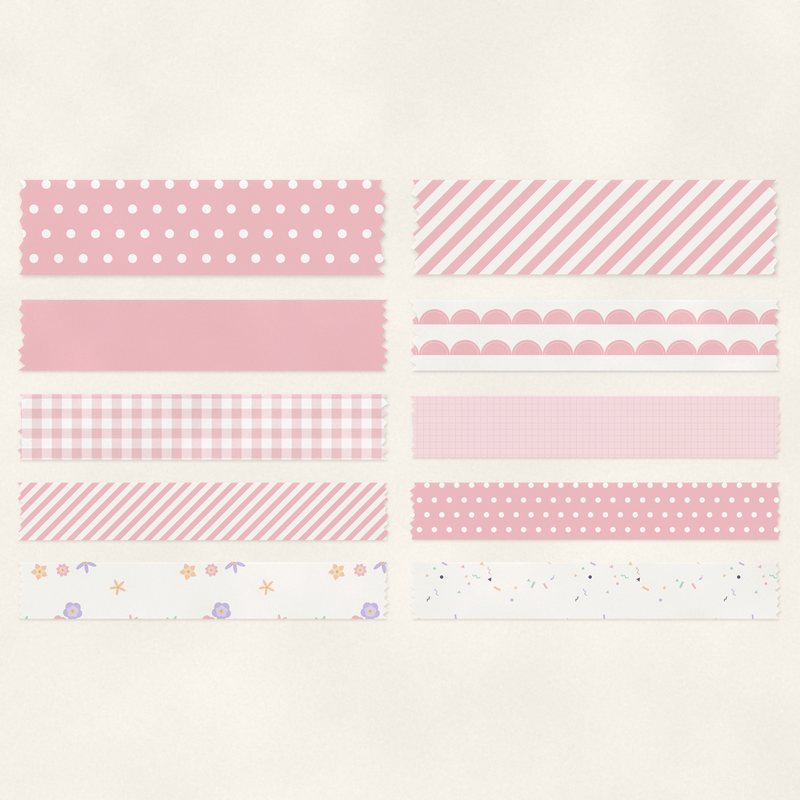
Pastel Washi Tape
Ten translucent pastel washi tape strips.
- Type
- Embellishments
- Inside
- 10 elements
- Format
- PNG with transparency, 300 dpi
- Download
- ZIP, 2.4 MB
- Themes
- Baby, Spring, Everyday
- white
- blush
- mint
- lavender
- peach
Free for personal use and for layouts and cards you sell or give away. Please do not share or sell the files themselves; link to this page instead. Terms of use
About this freebie
This free embellishment pack includes ten translucent washi tape strips. The tapes come in a soft palette of white, blush, mint, lavender, peach, and plum ink. Because they are translucent, the patterns from your background papers will show through slightly. These digital tapes are perfect for baby and spring scrapbook pages. You can use them to anchor photos, attach journaling cards, or add a subtle pop of color to your everyday layouts. Each of the 10 items is a transparent PNG file at 300 dpi with a soft drop shadow already applied.
Ideas for using it
- Layer a few strips of blush and mint tape over the corners of your newborn photos to create a casual, taped down look.
- Place a piece of peach or lavender tape at the top of a journaling card to make it look like a physical note on your page.
- Create a colorful border by overlapping multiple pieces of washi tape along the edge of a spring garden layout.
How to use it
- These PNG files already include a soft drop shadow. You do not need to add your own shadow effects in your image editing software.
- Since the washi tape is translucent, try placing it over textured digital papers so the texture subtly shows through the tape.
- You can easily change the hue of these tapes to match other kits. Just use the hue and saturation adjustment tools in your graphics software.
- The 2.4 MB ZIP file needs to be extracted before you can use the 10 PNG items. Right click the folder and select extract.
- Elements are transparent PNG files: drag them onto a page above your papers.
- Each element includes a soft drop shadow. Keep one light direction for the whole page.
What is inside the ZIP
One folder named pastel-washi-tape with the files below (file names start with pastel-washi-tape-), plus README.txt and LICENSE.txt.
| File | What | Pixels | Type | Size |
|---|---|---|---|---|
| 01-washi-tape.png | washi tape | 1513 x 254 px | PNG | 275 KB |
| 02-washi-tape.png | washi tape | 1514 x 254 px | PNG | 214 KB |
| 03-washi-tape.png | washi tape | 1413 x 254 px | PNG | 202 KB |
| 04-washi-tape.png | washi tape | 1216 x 254 px | PNG | 185 KB |
| 05-washi-tape.png | washi tape | 917 x 254 px | PNG | 171 KB |
| 06-washi-tape.png | washi tape | 913 x 254 px | PNG | 138 KB |
| 07-washi-tape.png | washi tape | 1514 x 254 px | PNG | 310 KB |
| 08-washi-tape.png | washi tape | 1315 x 254 px | PNG | 328 KB |
| 09-washi-tape.png | washi tape | 1516 x 254 px | PNG | 297 KB |
| 10-washi-tape.png | washi tape | 1215 x 254 px | PNG | 267 KB |
You may also like
More embellishments


Tutorials for this freebie
- How to add realistic drop shadowsLearn how to add realistic drop shadows to your digital scrapbook pages with the right settings for papers, flowers and…
- Scrapbook layout design basicsLearn the basics of digital scrapbook layout design. Master focal points, the rule of thirds, visual triangles, and…
- How to recolor digital papers and elementsLearn how to recolor digital scrapbooking papers and elements. Discover simple steps for Photoshop, GIMP, Affinity and…