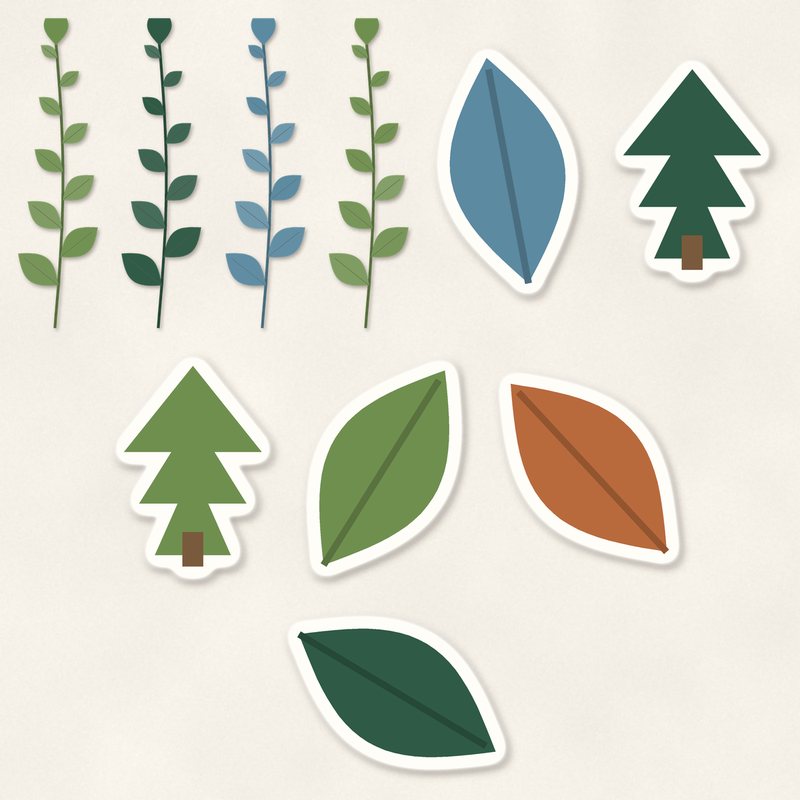
Leaves and Sprigs
Leaf sprigs, die cut leaves and little trees.
- Type
- Embellishments
- Inside
- 10 elements
- Format
- PNG with transparency, 300 dpi
- Download
- ZIP, 732 KB
- Themes
- Autumn, Spring, Everyday
- birch
- moss
- pine
- rust
- lake
Free for personal use and for layouts and cards you sell or give away. Please do not share or sell the files themselves; link to this page instead. Terms of use
About this freebie
This free embellishment pack includes 10 items to decorate your digital pages. You get 4 delicate leaf sprigs, 4 die cut sticker leaves, and 2 die cut sticker trees. The color palette features earthy shades of birch, moss, pine, rust, lake, and charcoal.
These graphics work beautifully for autumn and spring layouts, as well as everyday crafting projects. The files are transparent PNGs saved at 300 dpi for crisp printing. Each piece already has a soft drop shadow applied, making them ready to drop right onto your background papers.
Ideas for using it
- Layer the die cut sticker leaves over a journaling card to document a quiet morning walk in the crisp pine and rust colored woods.
- Tuck the 4 delicate leaf sprigs behind a photo frame to build a natural cluster on your everyday family layouts.
- Arrange the 2 little die cut sticker trees next to a title to create a simple scene for your outdoor spring photographs.
How to use it
- Since these PNG files already include a soft drop shadow, you can skip adding realistic drop shadows in your image editor.
- If the moss or pine colors do not match your photos, try recoloring digital elements using the hue and saturation sliders in your software.
- The ZIP file is about 0.7 MB. You can quickly download it and extract the 10 transparent PNG files to your regular embellishment folder.
- You can print these graphics to make physical greeting cards you sell or give away, as long as you do not share the digital files.
- Elements are transparent PNG files: drag them onto a page above your papers.
- Each element includes a soft drop shadow. Keep one light direction for the whole page.
What is inside the ZIP
One folder named leaves-and-sprigs with the files below (file names start with leaves-and-sprigs-), plus README.txt and LICENSE.txt.
| File | What | Pixels | Type | Size |
|---|---|---|---|---|
| 01-leaf-sprig.png | leaf sprig | 321 x 1170 px | PNG | 88 KB |
| 02-leaf-sprig.png | leaf sprig | 321 x 1170 px | PNG | 82 KB |
| 03-leaf-sprig.png | leaf sprig | 321 x 1170 px | PNG | 89 KB |
| 04-leaf-sprig.png | leaf sprig | 321 x 1170 px | PNG | 88 KB |
| 05-die-cut-sticker-leaf.png | die cut sticker leaf | 386 x 519 px | PNG | 57 KB |
| 06-die-cut-sticker-leaf.png | die cut sticker leaf | 441 x 465 px | PNG | 69 KB |
| 07-die-cut-sticker-leaf.png | die cut sticker leaf | 525 x 383 px | PNG | 62 KB |
| 08-die-cut-sticker-leaf.png | die cut sticker leaf | 354 x 585 px | PNG | 65 KB |
| 09-die-cut-sticker-tree.png | die cut sticker tree | 387 x 534 px | PNG | 65 KB |
| 10-die-cut-sticker-tree.png | die cut sticker tree | 387 x 534 px | PNG | 64 KB |
You may also like
More embellishments


Tutorials for this freebie
- How to add realistic drop shadowsLearn how to add realistic drop shadows to your digital scrapbook pages with the right settings for papers, flowers and…
- Scrapbook layout design basicsLearn the basics of digital scrapbook layout design. Master focal points, the rule of thirds, visual triangles, and…
- How to recolor digital papers and elementsLearn how to recolor digital scrapbooking papers and elements. Discover simple steps for Photoshop, GIMP, Affinity and…