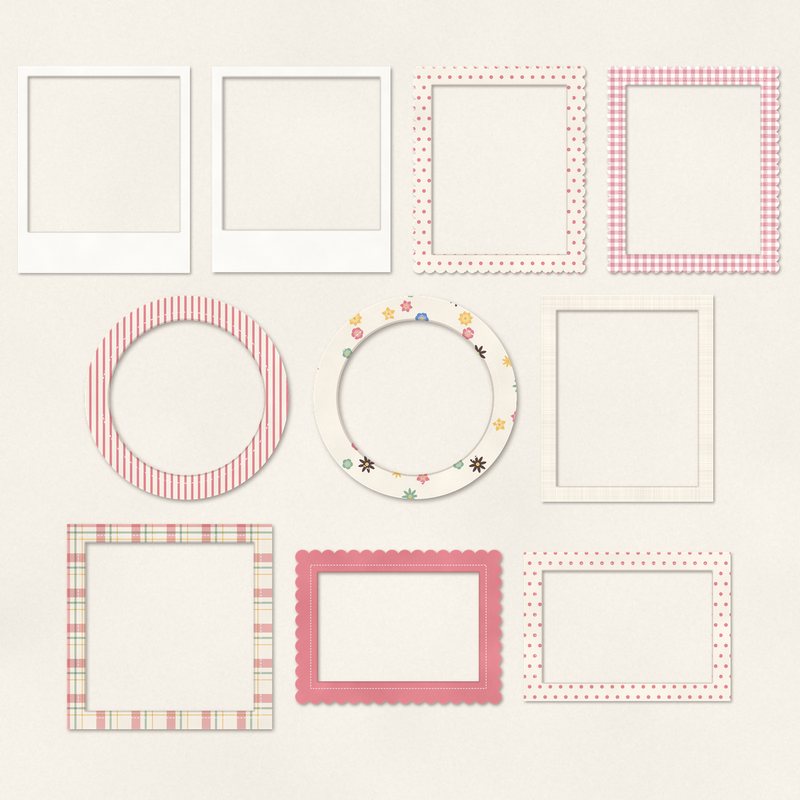
Photo Frames Pack
Ten frames with transparent centers: instant prints, scallops, circles and mats.
- Type
- Embellishments
- Inside
- 10 elements
- Format
- PNG with transparency, 300 dpi
- Download
- ZIP, 6.5 MB
- Themes
- Everyday
- cream
- dusty rose
- sage
- butter yellow
- cornflower
Free for personal use and for layouts and cards you sell or give away. Please do not share or sell the files themselves; link to this page instead. Terms of use
About this freebie
Add structure to your pages with this free Photo Frames Pack from Free Digital Scrapbooking. This download includes 10 frames with transparent centers. You get a mix of instant prints, scallops, circles, and mats. The palette features soft cream, dusty rose, sage, butter yellow, cornflower, and cocoa.
These muted colors work well for everyday layouts and family albums. The embellishments are saved as 300 dpi PNG files with a soft drop shadow already applied. The ZIP file is about 6.5 MB. You can use these frames for personal projects or on handmade cards you sell.
Ideas for using it
- Layer the instant print frames over a busy background paper to make your photos stand out on a family layout.
- Use the scalloped and circle frames to highlight close portraits of your pets or children.
- Arrange several butter yellow and cornflower frames in a grid to create a neat, organized page for your weekly photos.
- Place a dusty rose or sage mat behind a journaling card to give your text a clean border.
How to use it
- Place your photo on a layer below the PNG frame. Resize the photo until the main subject fits perfectly inside the transparent center.
- These frames already have a soft shadow applied. You do not need to add another shadow unless you want a heavier look.
- If the cream or cocoa colors do not match your page, try recoloring digital elements using the hue and saturation tools in your software.
- Elements are transparent PNG files: drag them onto a page above your papers.
- Each element includes a soft drop shadow. Keep one light direction for the whole page.
What is inside the ZIP
One folder named photo-frames-pack with the files below (file names start with photo-frames-pack-), plus README.txt and LICENSE.txt.
| File | What | Pixels | Type | Size |
|---|---|---|---|---|
| 01-frame.png | frame | 1552 x 1852 px | PNG | 391 KB |
| 02-frame.png | frame | 1352 x 1552 px | PNG | 295 KB |
| 03-frame.png | frame | 1550 x 1850 px | PNG | 754 KB |
| 04-frame.png | frame | 1550 x 1850 px | PNG | 1.2 MB |
| 05-frame.png | frame | 1252 x 1252 px | PNG | 539 KB |
| 06-frame.png | frame | 1152 x 1152 px | PNG | 461 KB |
| 07-frame.png | frame | 1552 x 1852 px | PNG | 776 KB |
| 08-frame.png | frame | 1852 x 1352 px | PNG | 589 KB |
| 09-frame.png | frame | 1452 x 1452 px | PNG | 891 KB |
| 10-frame.png | frame | 1650 x 1250 px | PNG | 589 KB |
You may also like
More embellishments


Tutorials for this freebie
- How to add realistic drop shadowsLearn how to add realistic drop shadows to your digital scrapbook pages with the right settings for papers, flowers and…
- Scrapbook layout design basicsLearn the basics of digital scrapbook layout design. Master focal points, the rule of thirds, visual triangles, and…
- How to recolor digital papers and elementsLearn how to recolor digital scrapbooking papers and elements. Discover simple steps for Photoshop, GIMP, Affinity and…