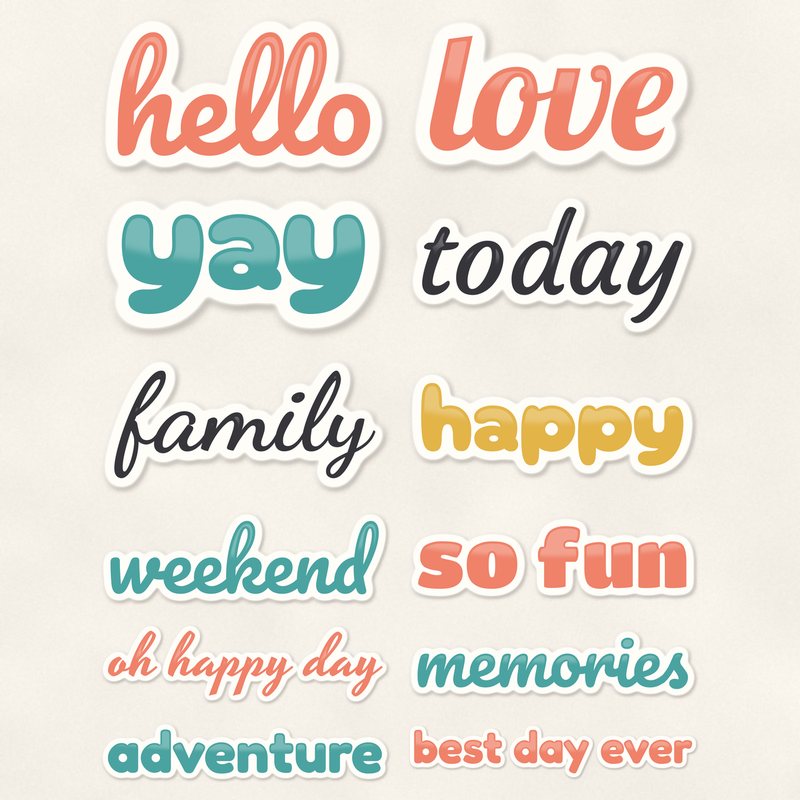
Word Art Stickers
Twelve word art stickers with white outlines.
- Type
- Embellishments
- Inside
- 12 elements
- Format
- PNG with transparency, 300 dpi
- Download
- ZIP, 3.2 MB
- Themes
- Everyday
- white
- coral
- teal
- mustard
- blush
Free for personal use and for layouts and cards you sell or give away. Please do not share or sell the files themselves; link to this page instead. Terms of use
About this freebie
Add a quick title or caption to your pages with this free embellishment pack. The download includes 12 word art stickers with thick white outlines and soft drop shadows. These transparent PNG files come in a versatile palette of coral, teal, mustard, blush, and charcoal. The phrases cover basic everyday moments like family, adventure, and weekend. Because they already have a shadow applied, you can just drag and drop them onto your layouts.
Ideas for using it
- Layer the best day ever sticker over a large focal photo to create an instant title for a birthday layout.
- Cluster the hello and today word art pieces near your journaling block on a daily pocket page spread.
- Print the love and happy PNG files onto white cardstock and cut them out by hand for physical greeting cards.
- Place the adventure sticker at the top of a travel page and pair it with a charcoal text box.
How to use it
- These files are saved at 300 dpi. You can scale them down for smaller cards without losing any print quality.
- Since these PNG files already include a soft shadow, you do not need to add your own layer styles in your software.
- If the coral or teal colors do not match your photos, try recoloring digital elements using the hue and saturation tool.
- The white outlines help the text stand out. Place them directly over busy patterned papers so the words remain easy to read.
- Elements are transparent PNG files: drag them onto a page above your papers.
- Each element includes a soft drop shadow. Keep one light direction for the whole page.
What is inside the ZIP
One folder named word-art-stickers with the files below (file names start with word-art-stickers-), plus README.txt and LICENSE.txt.
| File | What | Pixels | Type | Size |
|---|---|---|---|---|
| 01-word-art-hello.png | word art hello | 934 x 518 px | PNG | 178 KB |
| 02-word-art-memories.png | word art memories | 1703 x 421 px | PNG | 282 KB |
| 03-word-art-best-day-ever.png | word art best day ever | 2674 x 523 px | PNG | 448 KB |
| 04-word-art-family.png | word art family | 1137 x 539 px | PNG | 269 KB |
| 05-word-art-adventure.png | word art adventure | 2073 x 438 px | PNG | 312 KB |
| 06-word-art-love.png | word art love | 751 x 416 px | PNG | 138 KB |
| 07-word-art-happy.png | word art happy | 1249 x 478 px | PNG | 209 KB |
| 08-word-art-weekend.png | word art weekend | 1578 x 519 px | PNG | 279 KB |
| 09-word-art-so-fun.png | word art so fun | 1538 x 456 px | PNG | 227 KB |
| 10-word-art-today.png | word art today | 1147 x 577 px | PNG | 250 KB |
| 11-word-art-yay.png | word art yay | 755 x 383 px | PNG | 110 KB |
| 12-word-art-oh-happy-day.png | word art oh happy day | 2017 x 574 px | PNG | 450 KB |
You may also like
More embellishments


Tutorials for this freebie
- How to add realistic drop shadowsLearn how to add realistic drop shadows to your digital scrapbook pages with the right settings for papers, flowers and…
- Scrapbook layout design basicsLearn the basics of digital scrapbook layout design. Master focal points, the rule of thirds, visual triangles, and…
- How to recolor digital papers and elementsLearn how to recolor digital scrapbooking papers and elements. Discover simple steps for Photoshop, GIMP, Affinity and…