Stitched Labels Pack
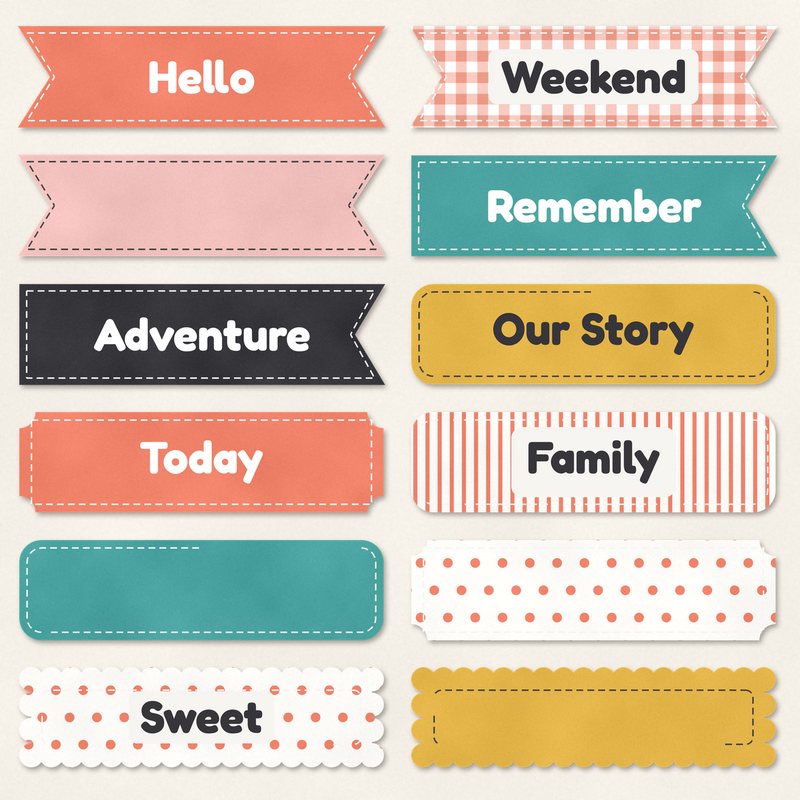
Twelve stitched labels and banners, eight with words and four blank.
- Type
- Embellishments
- Inside
- 12 elements
- Format
- PNG with transparency, 300 dpi
- Download
- ZIP, 2.8 MB
- Themes
- Everyday
- white
- coral
- teal
- mustard
- blush
Free for personal use and for layouts and cards you sell or give away. Please do not share or sell the files themselves; link to this page instead. Terms of use
About this freebie
Add a finishing touch to your everyday pages with this free Stitched Labels Pack. The download includes 12 embellishments saved as transparent PNG files at 300 dpi. You get eight labels with words like Hello, Remember, and Our Story, plus four blank shapes including a ticket and a scallop. The color palette features white, coral, teal, mustard, blush, and charcoal. Each label already has a soft drop shadow applied. These practical pieces work well for family photos, weekend memories, and simple greeting cards.
Ideas for using it
- Cluster the coral Hello label and the teal Weekend label together near a focal photo of a recent family outing.
- Use the blank mustard ticket shape as a base to type the date or location of a special memory.
- Layer the blush scallop label over a charcoal paper strip to create a simple title for your layout.
- Print the Our Story and Family labels to attach to physical greeting cards you plan to sell or give away.
How to use it
- Since these PNG files already include a soft drop shadow, you do not need to add your own shadow effects in your software.
- If the colors do not match your photos, you can learn about recoloring digital elements to change the mustard or coral to a different shade.
- The 2.8 MB ZIP download must be extracted before you can open the 12 individual files in your photo editing program.
- You can write text on the four blank notched, rounded, scallop, and ticket labels using a simple dark charcoal font.
- Elements are transparent PNG files: drag them onto a page above your papers.
- Each element includes a soft drop shadow. Keep one light direction for the whole page.
What is inside the ZIP
One folder named stitched-labels-pack with the files below (file names start with stitched-labels-pack-), plus README.txt and LICENSE.txt.
| File | What | Pixels | Type | Size |
|---|---|---|---|---|
| 01-label-hello.png | label Hello | 1226 x 367 px | PNG | 215 KB |
| 02-label-remember.png | label Remember | 1232 x 367 px | PNG | 214 KB |
| 03-label-our-story.png | label Our Story | 1237 x 367 px | PNG | 225 KB |
| 04-label-today.png | label Today | 1237 x 367 px | PNG | 211 KB |
| 05-label-sweet.png | label Sweet | 1236 x 366 px | PNG | 252 KB |
| 06-label-weekend.png | label Weekend | 1226 x 367 px | PNG | 317 KB |
| 07-label-family.png | label Family | 1237 x 367 px | PNG | 225 KB |
| 08-label-adventure.png | label Adventure | 1232 x 367 px | PNG | 210 KB |
| 09-label-notched.png | label notched | 1226 x 367 px | PNG | 205 KB |
| 10-label-rounded.png | label rounded | 1237 x 367 px | PNG | 201 KB |
| 11-label-scallop.png | label scallop | 1236 x 366 px | PNG | 231 KB |
| 12-label-ticket.png | label ticket | 1237 x 367 px | PNG | 258 KB |
You may also like
More embellishments


Tutorials for this freebie
- How to add realistic drop shadowsLearn how to add realistic drop shadows to your digital scrapbook pages with the right settings for papers, flowers and…
- Scrapbook layout design basicsLearn the basics of digital scrapbook layout design. Master focal points, the rule of thirds, visual triangles, and…
- How to recolor digital papers and elementsLearn how to recolor digital scrapbooking papers and elements. Discover simple steps for Photoshop, GIMP, Affinity and…