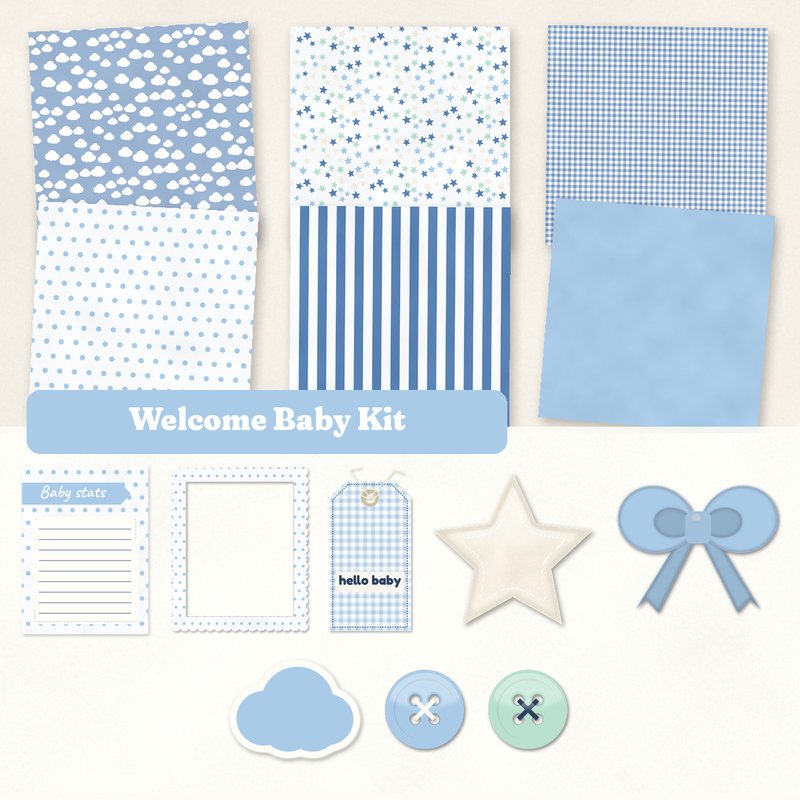
Welcome Baby Kit
Clouds, stars and soft blues for a new baby album.
- Type
- Kit
- Inside
- 6 papers, 11 elements
- Format
- JPG papers, PNG elements, 300 dpi
- Size
- 12 x 12 in papers (3600 x 3600 px)
- Download
- ZIP, 9.8 MB
- Themes
- Baby
- white
- baby blue
- denim
- cream
- mint
Free for personal use and for layouts and cards you sell or give away. Please do not share or sell the files themselves; link to this page instead. Terms of use
About this freebie
The Welcome Baby Kit gives you soft blues and sweet patterns for a new baby album. This free download includes 6 JPG papers measuring 12x12 inches at 300 dpi. You will find patterns like clouds, stars, small gingham, polka dots, and wide stripes. The palette mixes white, baby blue, denim, cream, mint, and navy.
You also get 11 element files to decorate your pages. Most items are transparent PNG files with a soft drop shadow to save you time. Use the frame, bow, and washi tape to accent your photos.
Ideas for using it
- Create a birth announcement layout using the solid baby blue paper as a base. Add the Baby stats journaling card to record the birth details.
- Make a sleepy time page with the clouds and stars patterned papers. Place the sweet dreams word art near a photo of the sleeping baby.
- Design a simple greeting card to welcome a newborn. Layer the small gingham paper with the hello baby tag and a cute die cut sticker cloud.
How to use it
- The 11 elements already include a soft shadow. You do not need to add your own unless you want to match other items on your page.
- Unzip the 9.8 MB download folder before trying to use the files. Most computers let you right click the folder and choose extract all.
- If you are new to this hobby, read our guide on getting started with digital scrapbooking to learn how to open these files.
- Everything in a kit shares one palette, so any paper works with any element in it.
- Elements already carry a soft shadow; on busy papers you can add a little more.
What is inside the ZIP
One folder named welcome-baby-kit with the files below (file names start with welcome-baby-kit-), plus README.txt and LICENSE.txt.
Show all 17 files
| File | What | Pixels | Type | Size |
|---|---|---|---|---|
| paper-01-clouds.jpg | Clouds | 3600 x 3600 px (12 x 12 in) | JPG | 1.0 MB |
| paper-02-stars.jpg | Stars | 3600 x 3600 px (12 x 12 in) | JPG | 1.2 MB |
| paper-03-small-gingham.jpg | Small gingham | 3600 x 3600 px (12 x 12 in) | JPG | 1.7 MB |
| paper-04-polka-dots.jpg | Polka dots | 3600 x 3600 px (12 x 12 in) | JPG | 906 KB |
| paper-05-wide-stripes.jpg | Wide stripes | 3600 x 3600 px (12 x 12 in) | JPG | 885 KB |
| paper-06-solid-baby-blue.jpg | Solid baby blue | 3600 x 3600 px (12 x 12 in) | JPG | 913 KB |
| 01-tag-hello-baby.png | tag hello baby | 764 x 1479 px | PNG | 889 KB |
| 02-label-little-one.png | label Little One | 1237 x 367 px | PNG | 218 KB |
| 03-frame.png | frame | 1550 x 1850 px | PNG | 775 KB |
| 04-die-cut-sticker-cloud.png | die cut sticker cloud | 583 x 452 px | PNG | 72 KB |
| 05-sticker-star.png | sticker star | 695 x 666 px | PNG | 228 KB |
| 06-button.png | button | 361 x 361 px | PNG | 55 KB |
| 07-button.png | button | 361 x 361 px | PNG | 55 KB |
| 08-bow.png | bow | 882 x 706 px | PNG | 209 KB |
| 09-washi-tape.png | washi tape | 1513 x 254 px | PNG | 198 KB |
| 10-word-art-sweet-dreams.png | word art sweet dreams | 2459 x 526 px | PNG | 425 KB |
| 11-journal-card-baby-stats.jpg | journaling card Baby stats | 900 x 1200 px | JPG | 75 KB |
You may also like
More kits


Tutorials for this freebie
- Getting started with digital scrapbooking: your first pageLearn how to make your first digital scrapbook page with this step-by-step tutorial. Find out how to choose software…
- How to add realistic drop shadowsLearn how to add realistic drop shadows to your digital scrapbook pages with the right settings for papers, flowers and…
- Scrapbook layout design basicsLearn the basics of digital scrapbook layout design. Master focal points, the rule of thirds, visual triangles, and…