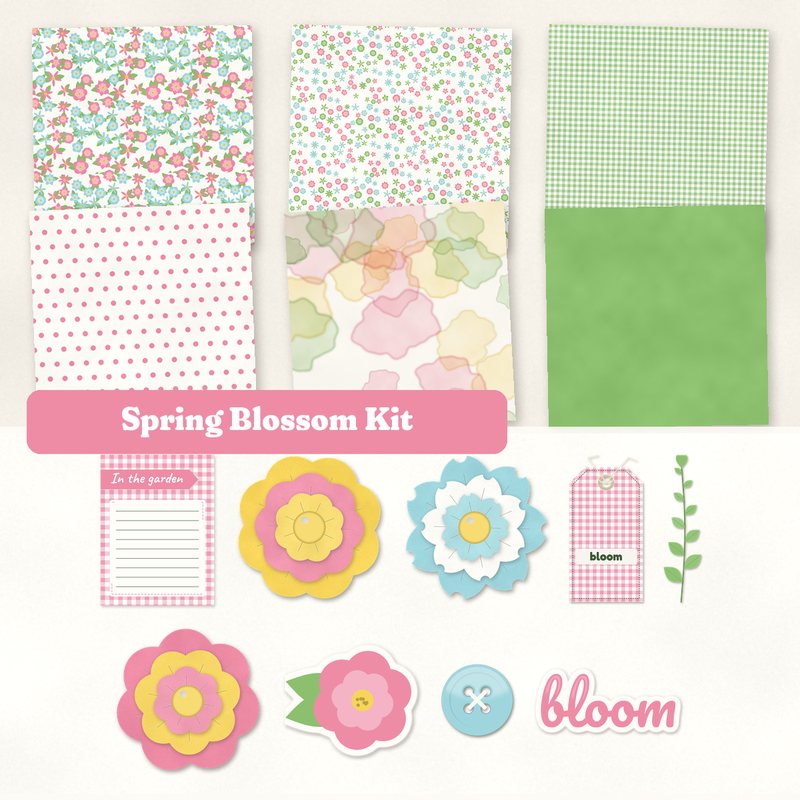
Spring Blossom Kit
Paper flowers, sprigs and gingham for spring.
- Type
- Kit
- Inside
- 6 papers, 11 elements
- Format
- JPG papers, PNG elements, 300 dpi
- Size
- 12 x 12 in papers (3600 x 3600 px)
- Download
- ZIP, 10.3 MB
- Themes
- Spring
- white
- tulip pink
- leaf
- daffodil
- robin egg
Free for personal use and for layouts and cards you sell or give away. Please do not share or sell the files themselves; link to this page instead. Terms of use
About this freebie
The Spring Blossom Kit brings paper flowers, sprigs and gingham to your digital scrapbooking pages. This free download features a fresh palette of white, tulip pink, leaf, daffodil, robin egg and moss. You get 6 JPG papers sized at 12x12 inches and 300 dpi. Patterns include a watercolor wash, polka dots and a ditsy floral. The kit also includes 11 elements like paper flowers, a leaf sprig, washi tape and a button. These supplies work well for spring layouts, garden photos and handmade greeting cards.
Ideas for using it
- Document your garden progress using the Solid leaf paper as a base. Add the journaling card In the garden to record your planting dates.
- Create an Easter layout with the Small gingham and Polka dots papers. Use the Hello Spring label to anchor your title.
- Design a handmade greeting card by layering the 3 paper flowers over the Watercolor wash paper. Top it with the word art bloom.
- Frame photos of a spring walk with the washi tape and leaf sprig. The robin egg and daffodil colors highlight sunny outdoor pictures nicely.
How to use it
- The 11 elements are transparent PNG files with a soft drop shadow already applied. You can place them directly onto your 12x12 inch canvas.
- The 6 papers are 3600 x 3600 pixels. If you print your pages, the 300 dpi resolution ensures crisp details for your physical albums.
- You can use this 10.3 MB ZIP file for personal projects. You may also use the items for cards and layouts you sell or give away.
- If you are new to using digital supplies, read our guide on getting started with digital scrapbooking for basic software instructions.
- Everything in a kit shares one palette, so any paper works with any element in it.
- Elements already carry a soft shadow; on busy papers you can add a little more.
What is inside the ZIP
One folder named spring-blossom-kit with the files below (file names start with spring-blossom-kit-), plus README.txt and LICENSE.txt.
Show all 17 files
| File | What | Pixels | Type | Size |
|---|---|---|---|---|
| paper-01-floral.jpg | Floral | 3600 x 3600 px (12 x 12 in) | JPG | 1.6 MB |
| paper-02-ditsy-floral.jpg | Ditsy floral | 3600 x 3600 px (12 x 12 in) | JPG | 1.7 MB |
| paper-03-small-gingham.jpg | Small gingham | 3600 x 3600 px (12 x 12 in) | JPG | 1.6 MB |
| paper-04-polka-dots.jpg | Polka dots | 3600 x 3600 px (12 x 12 in) | JPG | 885 KB |
| paper-05-watercolor-wash.jpg | Watercolor wash | 3600 x 3600 px (12 x 12 in) | JPG | 870 KB |
| paper-06-solid-leaf.jpg | Solid leaf | 3600 x 3600 px (12 x 12 in) | JPG | 913 KB |
| 01-paper-flower.png | paper flower | 732 x 725 px | PNG | 310 KB |
| 02-paper-flower.png | paper flower | 712 x 724 px | PNG | 315 KB |
| 03-paper-flower.png | paper flower | 718 x 718 px | PNG | 309 KB |
| 04-leaf-sprig.png | leaf sprig | 321 x 1170 px | PNG | 91 KB |
| 05-tag-bloom.png | tag bloom | 764 x 1479 px | PNG | 880 KB |
| 06-label-hello-spring.png | label Hello Spring | 1236 x 366 px | PNG | 206 KB |
| 07-button.png | button | 361 x 361 px | PNG | 55 KB |
| 08-die-cut-sticker-flower-leaves.png | die cut sticker flower_leaves | 653 x 557 px | PNG | 104 KB |
| 09-washi-tape.png | washi tape | 1513 x 254 px | PNG | 205 KB |
| 10-word-art-bloom.png | word art bloom | 1113 x 518 px | PNG | 200 KB |
| 11-journal-card-in-the-garden.jpg | journaling card In the garden | 900 x 1200 px | JPG | 98 KB |
You may also like
More kits


Tutorials for this freebie
- Getting started with digital scrapbooking: your first pageLearn how to make your first digital scrapbook page with this step-by-step tutorial. Find out how to choose software…
- How to add realistic drop shadowsLearn how to add realistic drop shadows to your digital scrapbook pages with the right settings for papers, flowers and…
- Scrapbook layout design basicsLearn the basics of digital scrapbook layout design. Master focal points, the rule of thirds, visual triangles, and…