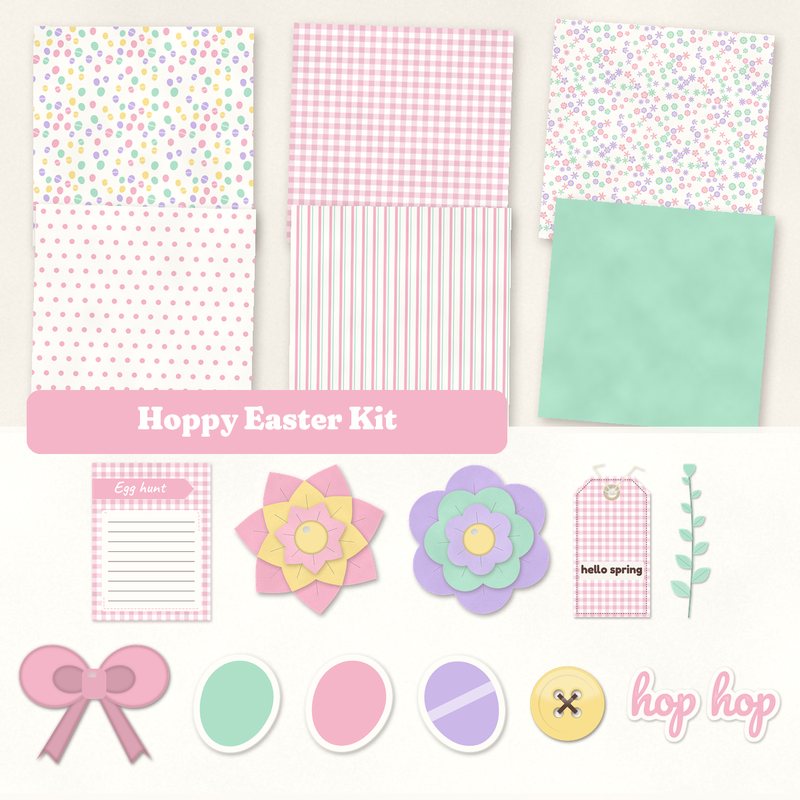
Hoppy Easter Kit
Pastel eggs, paper flowers and a gingham bow.
- Type
- Kit
- Inside
- 6 papers, 13 elements
- Format
- JPG papers, PNG elements, 300 dpi
- Size
- 12 x 12 in papers (3600 x 3600 px)
- Download
- ZIP, 9.4 MB
- Themes
- Easter, Spring
- white
- pink
- mint
- butter
- lilac
Free for personal use and for layouts and cards you sell or give away. Please do not share or sell the files themselves; link to this page instead. Terms of use
About this freebie
The Hoppy Easter Kit is a free digital scrapbook kit filled with sweet pastel colors like mint, butter, pink, and lilac. You get six 12x12 inch JPG papers featuring eggs, gingham, ditsy florals, polka dots, stripes, and a solid mint background. The download also includes 13 elements to decorate your spring and Easter layouts. You will find paper flowers, a gingham bow, a button, washi tape, and three die cut egg stickers. The chocolate brown accents add a nice contrast to the lighter shades. This kit works well for egg hunt photos, greeting cards, and seasonal memory keeping.
Ideas for using it
- Document your family egg hunt using the solid mint paper as a base and the Egg hunt journaling card to record your memories.
- Create a printable greeting card with the ditsy floral paper. Add the Happy Easter label and a paper flower for a quick holiday greeting.
- Frame a sweet photo of a child in their holiday outfit. Use the polka dot paper and decorate the corners with the leaf sprig and die cut egg stickers.
- Make a digital pocket page for spring. Slip the hello spring tag into one pocket and layer the gingham bow over a photo in another.
How to use it
- The elements are saved as transparent PNG files with a soft drop shadow already applied. You can place them directly over your photos or papers.
- The six background papers are 3600 by 3600 pixels at 300 dpi. They are formatted as JPG files, so they work in most standard photo editing software.
- You can resize the elements to fit your layout. Scale the paper flowers or the hop hop word art down to create custom embellishment clusters.
- The entire kit comes in a ZIP folder that is about 9.4 MB. You need to extract the folder on your computer before you can open the files.
- Everything in a kit shares one palette, so any paper works with any element in it.
- Elements already carry a soft shadow; on busy papers you can add a little more.
What is inside the ZIP
One folder named hoppy-easter-kit with the files below (file names start with hoppy-easter-kit-), plus README.txt and LICENSE.txt.
Show all 19 files
| File | What | Pixels | Type | Size |
|---|---|---|---|---|
| paper-01-eggs.jpg | Eggs | 3600 x 3600 px (12 x 12 in) | JPG | 1.0 MB |
| paper-02-gingham.jpg | Gingham | 3600 x 3600 px (12 x 12 in) | JPG | 1.2 MB |
| paper-03-ditsy-floral.jpg | Ditsy floral | 3600 x 3600 px (12 x 12 in) | JPG | 1.5 MB |
| paper-04-polka-dots.jpg | Polka dots | 3600 x 3600 px (12 x 12 in) | JPG | 860 KB |
| paper-05-stripes.jpg | Stripes | 3600 x 3600 px (12 x 12 in) | JPG | 1.1 MB |
| paper-06-solid-mint.jpg | Solid mint | 3600 x 3600 px (12 x 12 in) | JPG | 913 KB |
| 01-tag-hello-spring.png | tag hello spring | 764 x 1479 px | PNG | 850 KB |
| 02-label-happy-easter.png | label Happy Easter | 1236 x 366 px | PNG | 225 KB |
| 03-die-cut-sticker-egg.png | die cut sticker egg | 430 x 477 px | PNG | 58 KB |
| 04-die-cut-sticker-egg.png | die cut sticker egg | 426 x 480 px | PNG | 59 KB |
| 05-die-cut-sticker-egg.png | die cut sticker egg | 431 x 475 px | PNG | 61 KB |
| 06-paper-flower.png | paper flower | 713 x 713 px | PNG | 282 KB |
| 07-paper-flower.png | paper flower | 704 x 742 px | PNG | 294 KB |
| 08-button.png | button | 361 x 361 px | PNG | 55 KB |
| 09-bow.png | bow | 882 x 706 px | PNG | 210 KB |
| 10-washi-tape.png | washi tape | 1511 x 254 px | PNG | 192 KB |
| 11-leaf-sprig.png | leaf sprig | 321 x 1170 px | PNG | 94 KB |
| 12-word-art-hop-hop.png | word art hop hop | 1392 x 707 px | PNG | 292 KB |
| 13-journal-card-egg-hunt.jpg | journaling card Egg hunt | 900 x 1200 px | JPG | 87 KB |
You may also like
More kits


Tutorials for this freebie
- Getting started with digital scrapbooking: your first pageLearn how to make your first digital scrapbook page with this step-by-step tutorial. Find out how to choose software…
- How to add realistic drop shadowsLearn how to add realistic drop shadows to your digital scrapbook pages with the right settings for papers, flowers and…
- Scrapbook layout design basicsLearn the basics of digital scrapbook layout design. Master focal points, the rule of thirds, visual triangles, and…