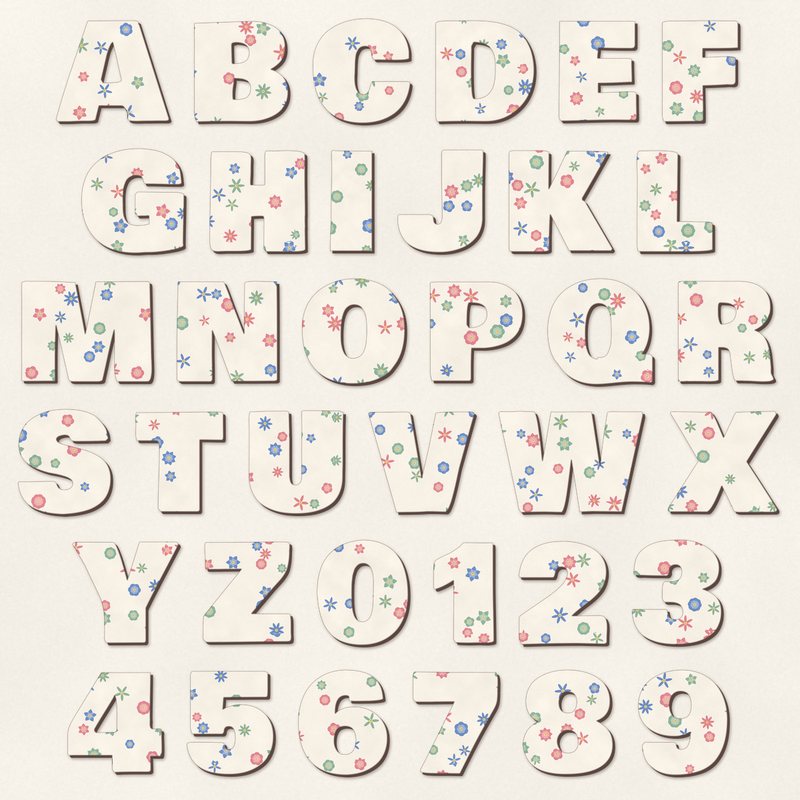
Floral Paper Cut Alphabet
Chunky letters cut from floral paper with a dark backing layer.
- Type
- Alphabet
- Inside
- 42 letters and symbols
- Format
- PNG with transparency, 300 dpi
- Download
- ZIP, 6.9 MB
- Themes
- Spring
- cream
- dusty rose
- sage
- butter yellow
- cornflower
Free for personal use and for layouts and cards you sell or give away. Please do not share or sell the files themselves; link to this page instead. Terms of use
About this freebie
Add a handmade touch to your spring scrapbook layouts with this free digital alphabet. The download contains 42 chunky letters cut from floral paper with a dark backing layer. You get separate transparent PNG files for letters A to Z, numbers 0 to 9, and basic punctuation. The palette includes cream, dusty rose, sage, butter yellow, cornflower, and cocoa. These letters stand about 2 to 3 inches tall at 300 dpi. They are perfect for bold titles on greeting cards or seasonal pages.
Ideas for using it
- Spell out a bold title for a garden layout using the dusty rose and sage letters to complement outdoor photos.
- Create custom greeting cards for spring holidays. The butter yellow and cornflower floral patterns add a soft touch to your designs.
- Mix the chunky letters with plain cardstock shapes on a digital canvas to emphasize the papercut effect in your scrapbook pages.
How to use it
- Drag each transparent PNG file onto your digital canvas to spell your words. You can overlap the letters slightly for a realistic paper look.
- If you need help arranging the characters, read our guide on how to make a scrapbook title for alignment tricks.
- The files are about 600 to 900 pixels tall. Scale them down by dragging the corner handles if you need smaller letters for a card.
- Save the 6.9 MB ZIP file in a folder named for the alphabet so you can find the individual letters easily later.
- Each character is its own transparent PNG file. Place letters on separate layers and line them up on one baseline.
- Resize all letters of a word by the same amount so they stay consistent.
What is inside the ZIP
One folder named floral-paper-cut-alphabet with the files below (file names start with floral-paper-cut-alphabet-), plus README.txt and LICENSE.txt.
Show all 42 files
| File | What | Pixels | Type | Size |
|---|---|---|---|---|
| A.png | A | 688 x 624 px | PNG | 187 KB |
| B.png | B | 583 x 622 px | PNG | 184 KB |
| C.png | C | 601 x 645 px | PNG | 176 KB |
| D.png | D | 609 x 623 px | PNG | 194 KB |
| E.png | E | 494 x 618 px | PNG | 145 KB |
| F.png | F | 482 x 624 px | PNG | 140 KB |
| G.png | G | 632 x 643 px | PNG | 209 KB |
| H.png | H | 594 x 626 px | PNG | 192 KB |
| I.png | I | 289 x 620 px | PNG | 87 KB |
| J.png | J | 539 x 631 px | PNG | 130 KB |
| K.png | K | 636 x 625 px | PNG | 199 KB |
| L.png | L | 482 x 624 px | PNG | 135 KB |
| M.png | M | 790 x 622 px | PNG | 266 KB |
| N.png | N | 619 x 620 px | PNG | 207 KB |
| O.png | O | 633 x 646 px | PNG | 196 KB |
| P.png | P | 575 x 613 px | PNG | 168 KB |
| Q.png | Q | 647 x 650 px | PNG | 210 KB |
| R.png | R | 591 x 619 px | PNG | 196 KB |
| S.png | S | 577 x 649 px | PNG | 187 KB |
| T.png | T | 550 x 618 px | PNG | 114 KB |
| U.png | U | 588 x 635 px | PNG | 194 KB |
| V.png | V | 647 x 622 px | PNG | 186 KB |
| W.png | W | 866 x 625 px | PNG | 282 KB |
| X.png | X | 666 x 624 px | PNG | 190 KB |
| Y.png | Y | 647 x 623 px | PNG | 154 KB |
| Z.png | Z | 554 x 621 px | PNG | 167 KB |
| 0.png | 0 | 569 x 646 px | PNG | 175 KB |
| 1.png | 1 | 393 x 620 px | PNG | 110 KB |
| 2.png | 2 | 552 x 634 px | PNG | 180 KB |
| 3.png | 3 | 558 x 645 px | PNG | 181 KB |
| 4.png | 4 | 585 x 617 px | PNG | 155 KB |
| 5.png | 5 | 540 x 635 px | PNG | 172 KB |
| 6.png | 6 | 558 x 646 px | PNG | 178 KB |
| 7.png | 7 | 535 x 628 px | PNG | 139 KB |
| 8.png | 8 | 561 x 645 px | PNG | 194 KB |
| 9.png | 9 | 556 x 646 px | PNG | 187 KB |
| ampersand.png | & | 728 x 644 px | PNG | 225 KB |
| exclamation.png | ! | 277 x 622 px | PNG | 77 KB |
| question.png | ? | 438 x 634 px | PNG | 112 KB |
| period.png | . | 252 x 219 px | PNG | 28 KB |
| comma.png | , | 297 x 304 px | PNG | 41 KB |
| apostrophe.png | ' | 211 x 301 px | PNG | 31 KB |
You may also like
More alphabets


Tutorials for this freebie
- How to use digital alphabetsLearn how to use digital alphabets on your scrapbook pages. Find tips for spacing letters, adding shadows, and building…
- How to make a scrapbook page titleLearn how to make a scrapbook page title that stands out. Discover tips for placement, mixing fonts, and using digital…
- How to recolor digital papers and elementsLearn how to recolor digital scrapbooking papers and elements. Discover simple steps for Photoshop, GIMP, Affinity and…