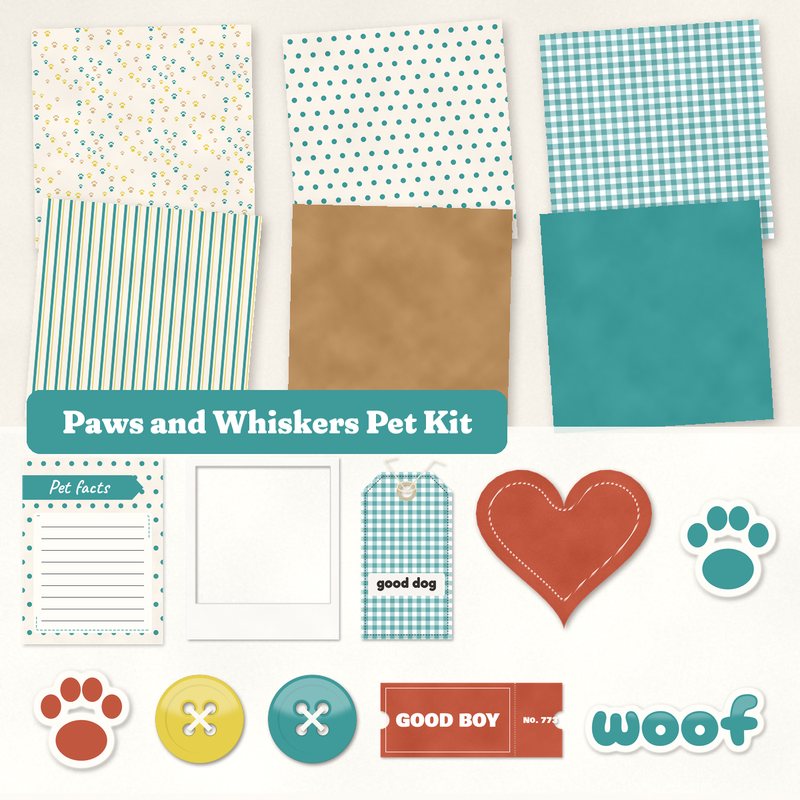
Paws and Whiskers Pet Kit
Paw prints, tags and a best friend banner for pet pages.
- Type
- Kit
- Inside
- 6 papers, 11 elements
- Format
- JPG papers, PNG elements, 300 dpi
- Size
- 12 x 12 in papers (3600 x 3600 px)
- Download
- ZIP, 9.5 MB
- Themes
- Pets, Everyday, Family
- cream
- teal
- tennis yellow
- brick
- biscuit
Free for personal use and for layouts and cards you sell or give away. Please do not share or sell the files themselves; link to this page instead. Terms of use
About this freebie
The Paws and Whiskers Pet Kit is a free digital scrapbook kit for your dog or cat pages. The color palette features cream, teal, tennis yellow, brick, biscuit, and ink. You get 6 JPG papers measuring 12x12 inches, including paw prints, gingham, and kraft patterns. The download also includes 11 elements like a good dog tag, buttons, and a Best Friend label. These supplies work well for everyday moments and family albums. The elements are PNG files with a soft drop shadow, making it easy to build your layout quickly.
Ideas for using it
- Document a new puppy adoption using the solid teal paper as a background. Add the Pet facts journaling card to record their age, breed, and favorite toys.
- Create a layout about your daily walks. Use the paw print paper and the good dog tag to highlight photos of your pet at the park.
- Make a greeting card for a fellow pet owner. Layer the polka dot and stripe papers, then add the woof word art and the sticker heart.
- Build a page for your family album featuring your children playing with the dog. Frame a favorite photo and decorate it with the Best Friend label.
How to use it
- The element files already include a soft drop shadow. You do not need to add your own shadow effects to the PNG files in your software.
- The 6 papers are saved as 300 dpi JPG files at 3600 by 3600 pixels. You can crop them to fit smaller canvases or print them at home.
- The 9.5 MB ZIP file needs to be extracted before you can use the kit. Right click the folder and select extract to view the images.
- The journaling card is a JPG file. You can use the text tool in your graphics program to type your pet memories directly onto the card.
- Everything in a kit shares one palette, so any paper works with any element in it.
- Elements already carry a soft shadow; on busy papers you can add a little more.
What is inside the ZIP
One folder named paws-and-whiskers-pet-kit with the files below (file names start with paws-and-whiskers-pet-kit-), plus README.txt and LICENSE.txt.
Show all 17 files
| File | What | Pixels | Type | Size |
|---|---|---|---|---|
| paper-01-paw-prints.jpg | Paw prints | 3600 x 3600 px (12 x 12 in) | JPG | 1.2 MB |
| paper-02-polka-dots.jpg | Polka dots | 3600 x 3600 px (12 x 12 in) | JPG | 1.0 MB |
| paper-03-gingham.jpg | Gingham | 3600 x 3600 px (12 x 12 in) | JPG | 1.4 MB |
| paper-04-stripes.jpg | Stripes | 3600 x 3600 px (12 x 12 in) | JPG | 1.3 MB |
| paper-05-kraft.jpg | Kraft | 3600 x 3600 px (12 x 12 in) | JPG | 1.4 MB |
| paper-06-solid-teal.jpg | Solid teal | 3600 x 3600 px (12 x 12 in) | JPG | 913 KB |
| 01-die-cut-sticker-paw.png | die cut sticker paw | 400 x 408 px | PNG | 70 KB |
| 02-die-cut-sticker-paw.png | die cut sticker paw | 400 x 408 px | PNG | 70 KB |
| 03-tag-good-dog.png | tag good dog | 764 x 1479 px | PNG | 746 KB |
| 04-label-best-friend.png | label Best Friend | 1226 x 367 px | PNG | 218 KB |
| 05-frame.png | frame | 1552 x 1852 px | PNG | 389 KB |
| 06-sticker-heart.png | sticker heart | 701 x 627 px | PNG | 231 KB |
| 07-button.png | button | 361 x 361 px | PNG | 55 KB |
| 08-button.png | button | 361 x 361 px | PNG | 53 KB |
| 09-ticket-good-boy.png | ticket GOOD BOY | 1134 x 484 px | PNG | 267 KB |
| 10-word-art-woof.png | word art woof | 1061 x 417 px | PNG | 180 KB |
| 11-journal-card-pet-facts.jpg | journaling card Pet facts | 900 x 1200 px | JPG | 81 KB |
You may also like
More kits


Tutorials for this freebie
- Getting started with digital scrapbooking: your first pageLearn how to make your first digital scrapbook page with this step-by-step tutorial. Find out how to choose software…
- How to add realistic drop shadowsLearn how to add realistic drop shadows to your digital scrapbook pages with the right settings for papers, flowers and…
- Scrapbook layout design basicsLearn the basics of digital scrapbook layout design. Master focal points, the rule of thirds, visual triangles, and…