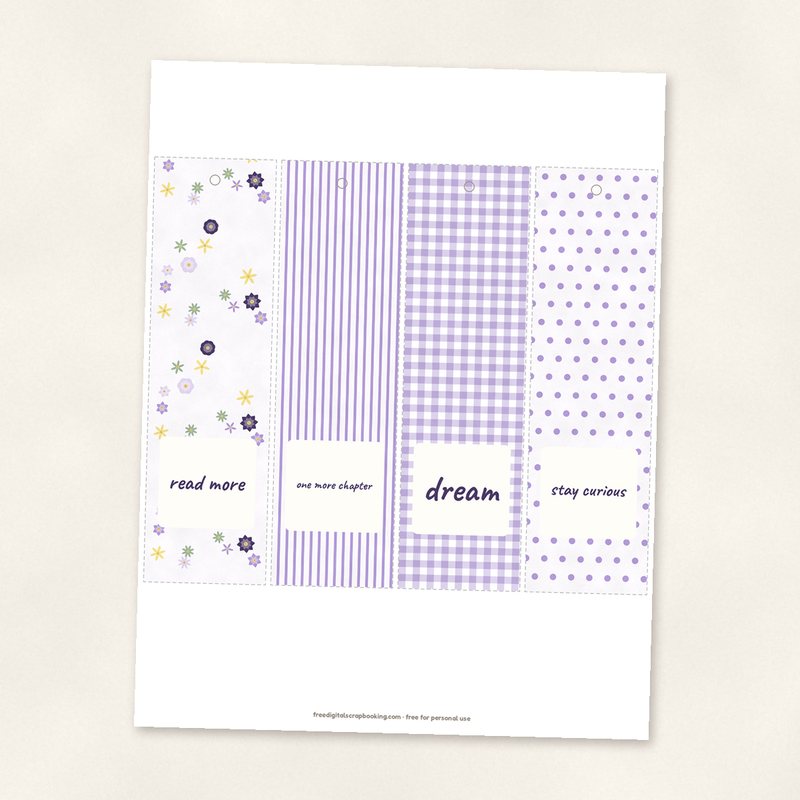
Printable Bookmarks
Four 2 x 7 inch bookmarks on one sheet.
- Type
- Printable
- Inside
- PDF, 1 page
- Format
- PDF and image files, 300 dpi
- Size
- US Letter, 8.5 x 11 in
- Download
- ZIP, 3.4 MB
- Themes
- Everyday
- white
- lavender
- sage
- lemon
- lilac
Free for personal use and for layouts and cards you sell or give away. Please do not share or sell the files themselves; link to this page instead. Terms of use
About this freebie
This free download gives you four 2 x 7 inch printable bookmarks on a single US Letter sheet. The design features a soft color palette of white, lavender, sage, lemon, lilac and violet ink. Light dashed cutting lines make it easy to trim the sheet down. These bookmarks are perfect for your everyday reading or as quick gifts for friends. The 3.4 MB ZIP file includes a 1 page PDF at 300 dpi, plus the matching image files. You can use these for personal projects or for items you sell or give away.
Ideas for using it
- Print the sheet on heavy cardstock and laminate the finished pieces to make durable bookmarks for your favorite novels.
- Punch a single hole at the top of each 2 x 7 inch bookmark and tie a ribbon through it for a classic finish.
- Use the individual image files to create digital hybrid cards and tags by resizing the graphics to fit your paper projects.
- Tuck one of these lavender and sage bookmarks into a greeting card as a small, practical gift for a friend.
How to use it
- Print the 8.5 x 11 inch PDF at actual size to ensure the bookmarks stay exactly 2 x 7 inches.
- Follow the light dashed cutting lines with a craft knife and a metal ruler to get straight, clean edges.
- If you prefer to print the image files instead of the PDF, check your printer settings to ensure they print at 300 dpi.
- Print at 100 percent (actual size) so the cards keep their size.
- Matte cardstock gives the best result for cards and tags; do a test print on plain paper first.
What is inside the ZIP
One folder named printable-bookmarks with the files below (file names start with printable-bookmarks-), plus README.txt and LICENSE.txt.
| File | What | Pixels | Type | Size |
|---|---|---|---|---|
| printable-bookmarks.pdf | PDF, 1 page | 2550 x 3300 px | 848 KB | |
| page-01.png | page 1 | 2550 x 3300 px | PNG | 2.7 MB |
You may also like
More printables


Tutorials for this freebie
- Hybrid crafting: cards and tags from digital suppliesLearn how to make hybrid crafting projects like cards and tags using digital scrapbook supplies. Find the right paper…
- Printing scrapbook pages at home vs at a photo labLearn how to print digital scrapbook pages at home or at a photo lab. Discover practical tips for paper choices, color…
- Scrapbook journaling prompts and ideasLearn how to write scrapbook journaling with easy prompts and practical ideas. Discover the five Ws, fun formats, and…