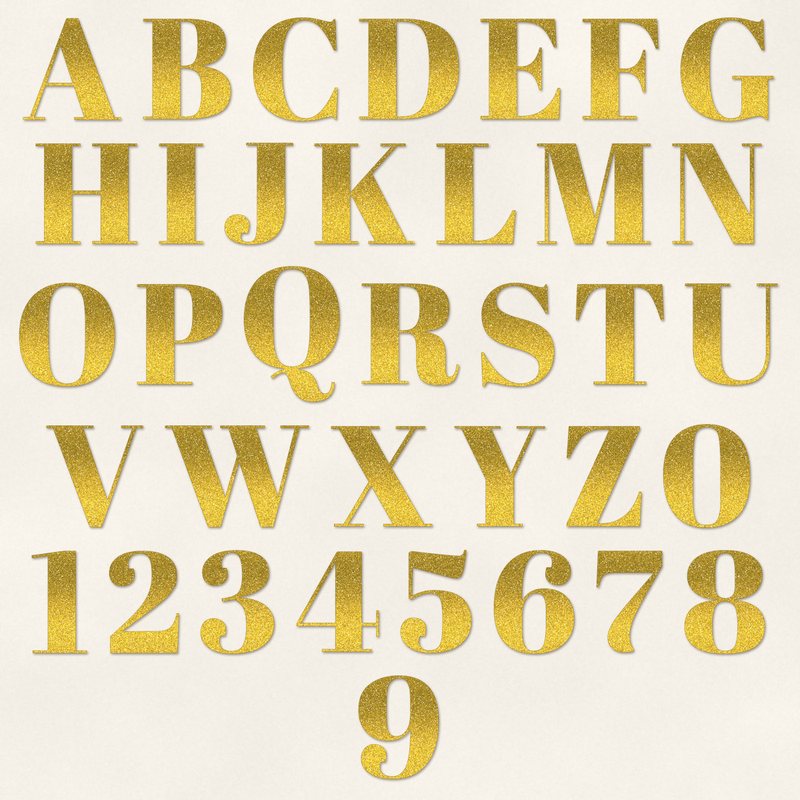
Gold Glitter Alphabet
Elegant serif letters filled with gold glitter.
- Type
- Alphabet
- Inside
- 68 letters and symbols
- Format
- PNG with transparency, 300 dpi
- Download
- ZIP, 5.5 MB
- Themes
- Wedding, Christmas
- ivory
- blush
- champagne
- eucalyptus
- gold
Free for personal use and for layouts and cards you sell or give away. Please do not share or sell the files themselves; link to this page instead. Terms of use
About this freebie
This free Gold Glitter Alphabet includes 68 separate transparent PNG files. You get uppercase letters from A to Z, lowercase letters from a to z, numbers 0 to 9, and basic punctuation marks. The elegant serif letters are filled with a textured gold glitter effect. Each character is about 600 to 900 pixels tall, which prints at 2 to 3 inches at 300 dpi. The classic gold color works beautifully for wedding layouts and Christmas cards. It coordinates well with soft palettes like ivory, blush, champagne, eucalyptus, and mocha.
Ideas for using it
- Spell out the names of the bride and groom on a wedding scrapbook page using a soft blush and eucalyptus background.
- Create a festive title for your family holiday cards by placing the gold letters over a dark mocha or champagne digital paper.
- Design elegant anniversary invitations with ivory cardstock, using these glittery serif numbers for the milestone year.
- Make a sparkling scrapbook title for a winter layout by combining the uppercase letters with the exclamation point.
How to use it
- Drag and drop each transparent PNG file onto your digital canvas to spell out your words. Overlap the edges slightly for a connected look.
- Add a small drop shadow to each letter in your image editing software. This makes the gold glitter pop against light ivory backgrounds.
- Scale the letters down to fit smaller greeting cards. Since they are 600 to 900 pixels tall, they will stay crisp when you shrink them.
- You can use these files for cards you sell or give away, but you cannot share or sell the 5.5 MB ZIP file itself.
- Each character is its own transparent PNG file. Place letters on separate layers and line them up on one baseline.
- Resize all letters of a word by the same amount so they stay consistent.
What is inside the ZIP
One folder named gold-glitter-alphabet with the files below (file names start with gold-glitter-alphabet-), plus README.txt and LICENSE.txt.
Show all 68 files
| File | What | Pixels | Type | Size |
|---|---|---|---|---|
| A.png | A | 547 x 566 px | PNG | 85 KB |
| B.png | B | 495 x 561 px | PNG | 103 KB |
| C.png | C | 475 x 577 px | PNG | 88 KB |
| D.png | D | 556 x 561 px | PNG | 103 KB |
| E.png | E | 453 x 562 px | PNG | 83 KB |
| F.png | F | 432 x 562 px | PNG | 72 KB |
| G.png | G | 523 x 577 px | PNG | 98 KB |
| H.png | H | 565 x 561 px | PNG | 92 KB |
| I.png | I | 260 x 561 px | PNG | 46 KB |
| J.png | J | 390 x 568 px | PNG | 65 KB |
| K.png | K | 558 x 561 px | PNG | 103 KB |
| L.png | L | 447 x 562 px | PNG | 62 KB |
| M.png | M | 628 x 561 px | PNG | 126 KB |
| N.png | N | 499 x 561 px | PNG | 84 KB |
| O.png | O | 536 x 577 px | PNG | 110 KB |
| P.png | P | 480 x 561 px | PNG | 82 KB |
| Q.png | Q | 536 x 748 px | PNG | 137 KB |
| R.png | R | 544 x 569 px | PNG | 111 KB |
| S.png | S | 416 x 577 px | PNG | 98 KB |
| T.png | T | 492 x 561 px | PNG | 71 KB |
| U.png | U | 519 x 569 px | PNG | 73 KB |
| V.png | V | 539 x 569 px | PNG | 83 KB |
| W.png | W | 790 x 569 px | PNG | 144 KB |
| X.png | X | 565 x 561 px | PNG | 98 KB |
| Y.png | Y | 506 x 561 px | PNG | 73 KB |
| Z.png | Z | 428 x 562 px | PNG | 88 KB |
| a-lower.png | a | 431 x 407 px | PNG | 77 KB |
| b-lower.png | b | 453 x 607 px | PNG | 93 KB |
| c-lower.png | c | 372 x 407 px | PNG | 63 KB |
| d-lower.png | d | 449 x 607 px | PNG | 91 KB |
| e-lower.png | e | 391 x 406 px | PNG | 63 KB |
| f-lower.png | f | 376 x 617 px | PNG | 66 KB |
| g-lower.png | g | 442 x 687 px | PNG | 117 KB |
| h-lower.png | h | 485 x 600 px | PNG | 85 KB |
| i-lower.png | i | 257 x 585 px | PNG | 47 KB |
| j-lower.png | j | 341 x 775 px | PNG | 79 KB |
| k-lower.png | k | 491 x 600 px | PNG | 86 KB |
| l-lower.png | l | 257 x 600 px | PNG | 46 KB |
| m-lower.png | m | 692 x 399 px | PNG | 101 KB |
| n-lower.png | n | 485 x 399 px | PNG | 68 KB |
| o-lower.png | o | 415 x 407 px | PNG | 72 KB |
| p-lower.png | p | 453 x 580 px | PNG | 90 KB |
| q-lower.png | q | 453 x 580 px | PNG | 87 KB |
| r-lower.png | r | 394 x 399 px | PNG | 52 KB |
| s-lower.png | s | 320 x 407 px | PNG | 63 KB |
| t-lower.png | t | 323 x 530 px | PNG | 51 KB |
| u-lower.png | u | 478 x 399 px | PNG | 67 KB |
| v-lower.png | v | 433 x 392 px | PNG | 55 KB |
| w-lower.png | w | 642 x 392 px | PNG | 96 KB |
| x-lower.png | x | 480 x 392 px | PNG | 68 KB |
| y-lower.png | y | 438 x 581 px | PNG | 78 KB |
| z-lower.png | z | 362 x 392 px | PNG | 60 KB |
| 0.png | 0 | 489 x 577 px | PNG | 104 KB |
| 1.png | 1 | 320 x 570 px | PNG | 49 KB |
| 2.png | 2 | 400 x 570 px | PNG | 85 KB |
| 3.png | 3 | 420 x 578 px | PNG | 96 KB |
| 4.png | 4 | 465 x 562 px | PNG | 70 KB |
| 5.png | 5 | 406 x 574 px | PNG | 87 KB |
| 6.png | 6 | 456 x 577 px | PNG | 110 KB |
| 7.png | 7 | 379 x 569 px | PNG | 62 KB |
| 8.png | 8 | 456 x 577 px | PNG | 112 KB |
| 9.png | 9 | 456 x 577 px | PNG | 110 KB |
| ampersand.png | & | 546 x 760 px | PNG | 153 KB |
| exclamation.png | ! | 151 x 577 px | PNG | 35 KB |
| question.png | ? | 377 x 577 px | PNG | 66 KB |
| period.png | . | 163 x 162 px | PNG | 15 KB |
| comma.png | , | 168 x 269 px | PNG | 21 KB |
| apostrophe.png | ' | 104 x 247 px | PNG | 12 KB |
You may also like
More alphabets


Tutorials for this freebie
- How to use digital alphabetsLearn how to use digital alphabets on your scrapbook pages. Find tips for spacing letters, adding shadows, and building…
- How to make a scrapbook page titleLearn how to make a scrapbook page title that stands out. Discover tips for placement, mixing fonts, and using digital…
- How to recolor digital papers and elementsLearn how to recolor digital scrapbooking papers and elements. Discover simple steps for Photoshop, GIMP, Affinity and…