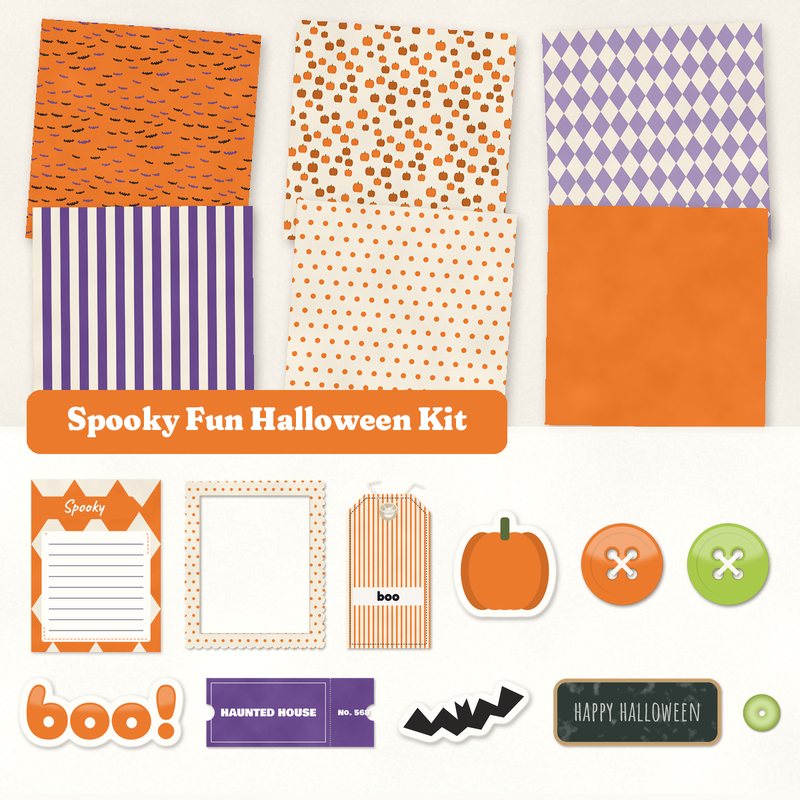
Spooky Fun Halloween Kit
Pumpkins, bats, a chalkboard label and candy colored buttons.
- Type
- Kit
- Inside
- 6 papers, 14 elements
- Format
- JPG papers, PNG elements, 300 dpi
- Size
- 12 x 12 in papers (3600 x 3600 px)
- Download
- ZIP, 9.6 MB
- Themes
- Halloween, Autumn
- bone
- pumpkin
- purple
- lime
- black
Free for personal use and for layouts and cards you sell or give away. Please do not share or sell the files themselves; link to this page instead. Terms of use
About this freebie
The Spooky Fun Halloween Kit is a free digital scrapbook download for your autumn and October memory keeping. The color palette features bone, pumpkin, purple, lime, black, and night. You get 6 JPG papers sized at 12x12 inches, including fun patterns like bats, harlequin, wide stripes, and polka dots.
The kit also includes 14 elements to decorate your pages. You will find a chalkboard label, candy colored buttons, a haunted house ticket, and die cut stickers of a bat and a pumpkin. This collection works well for trick or treat photos or party invitations.
Ideas for using it
- Create a scrapbook layout for your trick or treat photos using the night background and the haunted house ticket.
- Design custom party invitations with the solid pumpkin paper, the chalkboard label, and the boo word art.
- Make printable greeting cards to give away. Use the harlequin paper, the trick or treat label, and the die cut bat sticker.
- Document a neighborhood costume parade. Layer the wide stripes paper with the spooky journaling card and the washi tape.
How to use it
- The 14 elements are transparent PNG files with a soft drop shadow already applied. You can place them directly over the 12x12 inch papers.
- The 6 papers are 300 dpi JPG files. This high resolution ensures they print clearly if you make physical cards to sell or give away.
- The journaling card is a JPG file, so it does not have a transparent background. You can type your text right on top of it.
- If you are new to this hobby, read our guide on getting started with digital scrapbooking to learn how to combine these files.
- Everything in a kit shares one palette, so any paper works with any element in it.
- Elements already carry a soft shadow; on busy papers you can add a little more.
What is inside the ZIP
One folder named spooky-fun-halloween-kit with the files below (file names start with spooky-fun-halloween-kit-), plus README.txt and LICENSE.txt.
Show all 20 files
| File | What | Pixels | Type | Size |
|---|---|---|---|---|
| paper-01-bats.jpg | Bats | 3600 x 3600 px (12 x 12 in) | JPG | 1.3 MB |
| paper-02-pumpkins.jpg | Pumpkins | 3600 x 3600 px (12 x 12 in) | JPG | 1.3 MB |
| paper-03-harlequin.jpg | Harlequin | 3600 x 3600 px (12 x 12 in) | JPG | 1.1 MB |
| paper-04-wide-stripes.jpg | Wide stripes | 3600 x 3600 px (12 x 12 in) | JPG | 888 KB |
| paper-05-polka-dots.jpg | Polka dots | 3600 x 3600 px (12 x 12 in) | JPG | 1.0 MB |
| paper-06-solid-pumpkin.jpg | Solid pumpkin | 3600 x 3600 px (12 x 12 in) | JPG | 914 KB |
| 01-tag-boo.png | tag boo | 764 x 1479 px | PNG | 604 KB |
| 02-label-trick-or-treat.png | label Trick or Treat | 1232 x 367 px | PNG | 220 KB |
| 03-frame.png | frame | 1550 x 1850 px | PNG | 766 KB |
| 04-die-cut-sticker-pumpkin.png | die cut sticker pumpkin | 456 x 472 px | PNG | 65 KB |
| 05-die-cut-sticker-bat.png | die cut sticker bat | 574 x 293 px | PNG | 73 KB |
| 06-button.png | button | 361 x 361 px | PNG | 55 KB |
| 07-button.png | button | 361 x 361 px | PNG | 56 KB |
| 08-chalkboard-label-happy-halloween.png | chalkboard label happy halloween | 1337 x 557 px | PNG | 332 KB |
| 09-ticket-haunted-house.png | ticket HAUNTED HOUSE | 1134 x 484 px | PNG | 267 KB |
| 10-washi-tape.png | washi tape | 1515 x 254 px | PNG | 203 KB |
| 11-sequin.png | sequin | 170 x 170 px | PNG | 22 KB |
| 12-word-art-boo.png | word art boo! | 923 x 417 px | PNG | 163 KB |
| 13-journal-card-spooky.jpg | journaling card Spooky | 900 x 1200 px | JPG | 82 KB |
| 14-ribbon.png | ribbon | 2426 x 185 px | PNG | 164 KB |
You may also like
More kits


Tutorials for this freebie
- Getting started with digital scrapbooking: your first pageLearn how to make your first digital scrapbook page with this step-by-step tutorial. Find out how to choose software…
- How to add realistic drop shadowsLearn how to add realistic drop shadows to your digital scrapbook pages with the right settings for papers, flowers and…
- Scrapbook layout design basicsLearn the basics of digital scrapbook layout design. Master focal points, the rule of thirds, visual triangles, and…