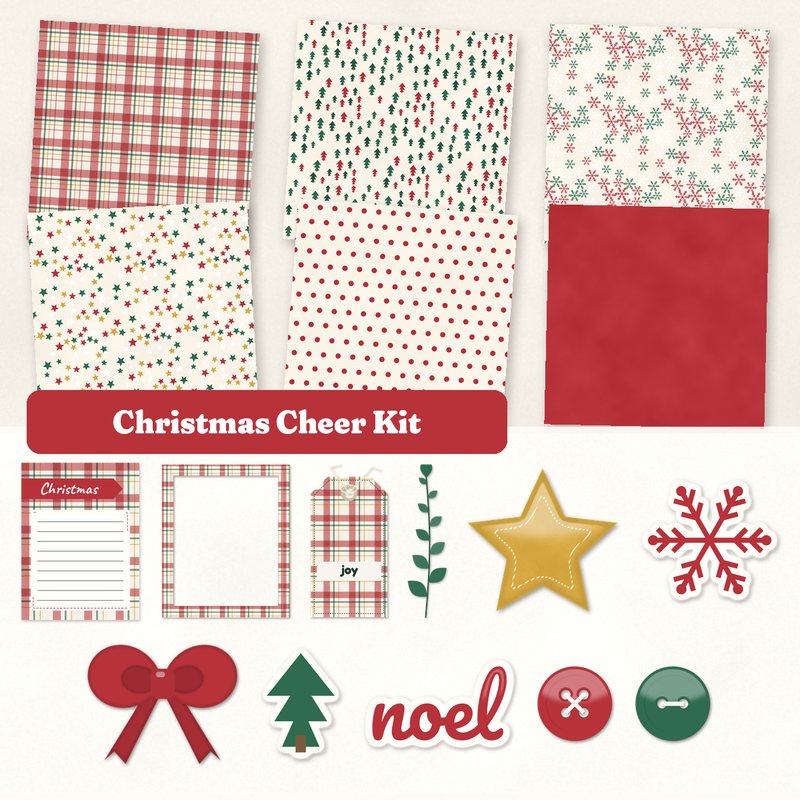
Christmas Cheer Kit
Plaid, pine trees, a bow and word art for Christmas pages.
- Type
- Kit
- Inside
- 6 papers, 15 elements
- Format
- JPG papers, PNG elements, 300 dpi
- Size
- 12 x 12 in papers (3600 x 3600 px)
- Download
- ZIP, 13.0 MB
- Themes
- Christmas, Winter
- cream
- cranberry
- pine
- gold
- snow
Free for personal use and for layouts and cards you sell or give away. Please do not share or sell the files themselves; link to this page instead. Terms of use
About this freebie
The Christmas Cheer Kit is a free digital scrapbook kit for your holiday projects. It features a classic palette of cream, cranberry, pine, gold, snow, and deep green. You get 6 JPG papers sized at 12 x 12 inches, including plaid, pine trees, snowflakes, stars, polka dots, and a solid cranberry background. The kit also includes 15 PNG elements with a soft drop shadow, like a bow, ribbon, washi tape, and word art. These supplies are perfect for Christmas and winter layouts or handmade greeting cards.
Ideas for using it
- Build a festive December memory page using the plaid paper as a background. Add the frame element to highlight a family photo by the tree.
- Design your own holiday greeting cards. Use the solid cranberry paper and layer the die cut sticker tree and the Merry Christmas label on top.
- Document a snowy afternoon outdoors. Pair the snowflakes paper with the die cut sticker snow and the leaf sprig for a crisp winter layout.
- Create a gift tag for presents. Print the Christmas journaling card and attach the joy tag and ribbon element to make it special.
How to use it
- The 6 patterned papers are 3600 x 3600 pixels at 300 dpi. You can print them at home or send them to a commercial printer.
- The 15 elements are transparent PNG files with a soft drop shadow already applied. You can place them directly over your photos or papers.
- The journaling cards are saved as JPG files. You can open them in your image editor to type text before printing them for your projects.
- The 13.0 MB download is a ZIP file. You will need to extract the folder to access the individual JPG and PNG files inside.
- Everything in a kit shares one palette, so any paper works with any element in it.
- Elements already carry a soft shadow; on busy papers you can add a little more.
What is inside the ZIP
One folder named christmas-cheer-kit with the files below (file names start with christmas-cheer-kit-), plus README.txt and LICENSE.txt.
Show all 21 files
| File | What | Pixels | Type | Size |
|---|---|---|---|---|
| paper-01-plaid.jpg | Plaid | 3600 x 3600 px (12 x 12 in) | JPG | 1.8 MB |
| paper-02-trees.jpg | Trees | 3600 x 3600 px (12 x 12 in) | JPG | 1.4 MB |
| paper-03-snowflakes.jpg | Snowflakes | 3600 x 3600 px (12 x 12 in) | JPG | 2.2 MB |
| paper-04-stars.jpg | Stars | 3600 x 3600 px (12 x 12 in) | JPG | 1.3 MB |
| paper-05-polka-dots.jpg | Polka dots | 3600 x 3600 px (12 x 12 in) | JPG | 1.0 MB |
| paper-06-solid-cranberry.jpg | Solid cranberry | 3600 x 3600 px (12 x 12 in) | JPG | 913 KB |
| 01-tag-joy.png | tag joy | 764 x 1479 px | PNG | 1.1 MB |
| 02-label-merry-christmas.png | label Merry Christmas | 1226 x 367 px | PNG | 229 KB |
| 03-frame.png | frame | 1552 x 1852 px | PNG | 1.2 MB |
| 04-button.png | button | 361 x 361 px | PNG | 55 KB |
| 05-button.png | button | 361 x 361 px | PNG | 40 KB |
| 06-sticker-star.png | sticker star | 695 x 666 px | PNG | 241 KB |
| 07-die-cut-sticker-tree.png | die cut sticker tree | 387 x 534 px | PNG | 64 KB |
| 08-die-cut-sticker-snow.png | die cut sticker snow | 644 x 576 px | PNG | 179 KB |
| 09-bow.png | bow | 882 x 706 px | PNG | 167 KB |
| 10-ribbon.png | ribbon | 2420 x 196 px | PNG | 450 KB |
| 11-washi-tape.png | washi tape | 1513 x 254 px | PNG | 329 KB |
| 12-brad.png | brad | 227 x 227 px | PNG | 27 KB |
| 13-word-art-noel.png | word art noel | 846 x 518 px | PNG | 168 KB |
| 14-journal-card-christmas.jpg | journaling card Christmas | 900 x 1200 px | JPG | 112 KB |
| 15-leaf-sprig.png | leaf sprig | 321 x 1170 px | PNG | 83 KB |
You may also like
More kits


Tutorials for this freebie
- Getting started with digital scrapbooking: your first pageLearn how to make your first digital scrapbook page with this step-by-step tutorial. Find out how to choose software…
- How to add realistic drop shadowsLearn how to add realistic drop shadows to your digital scrapbook pages with the right settings for papers, flowers and…
- Scrapbook layout design basicsLearn the basics of digital scrapbook layout design. Master focal points, the rule of thirds, visual triangles, and…